
A phone system that gets better every week.
103 releases and counting, each one itemized. See what changed, and where to find it in your portal.
Follow along with the Atom feedReleases per day, last 26 days to 2026-10-06
- 2026-09-11: 1 release
- 2026-09-12: 1 release
- 2026-09-13: 2 releases
- 2026-09-14: 1 release
- 2026-09-15: 1 release
- 2026-09-16: 0 releases
- 2026-09-17: 0 releases
- 2026-09-18: 0 releases
- 2026-09-19: 0 releases
- 2026-09-20: 0 releases
- 2026-09-21: 0 releases
- 2026-09-22: 1 release
- 2026-09-23: 3 releases
- 2026-09-24: 3 releases
- 2026-09-25: 4 releases
- 2026-09-26: 4 releases
- 2026-09-27: 9 releases
- 2026-09-28: 11 releases
- 2026-09-29: 4 releases
- 2026-09-30: 3 releases
- 2026-10-01: 11 releases
- 2026-10-02: 3 releases
One bar for every day. The taller the bar, the more releases that day.
Three to read first.
Straight from the running product. Each one links to its full release notes.
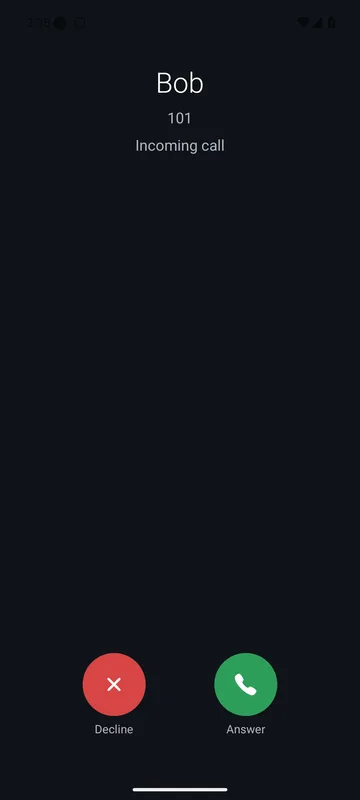
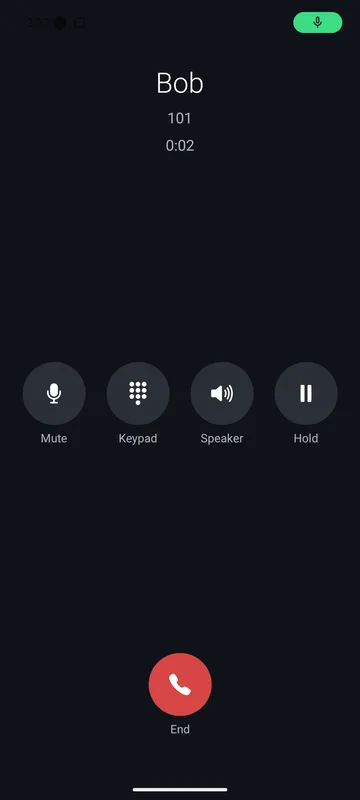
Your Android phone rings with the app closed.
Answer or decline from the call notification, with two-way audio over cellular. Tested on a real Android phone on cellular, 2026-10-01.
Wakes the app, rings like a call
A push message wakes the 4voice app and the call rings with Answer and Decline.
Audio on cellular and Wi-Fi
Call audio goes through our own relay server, so it works on cellular and on ordinary Wi-Fi.
Answered elsewhere first?
The phone is told to stop ringing the moment a desk phone or the browser picks up.
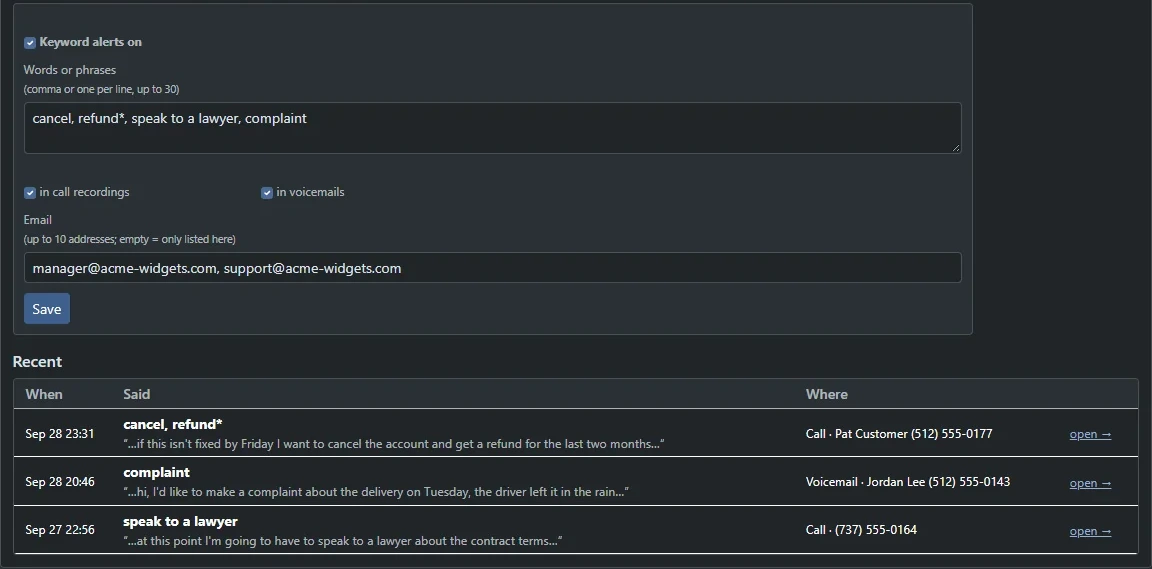
Hear about it when a watched word comes up.
Add words like cancel, refund or speak to a lawyer. When a call recording or voicemail transcript mentions one, your list gets an email and your webhook fires.
- Up to 30 words or phrases to watch, sent to up to 10 addresses.
- Email and webhook alerts, so your CRM or chat channel hears it too.
- Matched on our own servers. Only the alert leaves them.
A silent alarm from any extension.
Dial *999 and your own team is alerted by text and email, with an announcement over a page group. Nothing rings out loud at the desk.
Every release, dated and itemized.
Find any change in seconds: filter by area, or search a star code, a word or a feature.
- Security
Greeting sound check, off-hours change alerts and voicemail PIN guessing alerts
Silent or cut-off greetings, changes made out of hours and guessing attempts on voicemail boxes, each flagged by email.
- Greeting sound check: voicemail greetings, recorded names and menu prompts that are silent, too quiet, distorted, too long or cut off
- Phonebook number check: company phonebook numbers that can't be dialed as written: letters, missing area codes, extensions nobody has any more
- Unused calling access: extensions allowed to call abroad that haven't done so in 90 days, so you can tighten them and cut toll-fraud risk
- Away-from-office 911 check: desk phones on a different network from the rest of their 911 location right now, so the address can be updated in time
- Off-hours change alert: an email when someone changes settings in the portal outside working hours
- Bulk delete alert: an email when one person deletes many things in a few minutes
- Recording access spike alert: an email when one login plays or downloads an unusual number of call recordings
- Voicemail PIN guessing alert: an email to the managers when wrong voicemail PINs pile up on a box
- Feature
Keyword alerts, a text opt-out list and one-ring scam alerts
Hear when a voicemail or call mentions your words, keep STOP requests for compliance and spot one-ring scams.
- Phone key label check: phone keys whose label names someone other than the extension's current owner
- Forwarding target check: forwards and find-me pointing at an extension that's switched off, deleted or the extension itself
- Group member check: ring group and queue members that are switched off, forwarding every call or on do-not-disturb; groups that ring nobody
- Text opt-out list: who texted STOP to which company number and when; a CSV for the compliance file
- Keyword alert: an email when a voicemail or recorded-call transcript mentions words you pick
- Repeat unanswered caller alert: an email when one caller keeps calling and never reaches a person, and nobody has called back
- One-ring scam alert: an email when international or premium-rate numbers ring briefly and hang up, so nobody calls them back
- Unchecked voicemail alert: an email to the managers when a voicemail sits unheard for too long
- Feature
A daily change digest, hold music check and missed VIP call alerts
Every portal change in one morning email, hold music that sounds wrong and an email when a VIP caller goes unanswered.
- Hold music check: hold-music tracks that are silent, too quiet, distorted or loop too fast, and hold music chosen somewhere it doesn't play
- Unused add-ons report: the add-ons switched on for the company that nobody has used in 30 days
- Voicemail-off check: extensions with voicemail off where unanswered calls just end, and anything that sends callers to a voicemail that isn't there
- Calls to gone extensions: calls still dialed to switched-off or deleted extensions, who keeps calling people who left, and how, plus a CSV export
- Daily change digest: one email each morning with every change made in the portal the day before
- Recording failure alert: an email when calls that should have been recorded have no recording
- Directory sweep alert: an email when one outside caller rings many different extensions within an hour
- Missed VIP call alert: an email to the person and the managers when a VIP caller rings and nobody answers
- Security
Conference PIN check, phone key check and toll-fraud warnings
Weak conference PINs, keys that point nowhere and an email when a phone is allowed to dial further.
- Conference PIN check: conference rooms with no PIN, an easy PIN or the same PIN as another room, and rooms a company number rings directly
- Phone key & speed dial check: phone keys, key templates and speed dials that point at an extension, park slot, queue or number that no longer exists
- Missed internal calls report: calls between extensions nobody answered, by who called whom, and which were never sorted out, plus a CSV export
- Closure left-on reminder: an email when the office closure is still on as the office opens the next day
- Block list change alert: an email when a number is taken off a block list or anonymous calls are let in again
- Voicemail email change alert: an email when voicemails start being emailed somewhere new, another company or a personal mailbox
- Calling permission alert: an email when a phone may dial further or a calling cap is raised or removed, a toll-fraud warning
- New API key alert: an email when an API key or webhook is made for the company, or gets more access
- Security
911 callback number check, caller history and change alerts
Every extension's 911 callback number checked, every contact with one caller in one place and emails when 911, recording or caller ID settings change.
- 911 callback number check: each extension's 911 callback number: missing, not the company's, switched off or routed where nobody answers
- Recording opt-out report: callers who pressed 9 to opt out of recording, per extension, number and day, plus a CSV export
- Caller ID setup check: outbound caller IDs set to a number the company doesn't own or has switched off, and extensions with none
- Caller history lookup: type a phone number: every call, voicemail and text between it and the company
- 911 address change alert: an email when a 911 address or which address an extension sends changes, a compliance trail
- Recording switched-off alert: an email when call recording is switched off (or on) for an extension, number or queue
- Caller ID change alert: an email when an outbound caller ID number changes
- New SIP device alert: an email when an extension registers from a desk phone or SIP softphone model it never used before
- Feature
Caller verification, parked calls and an opening-time phone check
See which incoming calls carriers verified, how parked calls fare and who isn't ready when the office opens.
- Parked calls report: calls put on park: how many per person and slot, how long they waited, reminders, what's parked now, plus a CSV export
- Caller verification report: the carrier's caller-ID verdicts per number and day, unverified calls answered, the worst caller numbers, plus a CSV export
- Forwarded calls report: the calls each extension forwarded, why, where to (a colleague or an outside number), answered, outside minutes, plus a CSV export
- Schedule check: schedules that never open, are open around the clock, change nothing or that nothing uses
- Busy signal alert: an email when callers find one extension or number busy several times within an hour
- Spoofed calls alert: an email when a wave of calls arrives with a failed caller verification
- Opening-time phone check: when a schedule opens, an email listing the people its calls ring who have no phone registered or are on DND
- Quiet number alert: an email when one of the company's numbers that's usually busy at this time has had no calls for hours
- Feature
Service level by number, number journeys and call failure alerts
How fast each number's callers reach a person, the routes calls really take and an alert when calls in or out start failing.
- Calls to missing extensions: extension numbers people still dial that don't exist or are switched off: how often, who dials them, plus a CSV export
- Service level by number: per phone number: the share of callers a person answered within 20 / 30 / 60 seconds, average and longest wait, plus a CSV export
- Talk time split: per extension: talk minutes with outside callers, on calls out and with colleagues, plus a CSV export
- Number journeys: for each phone number, the most common routes its calls take, menu key, ring group, who answered or voicemail
- Calls out failing alert: an email when many calls out fail with network / carrier errors
- Calls in failing alert: an email when calls in on the company's numbers fail before anything answers them
- Short-call spike alert: an email when an unusual share of answered calls end within a few seconds (one-way audio, drops)
- Ring timing check: ring times that don't fit: callers hanging up before the voicemail / fallback, rings too short, members' ring times longer than the group's
- Feature
Calls out by state, who answered for whom and outbound spike alerts
Where your outside calls go, which colleague covered which calls and an alert when a phone suddenly dials far more than usual.
- Calls out by state: outside calls the company makes by US state / Canadian province (from the area code): calls, minutes, who makes them, plus a CSV export
- Ring group member share: which member answers how many of each ring group's calls, spot the one carrying the group, plus a CSV export
- Answered for someone else: calls to an extension that a colleague answered instead (picked up or forwarded): who covered whom, plus a CSV export
- Idle numbers: the company's phone numbers with no calls in or out and no texts for a while, plus a CSV export
- Outbound spike alert: an email when an extension makes far more outside calls in an hour than usual, a sign of a hacked phone
- Missed-call streak alert: an email when an extension misses several direct calls in a row
- Menu hang-up alert: an email when an unusual share of callers hang up inside an auto-attendant menu
- Shared phone login check: extensions whose phone login is in use on several devices or networks at once
- Feature
Desk phone and app usage, call outcomes by number and coverage gaps
Which devices people really use, what happens to each number's calls and single points of failure in your call flows.
- Desk phone vs app usage: calls made from desk phones, the browser phone and the mobile app, per extension, and what's registered now, plus a CSV export
- Call outcomes by number: what happened to each number's calls: answered, voicemail, hung up in a menu, refused, plus a CSV export
- Withheld callers report: calls in with no caller number: how many, per day and number, how many answered, plus a CSV export
- Daily activity grid: every extension's calls answered, missed, made and talk minutes, day by day, plus a CSV export
- Call flow change alert: an email when where calls go changes: a number, ring group, queue, menu or schedule
- Coverage gaps check: single points of failure: one-member groups, no fallback, a number with nothing behind its one extension
- Directory check: extensions sharing a name or email, names that are numbers, logins sharing an extension, extensions with no login
- Missing recording alert: an email when calls that should be recorded end up with no recording
- Feature
Dropped calls, busy calls and an extension setup check
Find calls that ended badly, callers who met a busy signal and extensions missing the basics.
- Dropped calls: answered calls that ended abnormally, per extension, phone model and line, plus a CSV export
- Busy calls: callers who found an extension busy, per extension, reason and hour, plus a CSV export
- DND time report: how long each person spends on Do Not Disturb per day (from when it's switched on), plus a CSV export
- Top callers: the outside numbers that call most, answered share and who usually answers, plus a CSV export
- Extension setup check: extensions missing the basics: name, voicemail email, a phone, an emergency address, a greeting
- Extension & number change alert: an email when an extension, number, ring group, queue or menu is added, removed or switched off
- Dropped call alert: an email when an extension or line has several dropped calls within an hour
- Schedule week ahead: each business-hours schedule's next 7 days: open, closed and holidays
- Feature
Who hung up first, monthly trends and outside forwarding alerts
Spot cut-off calls, compare the last 12 months and get an email when someone starts forwarding outside the company.
- Who hung up first: per extension: how often the caller or our side ended answered calls, and possible cut-offs, plus a CSV export
- Codec report: the audio codecs calls use per extension, line and phone model, HD, standard or compressed, plus a CSV export
- Monthly trends: the last 12 months side by side: calls, answered, talk minutes, voicemails, texts and faxes, plus a CSV export
- Workday span: each person's first and last call of the day, and the span between, plus a CSV export
- Missing recordings check: answered calls that should have been recorded but have no recording
- Outside forwarding alert: an email when an extension starts forwarding calls to an outside number
- Login & role change alert: an email when a portal login is added, removed, made a manager or loses two-factor
- Voicemail hang-ups: callers who reached voicemail and hung up without leaving a message, per mailbox
- Feature
Abandon time, new and returning callers and an access review
How long callers wait before giving up, who is calling for the first time and a dated review of every portal login.
- Abandon time report: how long callers waited before hanging up unanswered, per number and hour, plus a CSV export
- New vs returning callers: first-time callers against people who called before, per day and per number, plus a CSV export
- Unreviewed recordings: call recordings nobody has played or downloaded yet, oldest first
- Voicemail email failures: voicemails whose email copy failed, per mailbox, with an email to the managers when it happens
- Access review: every portal login with role, last sign-in and two-factor, and a dated sign-off, plus a CSV export
- Compare two extensions: two extensions' settings side by side, with the differences marked
- Empty ring group alert: an email when a ring group has nobody available to ring during open hours
- Phonebook duplicates: company phonebook contacts that share a number or a near-identical name
- Feature
First-call resolution, text response time and E911 coverage
Callers who had to ring back, how fast texts get replies and which extensions send their own 911 address.
- First-call resolution: callers who ring back soon after a call someone answered, per extension that took it, plus a CSV export
- Text response time: how fast incoming texts get a reply, per company number and hour; the unanswered ones, plus a CSV export
- Blocked calls report: calls turned away by block lists, withheld-number and spam rules: per day, per reason, the top numbers, plus a CSV export
- Week-over-week changes: this week against last week per extension and per number, with the big changes marked, plus a CSV export
- Holiday calendar feed: a private calendar link per schedule so staff see the holidays in Google, Outlook or Apple Calendar
- E911 address coverage: which extensions send their own 911 address, the company default, or none at all
- Outbound caller ID report: which caller ID numbers went out on calls, per extension, with any that aren't the company's own, plus a CSV export
- Free extension numbers: which internal numbers are taken (and by what) and which are free
- Feature
Internal call matrix, missed-call return time and an overnight summary
Who calls whom inside the company, how fast missed callers get a call back and one morning email for everything that came in while closed.
- Internal call matrix: who calls whom inside the company: calls between extensions as a grid and the busiest pairs, plus a CSV export
- Hold time report: how long callers wait on hold, per extension and per day (measured from when it's switched on), plus a CSV export
- Failed outbound calls: calls out that didn't connect, by reason (busy, no answer, wrong number, refused, blocked) per extension and number, plus a CSV export
- Missed-call return time: for each missed caller: whether and how fast someone called back, per extension, with the open list, plus a CSV export
- Closed switch left on: an email when a schedule's manual 'closed' switch stays on during its normal open hours
- Overnight summary email: at opening time, one email: the calls, voicemails and texts that came in while closed
- Forwarding loop check: finds extensions forwarding to each other in a circle (or to themselves)
- Unused call flows: menus, ring groups and queues no call has reached lately, and what still points at them
- Feature
Holiday import, a website open and closed badge and first-call alerts
Load holidays from a calendar file, show Open now on your website and know the moment a new or ported number takes its first call.
- Call length breakdown: answered calls by talk time per extension and per number, plus a CSV export
- Missed calls by extension: direct calls each extension didn't answer: count, share, busiest hours, plus a CSV export
- Holiday import from a calendar: upload a calendar file (.ics); its days become a schedule's holidays, after a preview
- Website open/closed badge: a public link per schedule showing 'Open now' / 'Closed' (badge or JSON) for the company's website
- Text failure alert: an email when outgoing texts keep failing, so a carrier or registration problem gets fixed fast
- Fax failure alert: an email when outgoing faxes fail several times in a row
- Webhook switched-off alert: an email to the managers when a webhook is switched off after repeated failures
- First call on a new number: an email when a newly added number takes its first call, proof a new or ported number works
- Feature
Number routing check, call surge alert and sign-in history
Find numbers whose calls can't reach anyone, hear about unusual surges and see every sign-in by login.
- Forwarding overview: every extension's Do Not Disturb, call forwarding and find-me on one page; forwarding to outside numbers marked
- Sign-in history: each login's sign-ins (when, where from, portal or app); managers see the company's, plus a CSV export
- Phone inventory export: every desk phone: MAC, model, extension, firmware, last provisioned, registered address, plus a CSV export
- Number routing check: phone numbers whose calls can't reach anyone: a missing or switched-off extension, an empty ring group, a queue with no agents
- Call surge alert: an alert when far more calls than usual for that weekday and hour come in
- Own-trunk down alert: an email when the company's own carrier trunk goes down, and again when it's back
- E911 test reminder: when each emergency location was last tested with 933; a reminder for the ones not tested lately
- Recording retention per extension: keep some extensions' call recordings longer or shorter than the company's retention
- Feature
Fax and text usage, queue callback reports and a no-calls alert
Usage per fax box and number, how well queue callbacks land and an alert when the phones go quiet while you're open.
- Fax usage report: per fax box: faxes sent and received per day, pages, failures and why, plus a CSV export
- Text message usage: per number: texts in and out per day, delivered / failed, conversations, plus a CSV export
- Recording storage report: per extension: recordings kept, minutes, estimated size, oldest; new ones per month; what retention removes next
- Queue callback report: per queue: callbacks asked for, reached, failed, expired, and how long callers waited for the call back
- No-calls alert: an alert when no outside calls come in for hours while a schedule is open: the first sign of a carrier or routing outage
- New-country call alert: an email when the company calls a country it never called before, an early toll-fraud warning
- Unused API keys: API keys unused for a set number of days are revoked automatically, after a warning
- Phone restart for managers: managers restart one or all of the company's desk phones from the portal; phones on a call are skipped
- Feature
A calls heatmap, voicemail response time and two-factor adoption
The busiest hours of the week at a glance, how long voicemails wait and who still signs in without two-factor.
- Calls heatmap: incoming calls by weekday and hour over the last weeks, with the answer rate in each hour, plus a CSV export
- Voicemail response time: per mailbox: how long voicemails wait before someone listens, and how many are still unheard
- Closed-hours calls: incoming calls while a schedule was closed, by day and hour, with the voicemails left, to decide opening hours
- Conference usage: per conference room: calls, minutes, distinct callers, most at once, plus a CSV export
- Weak voicemail PINs: extensions whose voicemail PIN is easy to guess, and an email asking each to change it
- New-network phone alert: an email when an extension registers from a network it never used before, an early sign of a stolen phone password
- Holiday reminder: a week before a holiday in a company schedule, managers get an email to check greetings and where calls go
- Two-factor adoption: which logins have two-factor sign-in on, and an email nudging the rest
- Security
Phone health, answer rate alerts and password rules
Every desk phone's firmware and status on one page, alerts when answer rates slip and sign-in rules that keep logins safe.
- Callers by state: incoming calls by the caller's US state / Canadian province (from the area code): calls, answered, minutes, plus a CSV export
- Trunk usage report: per trunk: calls in and out, minutes, the most calls at once and failed calls by cause, plus a CSV export
- Answer rate alert: when too few incoming calls in the last hour were answered by a person, chosen phones and emails hear of it
- Queue service-level alert: when a queue answers too few callers within its target time, a supervisor hears of it
- Phone health report: every desk phone: model, firmware vs the one we deliver, last provisioned, registered now; problems flagged
- Sign-in lockout: after a set number of wrong passwords a company login is locked for a set time; it hears of it, a manager can unlock
- Inactive login auto-disable: logins unused for a set number of days are switched off, with a warning email a week before
- Password rules: a minimum password length, letters and digits, and common passwords and the username refused
- Feature
Speed to answer, a call volume forecast and agent occupancy
How fast people answer, how many calls next week will bring and how many people it takes to answer them.
- Speed to answer: per extension, ring group and queue: average and 90th-percentile seconds before a person answered, and by hour of day, plus a CSV export
- Agent occupancy: per queue agent: time logged in vs time on calls, as an occupancy %, plus a CSV export
- Call volume forecast: next week's expected incoming calls hour by hour from the past weeks, with the people needed to answer 80% within 20 seconds
- Short calls report: answered calls that ended within a few seconds (drops, one-way audio) by extension, number and trunk, plus a CSV export
- Extension directory export: every extension on one sheet: name, email, numbers, voicemail, phones, logins, department, site, plus a CSV export
- Extension change history: on each extension's page, who changed what and when, from the audit log
- Password expiry: company logins pick a new portal password every a set number of days; a reminder email a week before
- Portal session limit: each company login is signed in to the portal in at most a set number of browsers; the oldest is signed out
- Feature
Peak calls, calls by country and new sign-in alerts
Size your lines from the busiest moments, see where outside calls go and get an email when a login appears somewhere new.
- Peak simultaneous calls: day by day, the most calls the company had at once (all, in, out) against its outbound cap; for sizing trunks, plus a CSV export
- Calls by country: where outside calls go: US / Canada, Caribbean area codes and each country, with calls and minutes, plus a CSV export
- Voicemail box report: every mailbox's messages, unheard ones and the oldest unheard, boxes nobody checks stand out
- After-hours outbound alert: each morning, an email of yesterday's outside calls made while the company's schedule was closed
- Personal weekly summary: users can get their own last week by email on Monday: calls taken, missed, made, voicemails waiting
- Unanswered texts alert: an incoming text with no reply after a set number of hours tells chosen phones and email addresses
- Audit log export: the company's change log (who changed what, when) between two dates, as a CSV
- New sign-in alert: a login signing in from a new browser or network gets an email, with a link to change the password
- Feature
Call path viewer, ring group reports and recording bookmarks
Follow one call step by step, see how every ring group performs and pin notes to the moment that matters in a recording.
- Queue staffing alert: too few agents logged in to a queue (optionally only while a schedule is open) for a set number of minutes tells a supervisor's phone and email
- Transfer report: who transferred which calls, where to, blind or attended; counts and a CSV
- Ring group report: per ring group: calls, answered %, missed, average wait before an answer, plus a CSV export
- Call path viewer: from call history, one call's journey step by step: menus, queues, rings, transfers, voicemail
- Recording bookmarks: time-stamped notes on call recordings; click one to jump there
- Monthly usage summary: on the 1st, managers get last month's calls, minutes, missed % and busiest numbers, against the month before
- Portal idle sign-out: company logins' portal sessions left idle for a set number of minutes are signed out
- Idle extensions & numbers: extensions and phone numbers with no calls in a set number of days, to clean up, plus a CSV export
- Feature
A route tester, a missed-call follow-up list and agent attendance
See where a call would go before it rings, keep missed calls on a list until someone calls back and track agents' logged-in hours.
- Who-am-I code: *63 on a phone says which extension it is and the caller ID its outside calls show
- Speaking clock: *64 on a phone says the time and date (the extension's time zone)
- Transfer to voicemail, full options: *<ext> (dialed or transferred to) goes through the extension's own voicemail step: temporary greeting, operator / urgent keys, callback prompt
- Outbound capacity alert: live outside calls reaching a share of the company's call cap alert managers on their phones and by email, at most hourly
- Missed-call follow-up list: missed outside calls stay on a list until someone calls back (spotted automatically); overdue ones are emailed
- Agent attendance log: when queue agents logged in and out, hours logged in and on break per day, with a CSV
- Recording access log: who played or downloaded each call recording, and when
- Inbound route tester: pick a number, a caller and a time: see step by step where the call would go
- Feature
Business hours read-out, text-me-a-link and an interpreter on call
A number that tells callers whether you're open, menus that text your address and *7 to bring an interpreter into the call.
- Business hours read-out: a company number (an IVR option can point at it) that reads the opening hours from a schedule and says whether you're open now
- Text-me-a-link: a number an IVR option can point at that texts the caller your link or address, then goes on to the number you pick
- Consent-state recording notice: callers from all-party-consent states (by area code) hear "this call may be recorded" first
- Unheard-voicemail whisper: answering a caller who left a voicemail nobody has heard yet, you hear so first
- Nightly phone restart: desk phones restart at a set hour each night; phones on a call are skipped
- Callback number prompt: a caller with a hidden number who reaches voicemail keys in a callback number, saved with the message
- After-call thank-you text: after an answered outside call the caller gets your text from the number they called; once a day per caller
- Interpreter on call: *7 during a call brings the company's interpreter service into the call
- Feature
Closing-soon messages, missed-call emails and VIP call alerts
Callers hear when you close shortly, missed calls arrive by email and a VIP ringing in lights up chosen phones.
- Closing-soon message: callers in the last minutes before a schedule closes hear "we close in about 10 minutes" before the usual routing
- Missed-call email: an email for each missed call (or one an hour) to the extension's owner
- Agent idle alert: a queue agent Available but not taking calls while callers wait: the supervisor is told
- Not-in-service intercept: dialing an extension that doesn't exist plays a clear message and offers the operator
- Long hold alert: an outside caller left on hold too long: a supervisor's phone screen / email
- High-volume message: while many callers are waiting in the queues, new callers hear "we're busier than usual"
- VIP call alert: a VIP-list caller ringing in shows on chosen phones' screens and texts chosen mobiles
- DND left-on reminder: an extension on Do Not Disturb for hours gets a phone screen reminder and an email
- Feature
Forwarding profiles, a daily call summary and 'got your message' texts
One tap switches between In office, Working from home and Away, managers start the day with yesterday's numbers and callers who leave a voicemail get a text back.
- Forwarding profiles: one-tap presets per extension (In office / Working from home / Away) that switch do not disturb, forwarding and find-me together, from the portal, the apps or *90 + 1-3
- Daily call summary email: each morning managers get yesterday's calls: in, answered, missed, voicemails, out, talk time, the busiest hour, who called most
- Voicemail auto-delete: heard voicemails older than the company's limit (30-365 days) are deleted, after a week's warning email to the box owner
- Parked call reminder: a call left parked too long puts a reminder on the parker's phone screen (and over the park page group)
- 'Got your message' text: an outside caller who leaves a voicemail gets a text from the number they called saying the message arrived
- Unanswered call page: a call to a chosen number that nobody answers within a set number of seconds is announced over a page group
- Long call alert: a call that runs past a set number of minutes tells a supervisor (phone screen / email); the call carries on
- First-time caller welcome: a number that has never called the company hears an extra welcome message first
- Feature
Camp-on, a missed-on-DND summary and park and page
Callers can wait for a busy extension, do not disturb ends with a list of what you missed and parked calls are announced over the speakers.
- Camp-on for outside callers: a caller who finds an extension busy can press 1 to hold until it's free
- Daily call cap per extension: a daily limit on outside calls for chosen phones; 911 and 933 always go through
- Missed-on-DND summary: turning Do Not Disturb off sends an email and a phone message listing the calls that came in meanwhile
- Greeting reminder: people who never recorded a voicemail greeting or name get a weekly email nudge
- Returning-caller whisper: the answering phone hears "Called 3 times this week" before the caller is put through
- Park and page: parking a call announces it over a page group
- Hold music by time of day: a different hold-music track while a schedule is closed
- VIP voicemail marked urgent: a voicemail left by a VIP caller is marked urgent automatically
- Feature
A help button for agents, personal meeting rooms and fax detection
Press *4 for a supervisor mid-call, give everyone an always-on meeting room and let fax calls find the fax inbox by themselves.
- Supervisor help request: press *4 during a call: supervisors see it on the Switchboard (and by text) and can listen or whisper in one click
- Personal meeting rooms: every extension can have its own always-on meeting room with its own PIN
- Fax tone detection: a fax machine calling a voice number is switched to the company's fax inbox
- Break after this call: a queue agent presses *5 during a call and goes on break when it ends
- Reminder calls to yourself: dial *65 and a time (or set it in the portal): your phone rings then with a reminder
- Call timer beeps: a soft beep every a set number of minutes on chosen extensions' calls, for billing by time
- Nuisance caller auto-block: a caller who rings too often in a short time is blocked for a while
- Caller location on screen: unknown North American callers show their state after the name
- Feature
International call confirm, dead-air hang-up and a night bell
Phones confirm the country before dialing abroad, silent calls end themselves and an overhead bell rings after hours.
- International call confirm: a phone dialing abroad hears the country and presses 1 to go ahead
- Language by caller's country: callers from a country you map hear the company in its language
- IVR choice whisper: the answering phone hears which menu option the caller chose
- Dead-air hang-up: calls with no audio for a set time end themselves; 911 and 933 always stay up
- Phone key templates: save a phone's key layout and apply it to many phones at once
- Night bell: after hours, incoming calls also ring a bell or overhead speaker
- Ring group call-back list: missed ring-group calls land on a shared list to claim and call back
- Forwarding with an end time: forward all calls until a set time; it switches itself off
- Feature
Outbound calling hours, unheard voicemail reminders and queue backlog alerts
Outside calls follow your schedule, forgotten voicemails send reminders and managers hear when callers pile up.
- Wait time told to agents: before a queue call connects, the agent hears how long the caller waited
- Outbound calling hours: outside calls only while a company schedule is open; 911 and 933 always go through
- Inside-caller greeting: a separate voicemail greeting for colleagues calling from inside the company
- Conference head count: a caller joining a conference hears how many people are already there
- Unheard voicemail reminders: a reminder email when a voicemail is still new after a set number of hours
- Break overrun alerts: an agent on a queue break longer than the limit emails the supervisors
- No missed call if answered: ring group and queue calls a colleague answered stay off the other members' missed-call lists
- Queue backlog email / text: email or text managers when callers pile up in a queue
- Feature
Status told to callers, a day and night switch per number and hold recall
Callers hear that you're in a meeting, *29 flips a number to its night destination and calls left on hold ring back.
- Status told to callers: callers hear a person's status (In a meeting, Away and so on) and their note first
- Moderator keypad controls: conference moderators mute / unmute everyone, lock and record from the keypad
- Day / night switch per number: *29 + a number's last four digits flips it to its night destination
- Group name on caller ID: calls from a ring group or queue show the group's name before the caller's
- More find-me numbers: up to two more outside numbers ring together with the extension
- 911 alerts by text: the company's 911 and 933 alerts also go out as text messages
- Conference time limit: a conference room ends itself after a set number of minutes, with a warning
- Hold recall: a call left on hold too long rings the person who put it on hold again
- Feature
Mobile-only mode, supervisor codes and voicemail PIN lockout
*54 sends your calls only to your mobile, supervisors listen, whisper or barge from the keypad and guessed voicemail PINs lock the box.
- Account codes for international calls: phones can be asked for an account code on international calls only (with Account codes)
- Mobile-only mode: *54 switches an extension to ring only its mobile, and back
- Supervisor codes on the phone: supervisors dial *47 / *48 / *49 + an extension to listen, whisper or barge
- Ring group status lamps: a phone key per ring group that flashes while a call rings it
- Caller language memory: a returning caller hears the language they picked last time (with Languages)
- Voicemail email without audio: voicemail emails carry the transcript and a link to the recording
- Recording emails: after each recorded call, an email with a link to the recording
- Voicemail PIN lockout: too many wrong voicemail PINs lock the box for 30 minutes and tell its owner
- Feature
Call out by PIN, remote forwarding and conference lecture mode
Call in to a company number and out as your extension, change forwarding from any phone and run a conference where only the moderator speaks.
- Outside line by PIN: call a company number, key a personal PIN and call out as your extension
- Remote call forwarding: change your call forwarding from any phone with your extension and PIN
- Queue log in / out per queue: agents join or leave one queue at a time (*43 / *44 + the queue)
- Queue exit to voicemail: waiting queue callers press 2 to leave a message instead
- Ring group whisper: whoever answers a ring group call first hears the group's name
- Conference lecture mode: participants join muted; only the moderator speaks
- Voicemail to several emails: each new voicemail also goes to extra email addresses
- Reject anonymous per extension: an extension turns away outside callers who hide their number
- Feature
Dial 9 for an outside line, auto-answer extensions and smarter recording
Old phone-system habits keep working, chosen phones answer on speaker and recordings follow call direction and pause on hold.
- Dial 9 for outside line: phones may dial 9 before an outside number, as on an old phone system
- Withheld caller number: callers who hide their number are asked for one before voicemail or a queue
- Auto-answer extension: chosen extensions answer every call by themselves, on the speaker
- Conference trusted callers: chosen callers join a conference room without the PIN
- Outbound recording notice: the person called hears the recording notice on a recorded outgoing call
- Recording by direction: an always-recorded extension records incoming calls, outgoing calls or both
- Pause recording on hold: a recorded call's recording pauses while the call is on hold
- Language per extension: callers to an extension hear its prompts in its language (with the Languages add-on)
- Feature
Voicemail call-out, agent name announce and queue lamps
New voicemail calls your mobile and plays itself, callers hear the agent's name and a phone key flashes while a queue waits.
- Voicemail operator key: callers press 9 in someone's voicemail to reach a person instead
- Intercom permissions: each extension decides who may intercom it: everyone, chosen colleagues or nobody
- Queue status lamps: a phone key per queue that flashes while callers are waiting
- Record queue calls: every call a queue's agents answer is recorded
- Voicemail call-out: a new voicemail calls your mobile and plays it (2 calls the caller back)
- Agent name announce: queue callers hear "You're speaking with <name>" as an agent picks up
- Ring group member hours: each ring group member rings only during their own hours
- Conference size limit: at most a set number of people per conference room; one more is told it's full
- Feature
Transfer recall, per-number recording and voicemail to email only
Unanswered transfers ring back, chosen numbers are always recorded and voicemail can live in your inbox alone.
- Transfer recall: a blind transfer nobody answers rings back the person who transferred it
- Record calls per number: every call that comes in on a chosen company number is recorded
- Queue answer confirm: a queue agent presses 1 to take the call, so a voicemail never takes it
- Voicemail without PIN: your own desk phone goes straight into your voicemail without asking for a PIN
- Voicemail to email only: once a voicemail is emailed, it's removed from the box
- Voicemail box limits: at most a set number of messages per box; when it's full callers are told and the owner is emailed
- Language per number: callers on a chosen company number hear prompts in its language (with the Languages add-on)
- Agents paused on DND: a queue agent on do not disturb is put on break, and back when DND goes off
- Feature
Temporary extensions, extension aliases and call back from voicemail
Extensions that switch themselves off on their last day, extra numbers that ring the same person, and press 5 to return a voicemail.
- Skip busy ring members: a ring group doesn't ring members who are already on a call
- Temporary extensions: an extension with a last day switches itself off after it: ideal for temps and interns
- Return call from voicemail: press 5 after a voicemail message to call the caller back
- Extension aliases: extra numbers that ring an extension (an old number, 500 for reception)
- Caller ID routing: calls from chosen callers go straight to a chosen person, group or queue
- Voicemail PIN reset: forgot the voicemail PIN? Reset it from the portal; the new one is emailed
- Ring group last answerer: a returning caller rings the member who answered them last time first
- Recording notice per number: each company number its own recording notice, or none
- Feature
Sticky agents, recording exclusions and per-number call limits
Repeat callers reach the agent who helped them last, private lines stay out of recordings and every extension can get a calling allowance.
- Sticky agent: a repeat caller to a queue rings the agent who helped them last, then the queue
- Recording exclusions: numbers whose calls stay out of recordings: the doctor, HR or legal lines
- IVR call-back option: an IVR key that takes the caller's number for a call-back through a queue
- Ring group answer confirm: whoever answers a ring group call presses 1 to take it, so a mobile's voicemail never takes the call
- Outbound block list: numbers nobody in the company may dial; 911 and 933 always go through
- Monthly minutes per extension: an outside-calling allowance per person each month; 911 always works
- Staggered ring groups: on a ring-all group, some members' phones join a few seconds later
- Per-number call limit: at most a set number of calls at once on a company number; more get busy
- Ring group missed alerts: an email / text when nobody in a ring group answers a call
- Agent auto-logout: queue agents whose phone goes offline are logged out, and back in when it returns
- Feature
On-call rotations, caller name announce and a spam button
Eight add-ons for who answers and what callers hear first: a weekly on-call number, a greeting per number and *62 to report spam.
- On-call rotation: a number that rings whoever is on call this week; weekly hand-offs, overrides, a text at hand-off
- Canned announcements: recorded announcements played over a page group with *86 and a number, or Play now
- Find-me delay: the desk phone rings first; the mobile joins after a few seconds
- Music instead of ringing: callers hear the company's hold music while an extension or ring group rings
- Welcome message per number: a short greeting on a company number before the call is routed
- Caller name announce: the answering phone hears "Call from <name>" before the caller is connected
- Report spam (*62): *62 reports the last outside caller as spam: blocked for the whole company
- Recording opt-out: callers can press 9 after the recording notice so the call isn't recorded
- Feature
A silent panic alarm, pickup groups and scheduled call-backs
Raise the alarm from any phone with *999, pick up calls inside your own group, and have your phone ring first before it dials a customer.
- Panic button: dial *999 for a silent alarm to your own team: it texts and emails your list and announces over a page group
- Pickup groups: *8 picks up only calls ringing inside your own group
- Phone screen messages: send a short notice to chosen extensions
- Personal hold music: each extension can pick its own track from the company's
- Missed-call texts to me: a text with who called and when, for calls to your extension
- After-hours greeting: a voicemail greeting that follows your schedule
- Record a live call from the switchboard, with the recording notice played to both sides
- Scheduled call-backs: pick a number and a time and your phone rings first, then dials them
- Feature
Hide your number for one call, and set dialing limits per extension
Eight add-ons that put managers and users in control of how each extension makes and takes calls.
- Hide my number: *67 hides your caller ID for one call, *82 shows it once
- Dialing permissions: everything, North America only, or inside calls only, per extension
- Personal attendant: callers press 1 for your mobile, 2 for a colleague or 0 for reception before voicemail
- Phone offline alerts: email managers when a watched phone stays unregistered, and again when it returns
- Hotline phones: lifting the handset dials a set number, optionally the only one it can call
- Call dispositions: tag any call with an outcome code using *58*, then report by outcome
- Maximum call length: end calls at a limit from one to twenty-four hours, with a warning tone first
- Call limit per extension: from one to nine calls at once
- Feature
Support tickets from your portal and the app
Open a ticket, read the replies from 4voice staff and answer, all in the portal or the Android app.
- Open a ticket with a subject, message, urgency and up to five files
- See your tickets (managers see the whole company's), read the replies and answer
- Replies arrive as 4voice Support; internal staff notes are never shown to customers
- Available as an add-on in the portal and the Android app
- Apps
The Android app rings when it is closed
Incoming calls wake the 4voice app and ring with Answer and Decline, with two-way audio over cellular.
- A push message wakes the app, and the call rings as a call notification with Answer and Decline
- Tested on a real Android phone on cellular: it rang, answered and carried two-way audio
- Call audio from the app goes through our own relay server, so calls work on cellular and on ordinary Wi-Fi
- If the call ends or is answered elsewhere first, the phone is told to stop ringing
- Apps
Video calling in both apps, in light and dark
Tap Video on the keypad, follow your phone's light or dark setting, and see your company's add-ons right in the apps.
- Video calls: tap Video on the keypad, and incoming video calls get a Video answer button
- Camera on and off, flip cameras, picture-in-picture, and video calls start on speaker
- Light and dark follow the phone, or pin one under Account, Appearance
- Customer app: inbox, website chat, dialer, meetings, shifts, reminders, My calls and 911 location appear when your company has them
- Admin app for 4voice staff: a Phone tab with busy lamps and recent calls, and the support queue on the Support tab
- Feature
Let VIPs through do-not-disturb, and send any call to your mobile
Press *6 to move a call to your mobile, play your own messages on hold and set do-not-disturb on a timer.
- DND breakthrough: colleagues, VIPs and listed numbers still ring, or callers can press 1 for urgent
- Send a call to my mobile: *6 during a call, or To mobile in the browser phone
- On-hold messages: mix up to five announcements into your hold music
- Conference roll call: callers record their names so the room hears who joined and left
- Phone lock: *77 and a PIN lock a desk phone against outside calls
- Queue break reasons: *51 plus a code, reported by reason
- DND with a timer: *78 plus minutes, or an end time in the portal
- Personal speed dials: each person's own *0* shortcuts
- Feature
Tell calls apart by ringtone, and return the last call with *69
Eight add-ons that make every extension quieter, clearer and easier to manage.
- Distinctive ringing: eight ring tones for VIPs, company numbers, outside calls and inside calls
- Busy and temporary greetings for voicemail
- Call return: *69 reads back the last caller and one key rings them
- Selective call acceptance: only listed outside callers ring through
- Ring group log in and out with *45 and *46
- Hold reminder: your phone beeps while someone is on hold
- Recording share links: expiring links with an optional PIN and a play log
- Call waiting on or off with *70
- Feature
Ring back when a colleague is free, flag urgent voicemail, route by area code
Eight add-ons for follow-up, urgent messages and smarter routing.
- Ring back when free: press 5 when a colleague is busy, or dial *66
- Conference dial-out: call an extension or a North American number into a live room
- Urgent voicemail: callers flag a message urgent and an on-call list is alerted
- Voicemail broadcast: one message into many mailboxes
- Area-code routing: send callers from chosen states, provinces or area codes to the right place
- Repeat callers: flag a third call within an hour and list who needs a call back
- Agent state history: each agent's day as a bar by status
- Multicast paging for Yealink desk phones over the office network
- Feature
Bill by client code, record conferences and schedule bells
Billing codes, recorded conferences and timed announcements, plus a What's new page inside the portal.
- Account codes: tag outside calls with a client or project code, with a report by code
- Conference recording: always on, or start and stop from the live panel
- Voicemail forwarding: pass a message to a colleague or shared box with a note
- Scheduled bells: school bells, chimes or announcements over a page group at set times
- What's new: notes from 4voice appear inside the portal until you open them
- Feature
Scheduled quiet hours, call pull with *71 and a 20-second network test
Weekly do-not-disturb, taking a call over from another phone, and a quick check of an office connection.
- Scheduled quiet hours: weekly do-not-disturb per extension, in that person's time zone
- Call pull: *71 on another phone of your extension takes over the call
- Number-changed message: callers to an old number hear the new one and are connected on
- Network readiness test: a 20-second browser check that reports pass, warn or fail with a voice-quality score
- Maintenance notices: planned work is emailed to affected companies, shown as a banner and posted on the status page
- Two-person approval: 4voice can require a second admin for risky platform changes
- Feature
Local-number caller ID, out-of-office voicemail and caller ID reputation
Calls that look local, away messages that answer for you and a way to spot numbers that look like spam.
- Local presence dialing: outside calls show your number for the area code you are calling
- Out-of-office voicemail: an away message instead of ringing, with 0 to reach a colleague
- Line tags: calls ring as "[Sales] Caller" and the phone can announce the line
- Caller ID reputation: answer rates per outbound number and spare numbers to rotate to
- Company templates: 4voice can create a new company from a saved template in one step
- Feature
Calls always find a person: outage failover, queue overflow, personal rules
Calls reach someone when phones go offline, queues overflow to a backup, and each person sets their own rules.
- Outage failover: calls go to a failover number when an extension or a whole office has no phones registered
- Queue overflow rules: new callers go elsewhere when too many wait or the wait runs long
- IVR path analytics: each menu's key shares, hang-ups and most common paths
- Personal call rules: up to ten rules by caller, day, time and status
- Feature
Close the office in one tap, and ring groups that share the work fairly
One tap closes every number, ring groups spread calls evenly, and a receptionist answers common questions.
- Office closure override: close now or until a set time, with your closure message on every number
- Smarter ring groups: round robin, longest idle, fewest calls today or weighted
- Smart receptionist: callers ask "what are your hours?" and hear your answer
- Scheduled conference calls: invitations with a calendar file, PIN and reminders
- Answer-rate report: a printable monthly report per company
- Bulk changes: 4voice can change add-ons, prompt voice, call caps and retention across many companies, with undo
- Feature
Executive screening, number masking and your own carrier
Assistants screen for executives, two parties talk without swapping numbers, and your own SIP trunk can join the call path.
- Executive and assistant screening: outside calls to the executive ring only the assistants
- Agent call scripts: steps and questions on the screen pop, answers saved as call notes
- Text satisfaction surveys: NPS or CSAT by text after a call
- Number masking: connect two parties through a pool number
- Bring your own carrier: add your own SIP trunk after 4voice approves it, with your 4voice trunk as backup
- Privacy erasure requests: erase a person's calls, recordings, voicemail and texts by number or email, with a proof report
- Feature
Five languages, multi-site branches and an automatic fraud guard
Prompts in five languages, branches with their own settings, call records sent to your own storage and automatic fraud checks.
- Multi-language prompts: English, Spanish, French, Portuguese or German, with an IVR key to switch language
- Multi-site locations: each branch gets its own outbound number, emergency location and hours
- Agent leaderboards with badges and a TV view
- Call record export to S3-compatible storage or SFTP
- Fraud guard: each company's outside calling is checked every five minutes, and international calling can be suspended automatically
- Status page subscriptions by email, or by text where enabled
- Custom staff roles so each 4voice staff login sees only what it needs
- Taxes and fees on invoices: federal, state and local rates as their own lines
- Feature
Hotel mode, contacts sync and WhatsApp and Messenger in one inbox
Hospitality tools, your address book kept in step and social messages in the shared inbox.
- Hotel mode: check-in and check-out, outside calls blocked from vacant rooms, wake-up calls and a bill for each stay
- Contacts sync from Google Workspace or Microsoft 365, read-only
- WhatsApp and Messenger in the omnichannel inbox, using your own accounts
- My calls: a personal dashboard of calls made, received and missed
- Config history: see and put back earlier versions of extensions, menus, queues and more
- Login security: restrict sign-in to your own networks, and see every active session
- Least-cost routing and carrier failover for outside calls
- Feature
A public status page, mass notification and online booking
Show the platform's status publicly, reach everyone by call or text, and let customers book online.
- Public status page for calling, phone connections, portals, texting and video meetings
- Mass notification: one message by call, text or both, with a live report of who heard it
- Online booking page with reminders and a self-cancel link
- Call sentiment and topics from transcripts, tagged on our own servers
- Door phone: see the camera on the browser phone and open the door
- Spend limits and usage alerts with an optional hard stop
- Audit log forwarding to your own syslog or HTTPS collector
- Getting-started wizard: a six-step checklist built from your real settings
- Feature
One inbox for texts, chats and email, plus video meetings and reseller portals
Every channel in one assignable inbox, scheduled video meetings and branded portals for partners.
- Omnichannel inbox: texts, website chats and email in one assignable list
- Agent shift schedules that set status automatically, with a coverage grid
- Call transcripts: search every recorded call by what was said, now an add-on
- Video meetings with a nine-digit ID and PIN, and guest links
- 10DLC registration tracker for business texting
- Caller verification badges from the carrier's STIR/SHAKEN verdict
- Workflow automations: when a call is missed, a voicemail arrives or a keyword is said, text, post or create a task
- Reseller accounts: partners get their own branded portal for their companies
- Feature
Skills routing, QA scorecards, website live chat and single sign-on
Send calls to the right agent, grade recorded calls, chat with website visitors and sign in through your own identity provider.
- Skills-based routing: queue calls go first to agents with the skill needed
- QA scorecards: grade recorded calls against your own checklist
- Website live chat from one script tag
- Appointment reminders by call or text with confirm and cancel
- Single sign-on through your OpenID Connect provider, with SCIM user provisioning
- Dynamic number insertion for website visitors
- Softphone 911 location: the browser phone asks where you are before a 911 call
- Feature
Your CRM on every call, an outbound dialer and campaign call tracking
Connect your CRM, work call lists and see which campaign makes the phone ring.
- CRM hookup for HubSpot and Salesforce: contact on the screen pop and every call logged
- Call notes saved with the call record and shown on the next call
- Call tracking numbers per campaign, with a report
- Outbound dialer with call lists, outcomes and a recorded voicemail drop
- Call-flow editor: drag a destination onto a branch of the call-flow map
- Call quality scores and the poor calls in your portal
- Calendar status: Google or Outlook meetings set your status
- Slack and Google Chat alerts for missed calls, voicemail and queue backlogs
- Platform
Desk-phone video that connects first time, and phone passwords set for you
Yealink video connects more reliably, and every phone's web password is set by the system.
- Yealink desk-phone video negotiates more reliably
- Every phone's web password is now set by the system, never left at a factory default
- Feature
Your logo on every Yealink desk phone
Color-screen desk phones show a wallpaper sized to their screen: the 4voice logo, your own or a full-screen picture.
- The 4voice logo by default, or your own logo or a full-screen picture, per company
- Sized for each Yealink model, with a Push to phones button
- Phones keep their own provisioning address current, and you can regenerate it with a grace period
- Feature
Control the browser phone from your own software
Dial, answer, hang up, hold, mute and transfer by URL, and send call events to a web address you choose.
- Remote control by URL: dial, answer, hang up, hold, mute, transfer, redial and do-not-disturb
- Event URLs: calls, hold, mute, transfer and registration events sent out to a web address you choose
- Per-login access token, shown once, with optional allowed addresses
- Feature
Picture texting, per-minute usage billing and a one-click data export
Photos in texts, per-minute rating of outbound calls and a one-click copy of your data.
- Picture texting (MMS): photos, PDFs and contact cards, with large photos shrunk automatically
- Usage billing: a per-minute rate deck, included minutes and rounding, itemized on the invoice
- Company data export: calls, recordings, voicemail, texts, faxes, chat and settings in one ZIP
- Feature
Keyword alerts, retention rules and number ordering
Keep what you need and get told when it matters.
- Voicemail retention and legal hold alongside recording retention
- Transcript keyword alerts by email and webhook
- Number ordering: search local and toll-free numbers and build an order
- Feature
Text auto-replies, a website call-me button and boss-and-assistant lines
Auto-reply and scheduled texts, a website button that rings your phone first, and shared lines for a boss and assistants.
- Text auto-reply, reply templates and scheduled texts
- Website call-me widget: your phone rings first, then the visitor is dialed
- Boss and assistant lines: up to four assistants ring with the boss
- A time zone for each extension, including the desk phone's clock
- Feature
Text back missed calls, pick your caller ID and show your status
Missed-call text-back, a caller ID picker, holiday calendars and presence that tells colleagues when you are free.
- Missed-call text-back with an after-hours message
- Voicemail by text: a text with the caller and the first words of the message
- Caller ID picker: choose which company number your calls show
- Public holiday calendars for US and Canada on every schedule
- Presence status: available, busy, in a meeting, away or out of office, with an end time
- Feature
Park calls, speed dials, a call-flow map and business texting
Park and pick up calls, see where every number goes and text from your company numbers.
- Call park: numbered slots, a park code and lamps on desk phones
- Company speed dials with *0 and two digits
- Departments in directories, reports, the wallboard and the apps
- Call-flow map: where a call to a number goes, with the current path highlighted
- Business texting (SMS) on your own numbers, with a shared or per-extension inbox
- Feature
Typed greetings in your company's voice, VIP callers and call screening
Control what callers hear and who gets through.
- Type a greeting and hear it spoken in your company's voice, including closed and holiday messages
- Press *1 to pause a recording while a card number is read out
- VIP callers ring as VIP and jump to the front of VIP-first queues
- Call screening: callers say their name and you press 1 to accept
- Feature
Natural voices, searchable call transcripts and menus callers can talk to
Lifelike prompts, searchable recordings and speech menus, all on our own servers.
- Natural voice prompts in six English voices for every menu, announcement and confirmation
- Call recording transcripts that say who said what, searchable by the words spoken
- Speech-enabled menus: callers can say "sales" as well as press a key
- Click-to-call: your phone rings first, then dials the number
- Online invoice payments by card through a secure checkout link
- Feature
API keys and webhooks, post-call surveys, spam screening and number porting
Connect your own systems, hear how callers rate your queues and bring your numbers over.
- Company REST API with scoped API keys, and signed webhooks with automatic retries
- Post-call survey: callers rate the call from 1 to 5, shown in reports and on the wallboard
- Spam and robocall screening that labels, challenges, sends to voicemail or refuses
- Number porting requests with an online letter of authorization and a step-by-step history
- Security
Two-factor sign-in, password links and report emails
Stronger sign-in for everyone and reports delivered to your inbox.
- Two-factor sign-in with an authenticator app and ten recovery codes, which a company can require
- Forgot password? and welcome emails with one-time links
- Scheduled call-report emails and a daily missed-calls digest
- Feature
Send and receive faxes from the portal and the app
Send PDFs and pictures from your browser and receive faxes by email, with no fax machine.
- Send PDFs and pictures with an optional cover page
- Received faxes arrive in the portal and are emailed as PDF
- Busy or failed faxes retry automatically, with an audio fallback
- Give each fax number its own header, email list and users
- Feature
Decide where every call goes: forwarding, do not disturb and find me
Control it from the portal, the app or a star code, and get voicemail by email with the transcript.
- Forward all calls, when busy, when unanswered or when your phone is offline
- Do not disturb with *78 and *79, skipped by ring groups and queues
- Find me: ring your mobile with your desk phone, with press-1 to accept
- Voicemail to email with the transcript and the audio attached
- Feature
Page a group of phones, or intercom a single phone
Talk over a group of phones, or ring one phone that answers by itself.
- Page groups: dial the group number and speak over every member's phone, one way
- Intercom: *80 plus an extension for a two-way call that answers itself
- Every registered device of a member is paged, desk phone and browser phone alike
- Feature
Block unwanted callers for the company or one extension
Block by number or prefix, reject anonymous callers, and block the last caller with *61.
- Company block list and per-extension lists, by number or prefix
- Reject anonymous callers, with a busy signal or a short message
- *61 blocks the last outside caller
- Feature
Your own hold music, managed conference rooms and recorded greetings
Your own audio on hold, managed conference rooms and greetings you can record in the browser.
- Upload your own hold music, one for the company and one for each queue
- Conference rooms with participant and moderator PINs, wait for the moderator, and a live panel to mute, remove or lock
- Record or upload voicemail greetings, recorded names and IVR greetings from the portal or the app
- Feature
Call reports by hour, day, extension and number, with CSV
Totals and trends for every company, in the company's own time zone.
- Calls in, out, internal and fax, answer rate, missed, voicemails, talk time and blocked
- By hour, by day, by extension, by number and top callers
- CSV download of every counted call
- Feature
Emergency locations with staff alerts, dial by name and queue callback
Emergency locations with staff alerts, a company directory by voice, callbacks that keep your place and shared voicemail boxes.
- Emergency locations with a callback number sent on every 911 call, and an alert on every open portal when 911 or the 933 test line is dialed
- Dial by name: *411 or an IVR key
- Queue callback: press 1, hang up and keep your place in line
- Shared voicemail boxes with their own number and PIN, and who has heard each message
- Feature
A faster chat, a phonebook, a TV wallboard, hot desking, whisper and wrap-up
A faster chat client and a set of contact-center and desk-phone features.
- Redesigned chat: three panes, search that finds messages, reactions, replies, files and a lightbox
- Company phonebook shown on desk phones, on incoming calls and in the browser phone
- Queue wallboard for a TV, with a no-sign-in TV link
- Hot desking with *55 and *56
- Agent whisper and wrap-up codes after queue calls
- Feature
Every email the system sends, in one clean branded design
Voicemail, fax, 911 alerts, reports, invoices and welcome emails share one polished design.
- Branded HTML with a plain-text copy for every email
- Color-coded headers, with red for 911 alerts
- A button from each email into the portal
- Feature
4voice Support inside your chat, with announcements
A direct line to the 4voice support team inside the portal and the app.
- A pinned 4voice Support conversation in Chat, with unread badges
- Replies arrive as 4voice Support, and an automatic reply covers moments when nobody is around
- Announcements from 4voice, with an optional banner across your portal
- Feature
See who is calling, a second before the phone rings
Caller name, number and the line they dialed appear in your portal a second before the phone rings.
- Caller name, number and the line they dialed, for extensions, ring groups and queues
- Desktop notification when the portal tab is in the background
- A call only waits for the popup when somebody is actually watching
- Feature
A browser phone that looks like a desk phone, with busy lamps and call pickup
Dial pad, busy lamps, recent calls and one-key pickup, all in the browser.
- Desk-phone look with a dial pad, Call and Video buttons and in-call soft keys
- Busy lamps: green free, red busy, blinking red ringing, with a press to call or transfer
- Recent calls with All and Missed tabs and one-click call-back
- Call pickup: ** plus an extension, *8 for any ringing call, or press the ringing lamp key
- Platform
Phones keep calling through a management outage
Working phones keep registering and calling for up to 24 hours if the management platform is unreachable.
- Front-door controllers remember every company's route, encryption mode and call-rate cap for 24 hours
- Voice servers keep their last good directory and dialplan on disk for 24 hours
- Call records for calls that end during an outage are kept and re-sent when management is back
- Proven in a live test that blocked management for more than three minutes while calls kept connecting
- Platform
A live standby that takes over with one command
A live replica of the management platform takes over with one command, and the old server is fenced so it cannot split the system.
- A standby server streams a copy of the database and shares one address with the active server
- One command switches over; the old server is fenced so it cannot become a second primary
- In a test on 2026-09-25, a switchover each way took about twenty seconds with nothing lost, and test calls kept connecting
- Security
Flood and runaway-call protection, live on the front doors
A SIP guard, SIP flood protection and a per-company call-rate cap that stop floods, outsiders and looping phones.
- SIP guard: voice servers answer SIP only from our own network
- SIP flood protection on the front doors, never throttling addresses whose phones signed in recently
- Call-rate cap: a limit on new calls per minute per company, to stop a hijacked or looping phone
- Platform
Browser phone calls on any voice server
The browser phone works for companies on any voice server, and reconnects by itself when a company moves.
- The portal connects each company's browser phone to the voice server that holds its calls
- When a company moves between servers, the browser phone reconnects by itself
- Call quality of browser and trunk legs is now measured and reported
- Security
Encrypted desk phones: TLS and SRTP, switched per company
A per-company switch for encrypted signaling and audio on desk phones: Off, Offered or Required.
- Off, Offered or Required for each company
- TLS signaling with certificate and name checks, and SRTP audio, ending at the front-door controller
- Settings written for Yealink, Polycom and Grandstream phones
- Certificate expiry is checked hourly and monitored
- Security
Toll-fraud protection from day one: call caps and an international switch
Outbound call caps per company, and international and premium-rate calling off for every new company.
- A maximum number of outbound calls at once per company
- International and premium-rate calling off by default for new companies
- Refused calls hear a clear message and are never billed
- 911 and the 933 test line are never limited
- Platform
Every recording and voicemail in one list, whichever server took the call
The portal lists, plays and transcribes every call and message, whichever voice server took it.
- Recordings and voicemail from every server appear in one list
- Reading or deleting a message in the portal also updates the phone's mailbox, and the other way round
- Mailboxes follow a company when it migrates to another server
- Feature
Call queues (ACD) with nine ring strategies
Real call-center queues with escalation, announcements and reports.
- Longest idle, ring all, round robin, top down, least talk time, fewest calls, sequential, random and ring progressively
- Escalation levels with a per-queue agent order
- Agent availability: available, on break or logged out from the portal, the phone or *50, *51 and *52
- Position and estimated-wait announcements
- Service level, abandon rate, waits and talk time by queue and agent, with CSV
- Feature
Time-of-day routing: hours, holidays and a manual override
Open hours, holidays and a manual override decide where calls go.
- Weekly hours with lunch breaks and overnight ranges
- One-off and yearly holidays
- Manual override: automatic, force open or force closed
- *60 on a desk phone flips a schedule between forced closed and automatic
- Security
Portal forms and live connections locked to your own portal
Every portal form and live connection is checked to come from the portal itself.
- Same-origin checks on every portal POST and WebSocket
- Device tokens for the apps are exempt, because they carry their own credentials
- Feature
Video calls from the browser phone
Place and answer video calls from the browser phone.
- A Video button next to Call, and answer-with-video for incoming video calls
- Remote video with a self-view and a camera toggle
- Works with camera-equipped Yealink desk phones
- Platform
Dedicated voice servers, a backup front door and a phone activity log
More control over where a company runs and how its phones connect.
- Dedicated tier: reserve a voice server for one company
- Primary and backup front-door controller per company, both written into the phone configuration
- Reprovision and reboot buttons for every phone in a company
- Phone activity log of provisioning, firmware and registration events
- A time server and correct clock for every phone
- Platform
Approved firmware on a phone's first boot
Keep desk phones on an approved firmware without touching them.
- Set an approved firmware per model and a phone upgrades the first time it provisions
- Host vendor firmware images on the platform, even for older handsets
- One-click Arm for a single phone
- Platform
Move a company between voice servers without dropping calls
Live migration between voice servers, plus per-company backup and restore that never touches other companies.
- Live migration: both servers serve the company during cutover and the old one drains before finishing
- Per-company snapshots that restore in place, with an undo point
- Scheduled database backups with retention and an off-site copy
- Feature
Rich chat, chat video and a phone in your browser
Team chat with video and screen sharing, and a phone in your browser.
- Chat reactions, edit and delete, quoted replies, attachments, @mentions, read receipts and search
- One-to-one and group video with screen sharing, on a self-hosted media server
- The browser phone: real calls in any modern browser with encrypted audio
- Push alerts for chat and voicemail
- Platform
A multi-server cluster with front-door controllers and a security console
The platform grows from one server to a cluster with its own front doors and protection.
- Multiple voice servers with health-aware routing and failover
- Front doors that hide the voice servers and relay media
- Central IP ban list with a trusted-address allowlist
- HTTPS-only admin console
- Platform
ProjectPBX is running
The first working version of the platform, built around isolated companies.
- Isolated companies with their own portals, users, extensions and dialplans
- Ring groups, numbers, auto-attendant menus and SIP trunks
- Call recording, call queues, a switchboard console and supervisor tools
- Roles, billing with scheduled invoices and automated backups
No release matches that.
Try a shorter word, or clear the filters to see all of them.
Be first to know.
Every release arrives where you already look.
Subscribe once
Add the Atom feed to any feed reader. Each entry carries the date, the summary and every change in the release.
Search it all
Press Ctrl K on any page to jump to a feature, a page or a star code.Jump to a feature, a page or a star code. 577 features, one search box.
Be on the next release.
See ProjectPBX running on your own call flow, and how the newest features fit it.
- A call flow drafted for your business
- Pricing built around your team size
- Every question answered on the call