
Your calls, wired into the tools you already run.
With the CRM add-on, every answered outside call is logged in HubSpot or Salesforce. Missed calls and voicemails ping Slack or Google Chat. Each desk phone fetches its own settings. And a REST API with signed webhooks puts the rest in your own code.
Choose an event and see who hears about it.
Pick an event and the matching cells fill to show where it goes: your own webhook URL, your CRM and your chat channel. Call rings, Call ends and Caller rates the call reach the webhook and the CRM. Call missed and New voicemail reach all three.
Your webhookSigned JSON with the caller, the line they dialed and the hang-up cause.
Your CRMLogged as a missed call, or turned into a follow-up task by a workflow automation.
Chat channelA message in the channel the moment it happens, with the number and the line.
On the wirecall.missed from +15125550142 24 s signed X-4voice-Signature
Connect the tools your team already opens.
CRM, chat, calendars, identity and your own code, wired to every call. Filter by name or by topic and see exactly what each connection does.
All 247 featuresShowing 24 of 24
-
HubSpot and Salesforce
The contact shows on the screen pop, and every answered outside call is logged a minute after it ends, with its campaign and call notes. Never the audio.
-
Your helpdesk
Missed calls and voicemails reach any webhook-ready helpdesk as signed JSON, the moment they happen.
-
Workflow automations
Missed call, voicemail or a spoken keyword? Run up to five actions: text back, post to chat, add a CRM task, send an email.
-
Click-to-dial links
One link behind every number in your CRM opens the browser phone with the number filled in.
-
Slack and Google Chat
Missed calls, new voicemails, queue backlogs and poor call quality land in the channel your team already watches. Up to 10 channels, each with its own events.
-
WhatsApp Business and Messenger
Answer WhatsApp and Messenger customers from the same shared inbox as texts, website chats and email.
-
Google and Outlook calendars
A busy meeting flips your status to In a meeting, and calls can go straight to voicemail until it ends. Paste your calendar's private iCal address and you are done.
-
Online booking and reminders
Clients book a free time online, then get a call or text reminder. They press 1 to confirm, 2 to cancel or 3 to reach you.
-
Google Workspace and Microsoft 365 contacts
Your phonebook follows the contacts you already keep, refreshed hourly. Names show on incoming calls and on Yealink phones.
-
OpenID Connect sign-in and SCIM
Staff sign in through your own identity provider. SCIM 2.0 creates, updates and switches off users, and switching one off signs them out everywhere. How sign-in is secured
-
Audit log to syslog or HTTPS
Stream who changed what to your own collector over syslog (UDP, TCP or TLS) or HTTPS. A Test button shows one arrive.
-
Call records to S3 or SFTP
Drop a CSV of your calls into your own S3-compatible storage or SFTP server, hourly or daily. Your warehouse gets every call without anyone clicking Download.
-
Pay your 4voice invoice online
Every 4voice invoice email carries a Pay online button. Card details go straight to Stripe Checkout, and the invoice marks itself paid.
-
REST API
Read calls, extensions, voicemails with transcripts, queues and contacts. Add contacts. Place a call. One revocable key per system, 300 requests a minute each.
-
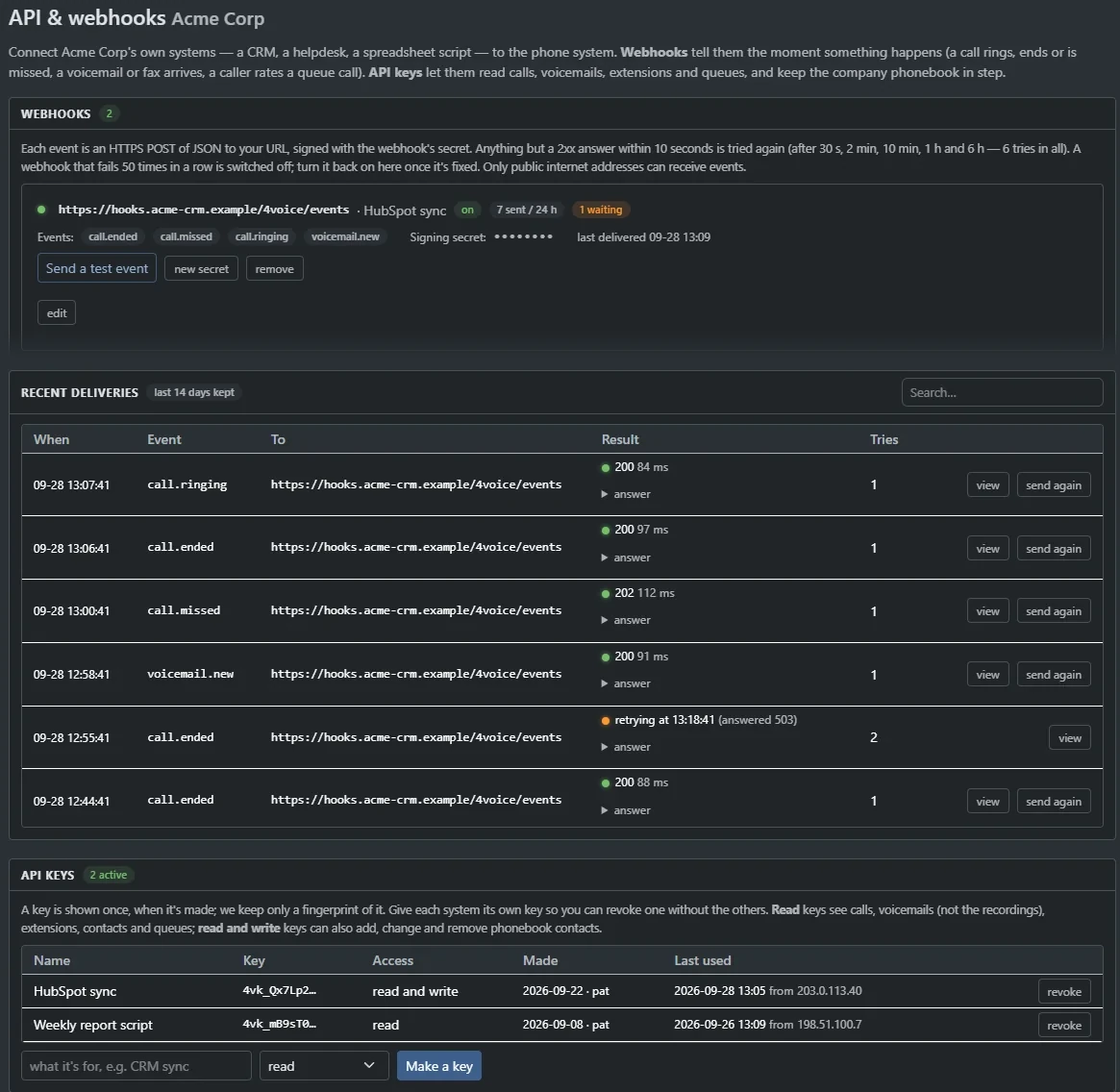
Signed webhooks
call.ringing, call.ended, call.missed, voicemail.new and more, signed with HMAC-SHA256. Six tries per event and 14 days of history.
-
Pause a recording from your own app
One API call pauses the recording while an agent takes a payment, another resumes it. Timing and transcripts stay in step.
-
Yealink, Polycom and Grandstream
Give a phone its secret address and it fetches its own settings. Reprovision or reboot a whole company in one click.
-
Website call-me widget
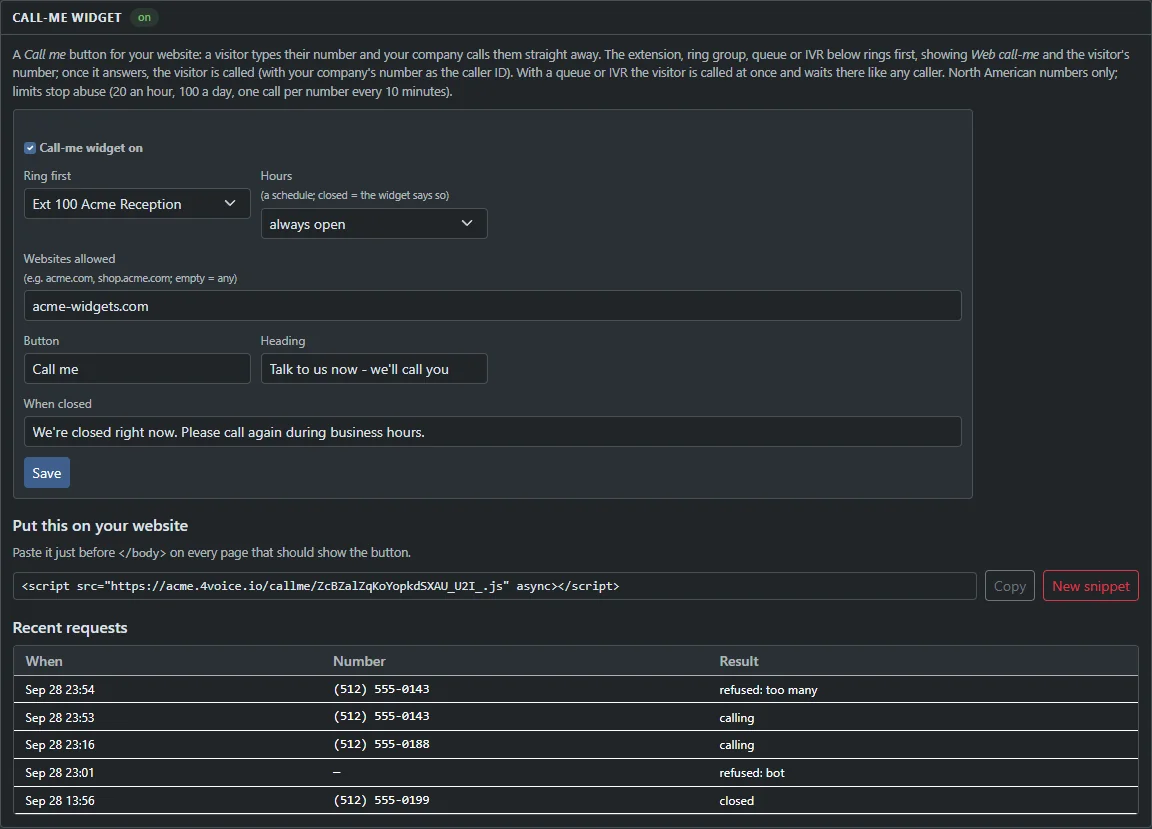
One script tag adds a Call me button to your site. Your chosen extension, ring group, queue or menu calls the visitor back.
-
Click-to-call
A phone button beside every number in call records, voicemail, recordings and the phonebook. Your phone rings first, then it dials out.
-
Browser phone URL control
Dial, answer, hold, mute and transfer from a CRM, a script or a Stream Deck button with Yealink-style action URIs.
-
Door phones
See a SIP door station's camera on the browser phone and open the door with one tap.
-
Hotel mode
Check guests in and out, block outside calls from vacant rooms, schedule wake-up calls with
*41and bill each stay. -
Website live chat
Another script tag and visitors chat with your agents. Set the title, greeting, away text and color; every chat lands in your inbox.
-
Call tracking and number insertion
Give each campaign its own number and see its calls in a daily chart. One script tag swaps the number by where each visitor came from.
Nothing on that line. Try , or , or ask us in a demo.
Add-ons are switched on per company by 4voice.
Your calls, voicemails and contacts, one request away.
A company REST API with a key for each system. Read calls, voicemails with transcripts, extensions, queues and contacts. Place a call. Pause a recording. Every request is scoped to your company.
Read calls · curl
curl -H "Authorization: Bearer 4vk_EXAMPLE_NOT_A_REAL_KEY" \
  "https://acme.projectpbx.net/api/company/v1/calls?direction=inbound&since=2026-10-01"
Inbound calls since 1 October, oldest first. Carry on from next_after_id for the next page.
Place a call · curl
curl -X POST "https://acme.projectpbx.net/api/company/v1/calls" \
  -H "Authorization: Bearer 4vk_EXAMPLE_NOT_A_REAL_KEY" \
  -H "Content-Type: application/json" \
  -d '{"extension": "101", "to": "5125550143"}'
Answers 202 Accepted. The extension rings first; pick up and the number is dialed.
Check a webhook · shell
# X-4voice-Signature: t=1790000000,v1=<hex>
T=1790000000
BODY='{"id":"evt_…","type":"call.missed", …}'
printf '%s.%s' "$T" "$BODY" | openssl dgst -sha256 -hmac "EXAMPLE_SECRET_NOT_REAL"
# the hex it prints must equal v1
Recompute the HMAC of the timestamp and the raw body, then compare. Turn away anything older than 5 minutes.
Read calls · JavaScript
const res = await fetch(
  "https://acme.projectpbx.net/api/company/v1/calls?direction=inbound&since=2026-10-01",
  { headers: { Authorization: "Bearer 4vk_EXAMPLE_NOT_A_REAL_KEY" } }
);
const { calls, next_after_id } = await res.json();
const missed = calls.filter((c) => c.missed);
console.log(`${missed.length} missed, read on from ${next_after_id}`);
Inbound calls since 1 October, oldest first. Carry on from next_after_id for the next page.
Place a call · JavaScript
const res = await fetch("https://acme.projectpbx.net/api/company/v1/calls", {
  method: "POST",
  headers: {
    Authorization: "Bearer 4vk_EXAMPLE_NOT_A_REAL_KEY",
    "Content-Type": "application/json",
  },
  body: JSON.stringify({ extension: "101", to: "5125550143" }),
});
console.log(res.status, await res.json()); // 202, then your phone rings
Answers 202 Accepted. The extension rings first; pick up and the number is dialed.
Check a webhook · Node.js
import { createHmac, timingSafeEqual } from "node:crypto";

export function verify(secret, header, rawBody) {
  const p = Object.fromEntries(header.split(",").map((x) => x.split("=", 2)));
  const mac = createHmac("sha256", secret).update(`${p.t}.${rawBody}`).digest("hex");
  const fresh = Math.abs(Date.now() / 1000 - Number(p.t)) < 300;
  return fresh && mac.length === p.v1.length &&
    timingSafeEqual(Buffer.from(mac), Buffer.from(p.v1));
}
Recompute the HMAC of the timestamp and the raw body, then compare. Turn away anything older than 5 minutes.
Read calls · Python
import requests

r = requests.get(
    "https://acme.projectpbx.net/api/company/v1/calls",
    params={"direction": "inbound", "since": "2026-10-01"},
    headers={"Authorization": "Bearer 4vk_EXAMPLE_NOT_A_REAL_KEY"},
    timeout=10,
)
data = r.json()
missed = [c for c in data["calls"] if c["missed"]]
print(len(missed), "missed; read on from", data["next_after_id"])
Inbound calls since 1 October, oldest first. Carry on from next_after_id for the next page.
Place a call · Python
import requests

r = requests.post(
    "https://acme.projectpbx.net/api/company/v1/calls",
    headers={"Authorization": "Bearer 4vk_EXAMPLE_NOT_A_REAL_KEY"},
    json={"extension": "101", "to": "5125550143"},
    timeout=10,
)
print(r.status_code, r.json())  # 202, then your phone rings
Answers 202 Accepted. The extension rings first; pick up and the number is dialed.
Check a webhook · Python
import hmac, hashlib, time

def verify(secret, header, body):          # body: the raw bytes
    p = dict(x.split("=", 1) for x in header.split(","))
    mac = hmac.new(secret.encode(), p["t"].encode() + b"." + body,
                   hashlib.sha256).hexdigest()
    return (hmac.compare_digest(mac, p["v1"])
            and abs(time.time() - int(p["t"])) < 300)
Recompute the HMAC of the timestamp and the raw body, then compare. Turn away anything older than 5 minutes.
What comes back
{
  "calls": [{
    "call_id": "6f1c0a1e-…", "direction": "inbound",
    "from": "+15125550142", "from_name": "Big Customer Inc",
    "to": "100", "did": "15125550100", "extension": "101",
    "started_at": "2026-10-01T14:02:11Z",
    "answered_at": null,
    "ended_at": "2026-10-01T14:02:35Z",
    "duration": 24, "talk_seconds": 0, "answered": false,
    "missed": true, "blocked": null, "spam": null,
    "hangup_cause": "NO_ANSWER", "id": 4821
  }],
  "next_after_id": 4821,
  "has_more": false
}
// 202 Accepted: your phone is ringing
{
"call_uuid": "b1f5…",
"extension": "101",
"to": "5125550143"
}// true: the signature matches and the timestamp is under 5 minutes old,
// so a replayed request is turned away.Example keys and addresses only. Every system gets its own key, shown once and revocable. Webhooks
One key per system
Shown once, revocable, with its last use stamped. Revoke one and the rest keep working.
Scoped to your company
Every request sees only your own calls, voicemails, extensions, queues and contacts.
Read, or read and write
Read-only keys for reports and dashboards. Read-and-write keys can add, change and remove contacts.
Oldest first, read on from the last id
Calls arrive oldest first. Pass after_id and you carry on exactly where you stopped.
Place a call
POST /calls rings an extension first, then dials. Your caller ID, call limits and recording rules apply.
Pause a recording
While an agent takes a payment, one call pauses the recording and another resumes it.
The endpoints
Bearer key in the Authorization header. Everything is JSON, and errors come back as {"detail": "…"}. Base address https://<company>.projectpbx.net/api/company/v1
- GET
/Who this key is and which events exist - GET
/callsCalls, oldest first; read on with after_id - GET
/calls/{id}One call - GET
/voicemailsNewest first, with transcripts - GET
/extensionsExtensions and their names - GET
/queuesThe wallboard's numbers for each queue - GET
/contactsThe phonebook, searchable - POST
/contactsAdd a contact (read-and-write keys) - PUT
/contacts/{id}Change a contact; fields you leave out keep their value - DELETE
/contacts/{id}Remove a contact - POST
/callsClick-to-call: your phone rings, then it dials - POST
/calls/{uuid}/recordingPause or resume a live recording - POST
/remindersSchedule an appointment reminder - GET
/reminders/{id}How a reminder went, from pending to confirmed
Hear every call the moment it happens.
Eight events, signed and delivered to up to 10 HTTPS URLs. Pick one to see the JSON your server receives.
Events
An incoming call that nobody answered and that was not blocked. It fires the moment the call record lands.
- X-4voice-Event
- call.missed
- X-4voice-Delivery
- 8841
- X-4voice-Signature
- t=1790000000,v1=9c2e…
{
  "id": "evt_3b1f…", "type": "call.ringing", "created": "2026-10-01T14:02:09Z",
  "company": { "id": 1, "domain": "acme.projectpbx.net" },
  "data": {
    "call_id": "6f1c0a1e-…", "from": "+15125550142", "from_name": "Big Customer Inc",
    "did": "15125550100",
    "ringing": { "type": "queue", "number": "300", "label": "Support" }
  }
}
{
"id": "evt_a07c…", "type": "call.ended", "created": "2026-10-01T14:05:48Z",
"company": { "id": 1, "domain": "acme.projectpbx.net" },
"data": {
"call_id": "6f1c0a1e-…", "direction": "inbound",
"from": "+15125550142", "from_name": "Big Customer Inc",
"to": "100", "did": "15125550100", "extension": "101",
"started_at": "2026-10-01T14:02:10Z",
"answered_at": "2026-10-01T14:02:16Z",
"ended_at": "2026-10-01T14:05:48Z",
"duration": 218, "talk_seconds": 212, "answered": true,
"missed": false, "blocked": null, "spam": null,
"hangup_cause": "NORMAL_CLEARING"
}
}{
"id": "evt_91d4…", "type": "call.missed", "created": "2026-10-01T14:02:35Z",
"company": { "id": 1, "domain": "acme.projectpbx.net" },
"data": {
"call_id": "6f1c0a1e-…", "direction": "inbound",
"from": "+15125550142", "from_name": "Big Customer Inc",
"to": "100", "did": "15125550100", "extension": "101",
"started_at": "2026-10-01T14:02:11Z",
"answered_at": null,
"ended_at": "2026-10-01T14:02:35Z",
"duration": 24, "talk_seconds": 0, "answered": false,
"missed": true, "blocked": null, "spam": null,
"hangup_cause": "NO_ANSWER"
}
}{
"id": "evt_5e20…", "type": "voicemail.new", "created": "2026-10-01T14:03:02Z",
"company": { "id": 1, "domain": "acme.projectpbx.net" },
"data": {
"voicemail_id": 377, "mailbox": "101",
"from": "+15125550142", "from_name": "Big Customer Inc",
"duration": 38, "received_at": "2026-10-01T14:03:02Z"
}
}{
"id": "evt_c6a9…", "type": "fax.received", "created": "2026-10-01T15:12:40Z",
"company": { "id": 1, "domain": "acme.projectpbx.net" },
"data": {
"fax_id": 52, "from": "+15125550177", "to": "+15125550110",
"fax_number": "Orders", "pages": 3, "complete": true,
"received_at": "2026-10-01T15:12:38Z"
}
}{
"id": "evt_2d77…", "type": "survey.completed", "created": "2026-10-01T16:40:12Z",
"company": { "id": 1, "domain": "acme.projectpbx.net" },
"data": {
"call_id": "6f1c0a1e-…", "queue": "Support", "agent": "102",
"caller": "+15125550142", "score": 5, "at": "2026-10-01T16:40:11Z"
}
}{
"id": "evt_f4b8…", "type": "transcript.keyword", "created": "2026-10-01T16:52:30Z",
"company": { "id": 1, "domain": "acme.projectpbx.net" },
"data": {
"kind": "recording", "id": 190, "uuid": "6f1c0a1e-…",
"keywords": ["cancel"], "snippet": "…I want to cancel the order…",
"caller": "+15125550142", "at": "2026-10-01T16:52:29Z"
}
}{
"id": "evt_0a31…", "type": "port.updated", "created": "2026-10-02T09:15:00Z",
"company": { "id": 1, "domain": "acme.projectpbx.net" },
"data": {
"request_id": 12, "status": "foc",
"status_label": "Port date set", "numbers": ["+15125550100"],
"carrier": "Example Carrier", "foc_date": "2026-10-09"
}
}Sample payloads with example data.
Signed
An X-4voice-Signature header carries a timestamp and an HMAC-SHA256 of the raw body, so you can reject forgeries and old replays.
Testable
Send a test event, rotate the signing secret or replay any delivery from the portal.
Public HTTPS
Each URL is checked when it is added and again at send time.
Only what you ask for
Each URL picks just the events it wants and signs with its own secret. Rotate the secret whenever you like.
14 days of history
Every delivery and every try is listed, with a Send again button for any of them.
Answer within 10 seconds
Reply with any 2xx and the event is done. A busy receiver is retried automatically.
If your server is busy, we keep knocking.
Six tries per event, every one on the page, and a Send again button for any of them. Your first look at a problem is a list, not a mystery.
- First try as the event happens
- Second try
- Third try
- Fourth try
- Fifth try
- Sixth try
Give a phone its address. It sets itself up.
Each Yealink, Polycom or Grandstream phone fetches its own settings from its own secret address. Lines, clock and passwords arrive ready, with programmable keys on Yealink and Polycom. Change a setting, then reprovision a whole company in one click.
A new phone boots, asks for its settings at its own secret address, registers as extension 101 and then its keys and clock appear. Choose Yealink, Polycom or Grandstream to see what each one gets.
Phone
- 1BootsPowers on and asks for its settings.
- 2Fetches its configFrom its own secret address, so only that phone can ask.
- 3RegistersSigns in as extension 101, Reception.
- 4Keys, wallpaper and clock setProgrammable keys sized to the model, your wallpaper, the right time zone.
Phone activity log
- phone boots
- config requested
- config sent
- registered 101
- keys, wallpaper, clock set
StateReady
Every phone
- Its own secret address, regenerated with a grace period
- The right clock and time zone, daylight saving included
- A managed web password
- One-click reprovision and reboot
Yealink
- Programmable BLF, speed-dial and park keys, sized to the model
- Wallpaper on color screens, pushed to every phone
- Approved firmware on the first provision
- Company phonebook as the phone's directory
- Distinctive ringing, as an add-on
Polycom
- BLF, speed-dial and park keys, park lamps included
- Distinctive ringing, as an add-on
Grandstream
- Account and line configured for you
Run the whole fleet from one screen
Reprovision, reboot, set the clocks and read every phone's story, for a whole company at once.
Reprovision in one click
Re-pull settings on every reachable phone in a company, and see which ones answered.
Reboot the lot
Restart every phone from the same screen.
Clocks that are right
One NTP server pushed to every phone, a per-company override, and each extension's own time zone.
Activity log
Provisioning, firmware and registration events for every phone, searchable.
Two front doors
A primary and a backup are written to each phone as outbound proxies, so phones can fail over.
Encrypted phones
Off, Offered or Required per company: TLS signaling and SRTP audio.
Your logo on every Yealink color screen.
Start with the 4voice logo, drop in yours, or fill the screen with a picture, then push it to every phone in the company. Each phone gets a wallpaper sized to its own screen.
- T58 and T56 at 1024 × 600
- T57, T48 and T49 at 800 × 480
- T54 and T46 at 480 × 272
- T33 at 320 × 240
T58 and T56: the logo sits lower, under the big idle clock.
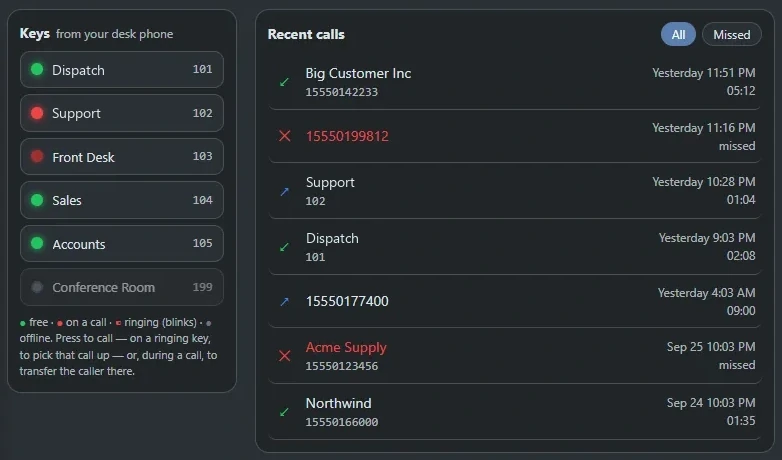
Press a lamp. Make the call.
Lamps refresh every 2 seconds. Press one to call that person, to blind-transfer the caller you are talking to, or to pick up a ringing call.
- FreeGreen
- BusySolid red
- RingingBlinking red
- OfflineGray
Desk phones get the same idea as programmable BLF, speed-dial and park keys: 27 keys on a T58 or T54, 29 on a T48, 2 on a T21. Park keys light on Yealink and Polycom phones.
Every number is a call waiting to happen.
One click and your phone rings. Every number in the portal is a call waiting to happen, and so is every visitor on your website.
A visitor opens the Call me button on a website, types a number and presses Call me. Reception rings first, showing Web call-me. When reception answers, the visitor is dialed and the two are connected.
acme-widgets.example
- Reception ringsShows Web call-me and the visitor's number
- Reception answersThe call is yours
- Visitor is dialedThrough your dialplan, with your caller ID
- ConnectedBoth sides on the line
<script src="https://acme.projectpbx.net/callme/<token>.js" async></script>Paste one script tag. Your phone does the rest.
A visitor types their number. Your extension or ring group rings first and the visitor is dialed when it answers; a queue or menu takes the visitor straight in.
- Who rings first. An extension, ring group, queue or menu.
- Opening hours. Your schedule, or always open, with a closed message in your words.
- Websites allowed. Only the ones you list.
- The button's words. Your heading, your button text.
- Every request logged, with abuse limits built in.
Hours, sites and the button's own words
The call-me settings and the log of recent requests.
Click a number. Pick up. It dials.
A phone button sits beside numbers in Call records, Voicemail, Recordings and the Phonebook. Your own phone rings first, showing who you are calling. Pick up and the call goes out exactly as if you had dialed it: your caller ID, your call limits, your recording rules.
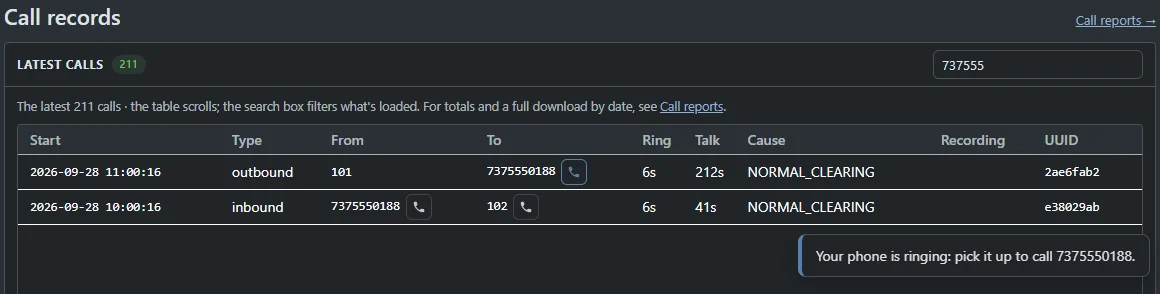
- From your CRM. A
https://<portal>/phone?dial={number}link opens the browser phone with the number filled in. - From your code. POST /calls with an extension and a number rings that extension first.
- Guarded. Emergency numbers go through the phone itself, and each extension can start up to 6 a minute.
Everything on this page, in the feature list.
Open any of them in the catalog for the full picture and the other features it works with.
Wire it to your stack.
Tell us what your phones need to talk to. We will show you the connection running, from the CRM log to the webhook.
- A call flow drafted for your business
- Pricing built around your team size
- Every question answered on the call