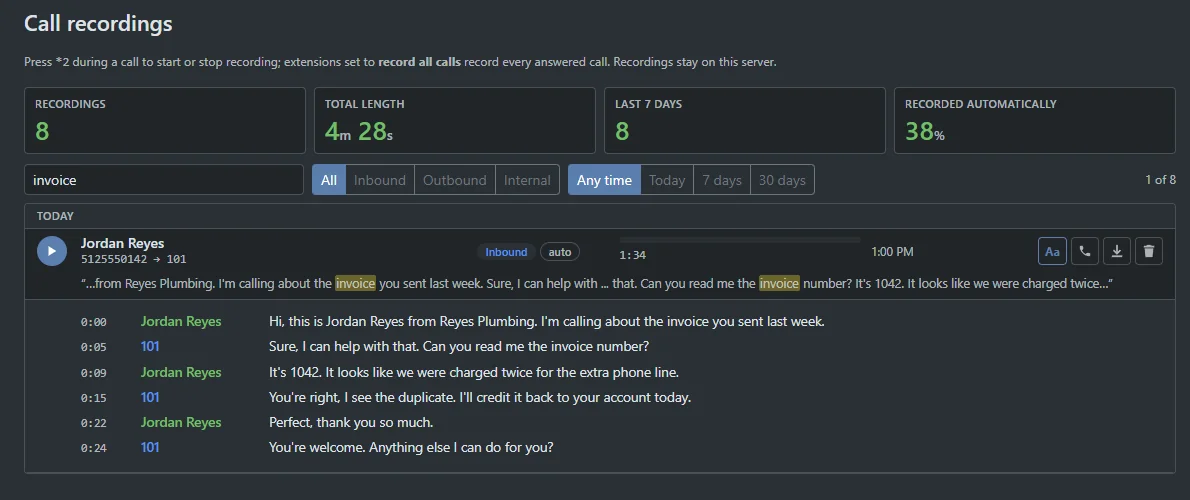
Search any recorded call by the words said

Talk, chat, text and fax from one login.

Team chat that shows who is on a call. Video with screen share in one click. Texts from the number your customers already call, faxes from the portal and voicemail you can read. Calls you record come written down, searchable by the words that were said.

Transcripts written on our own servers Video on a media server 4voice hosts 4voice Support pinned in every chat
yourcompany.projectpbx.net
Real screen
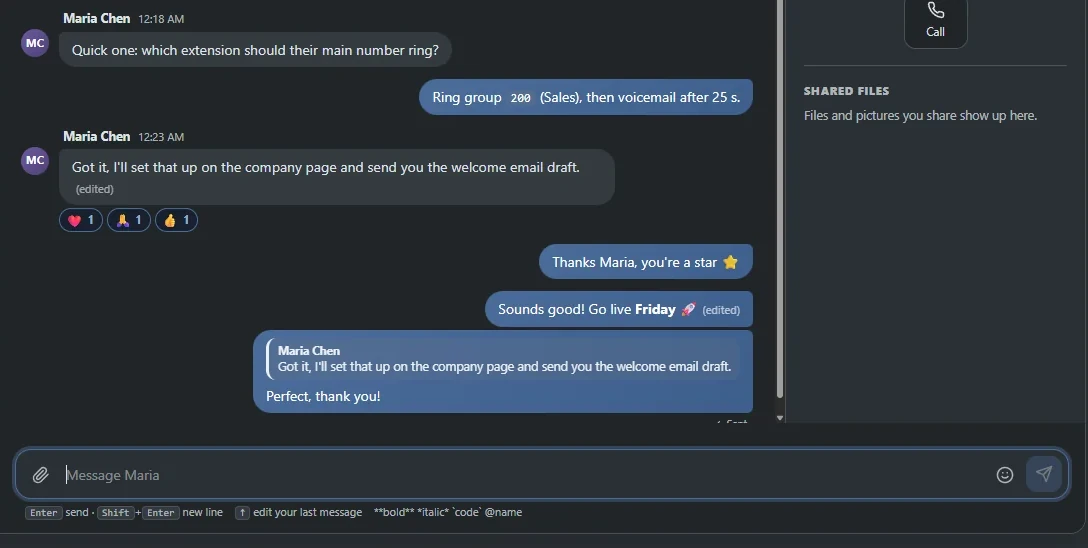
A team chat thread: a colleague asks which extension the main number should ring, the reply names ring group 200, and the thread shows reactions, an edited message, a quoted reply and the message box.
Team chat

Team chat that shows who is on a call.

Rooms, direct messages and a live phone badge next to every name. See who is on a call before you ping them, then call or video them from the conversation. It lives in the portal and the Android app, behind the login your phones already use.

Acme · Team chatLive demo

A chat window for the company Acme. Maria Chen shows an On a call badge and asks which extension the main number should ring. The reply names ring group 200. Controls: pick a conversation, type a message and press Enter to send, react to a message, press Up to edit your last message.

Rooms

Direct messages

Maria ChenOn a call · Ext 102
Video
  1. Maria Chen

    Which extension should their main number ring?
  2. Ring group 200 (Sales), then voicemail after 25 s.
  3. Maria Chen

    Got it. I'll set it up and send the welcome email.
  4. Thanks Maria, you're a star
  5. Sounds good! Go live Friday (edited)
  6. Maria ChenGot it. I'll set it up and send the welcome email.Perfect, thank you!

    Seen by Maria · 12:24 PM

Enter sendShift Enter new lineUp edit your last message

Pick a conversation, type and press Enter, or press Up to edit your last message.

Answer with a tap

Reactions, quoted replies, edit and delete. Press Up to fix your last message.

Mention and be heard

An @mention raises a browser notification, and read receipts show who has seen it.

Drop in files and pictures

Attach, paste or drag with a progress bar. Pictures open in a lightbox.

Find anything

Search covers people, rooms and the words inside messages. Older messages load as you scroll.

Team chat in the feature list

Video and screen share

Hop on video. Share your screen.

Ring a colleague or a whole group straight from chat. The invite rings like a call, then everyone lands in a tile grid with mic, camera and screen share. No separate meeting app, no link to paste.

  • One-to-one or a whole group, started from the conversation.
  • Share your screen and your window joins the grid as one more tile.
  • Video in the Android app and the browser phone. Camera-equipped Yealink desk phones work too.
  • Hosted by 4voice. Calls run on a media server we run ourselves.

Video calls in the feature list

Add-on Video meetings: schedule with a title, a time and invitees, who are emailed the link. Guests join from a link with just their name. See video meetings

Team callLive demo

A group video call with four people shown as tiles with initials and level bars. Controls: microphone, camera, share screen, and leave or rejoin. Sharing your screen adds your shared window to the grid as one more tile.

4 people in the call

Pat Manager (you)

Maria Chen

Jordan Reyes

Alex Kim

Mic, camera and share all work. Leave, then rejoin.
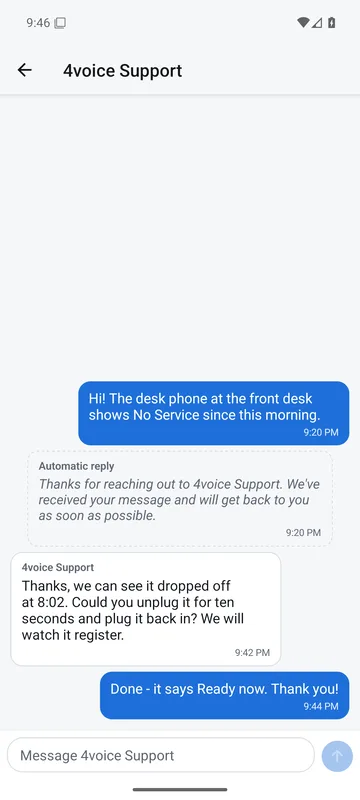
The 4voice app, Support conversation: a customer reports that the front desk phone shows No Service, an automatic reply acknowledges it, and 4voice Support answers with steps to try.
Real screen
4voice Support, in the Android app.
4voice Support

Support is one message away.

Every user has a 4voice Support conversation pinned at the top of chat, in the portal and in the app. Ask a question the way you would ask a colleague. Answers come back as 4voice Support, in the same thread.

Pinned for everyone

Top of the list for every person in your company, so the right help is never a search away.

Announcements in the same thread

News from 4voice arrives with a push to the app, and an optional banner can run across every portal page.

An answer even when nobody is in

An automatic “we will get back to you” goes out so you know your message landed.

Tickets, as an add-on Add-on

Open, track and reply to tickets with 4voice from the portal or the Android app.

4voice Support in the feature list

Business texting

Text customers from the number they call.

Business texting on your company's own numbers, with a shared or a personal inbox. Send pictures, answer from templates and schedule a text for later. Miss a call and a text-back goes out by itself.

Missed-call text-back · try itLive demo

A caller rings the company number and nobody picks up. The text-back message goes out automatically from the same number, a customer replies, and a picture is sent. Controls: choose During hours or After hours, let it ring out, customer replies, send a picture, start over.

When the call is missed

Write the message once. Your company's name is filled in for every caller, and a different message goes out when the number's schedule is closed.

(512) 555-0142from (555) 000-1000 · Acme main1
  1. Missed call from (512) 555-0142 · 4:41 PM
  2. Sorry we missed your call to Acme. We'll call you back shortly, or just reply here.

    Acme main · automatic text-back · 4:41 PM

  3. Can someone call me back about the invoice?

    4:43 PM

  4. spec-sheet.pdf
    Yes! Here is ours next to the larger size, and the spec sheet.

    Pat Manager · 4:44 PM

Switch to After hours and let it ring out again: a different message goes out.

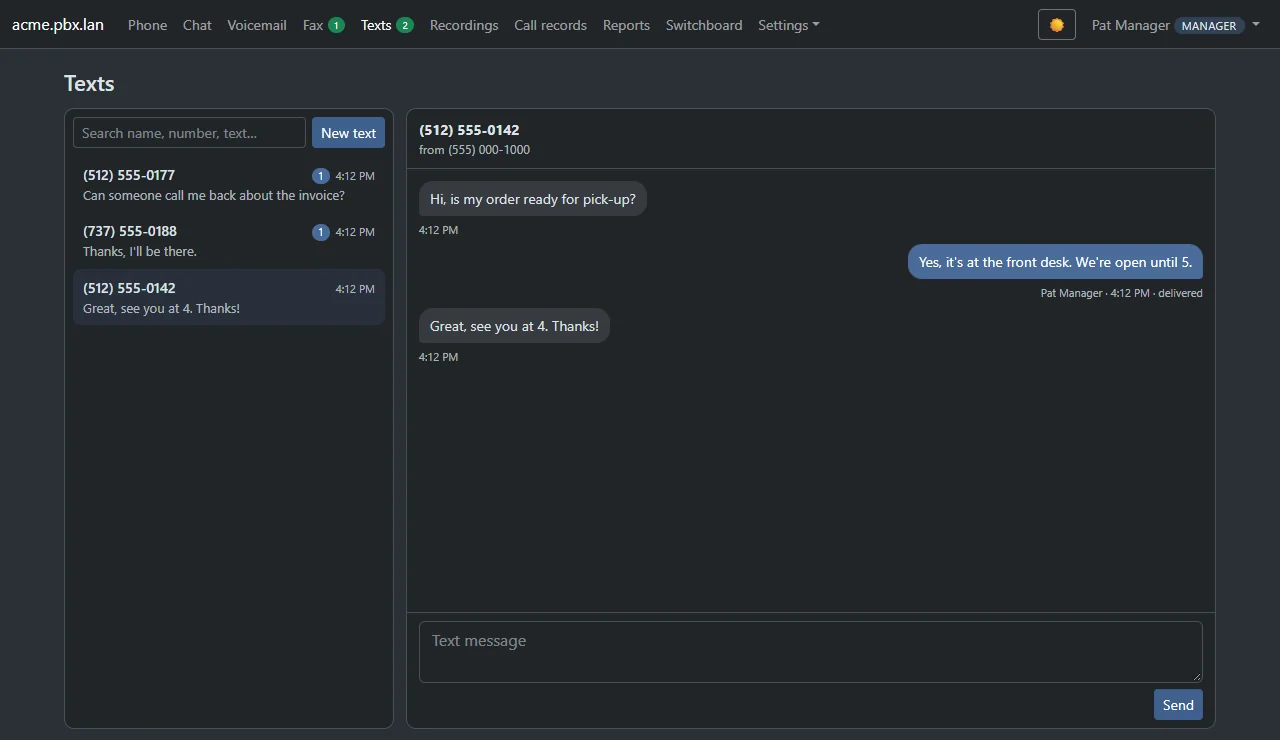
Every customer text, in one inbox.

Give each number a shared inbox for the front desk or a personal one for a single extension. Search by name, number or words, and get alerts in the browser and the app.

Shared or personal inboxBrowser and app alertsUp to 50 reply templates
Business texting
Real screenThe Texts page: a list of conversations with their last message on the left, and an open thread with a customer on the right, with a box to type the next text.

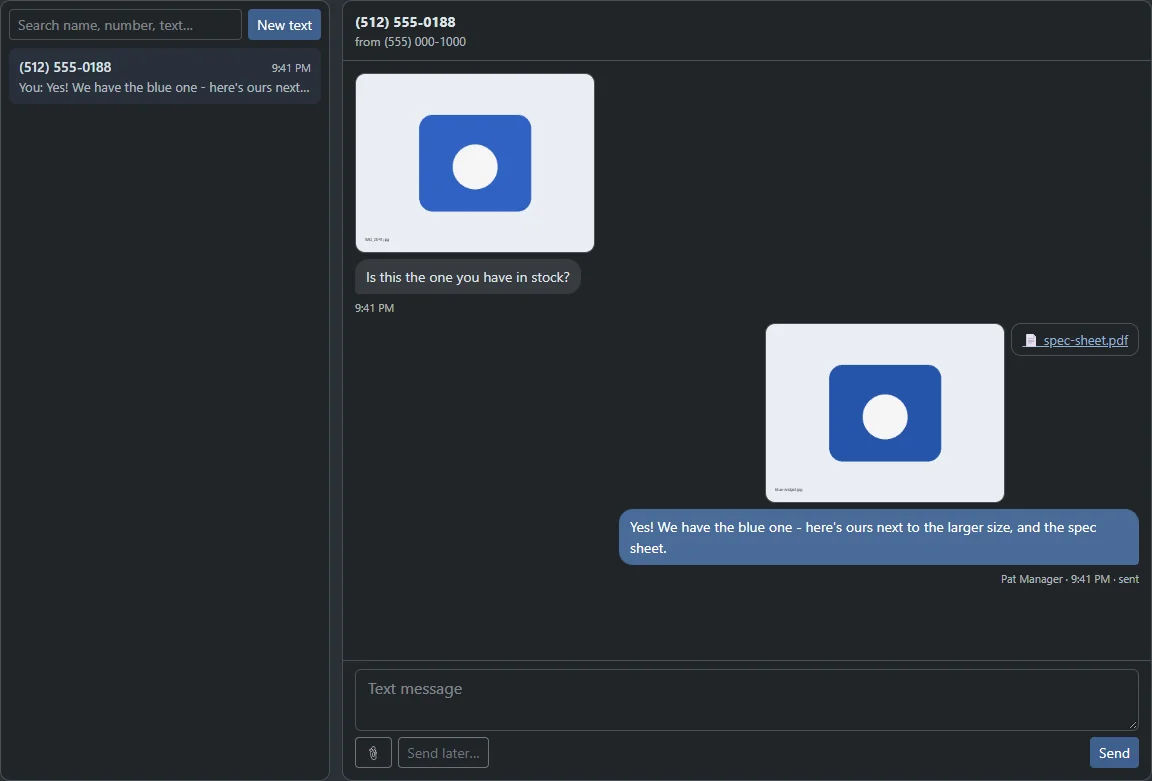
A picture text, as your team sees it.

Pictures show inline in the thread, so everyone sees what the customer sees. Up to three files a text: pictures, PDFs and contact cards.

Real screenA text thread: the customer sends a photo and asks if it is the one in stock. The reply carries a photo and a PDF spec sheet.

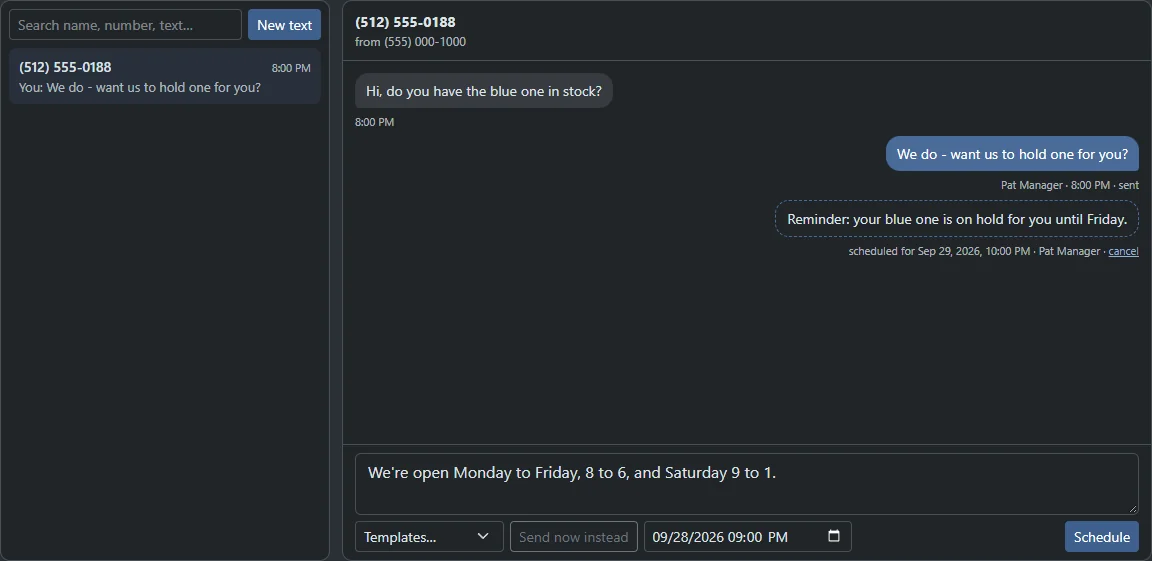
Send it later.

Queue a reminder for tonight or up to 90 days ahead. It shows in the thread as a dashed bubble, and you can cancel it any time.

Real screenA text thread with a scheduled reply shown as a dashed bubble, the schedule date and a cancel link, and a box with Templates and Schedule controls.

Turn a missed call into a text.

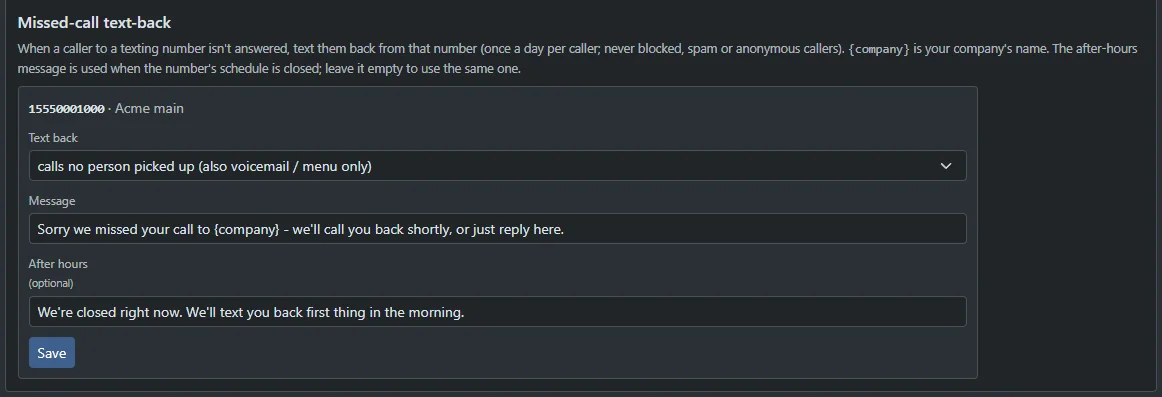
Write the message once. Your company's name is filled in for every caller, and a different message goes out when the number's schedule is closed. An auto-reply can answer incoming texts while you are closed.

Per numberAfter-hours messageAuto-reply to texts
Missed-call text-back
Real screenMissed-call text-back settings for one number: when to text back, the message with the company name filled in, and an optional after-hours message.
yourcompany.projectpbx.net
Real screen
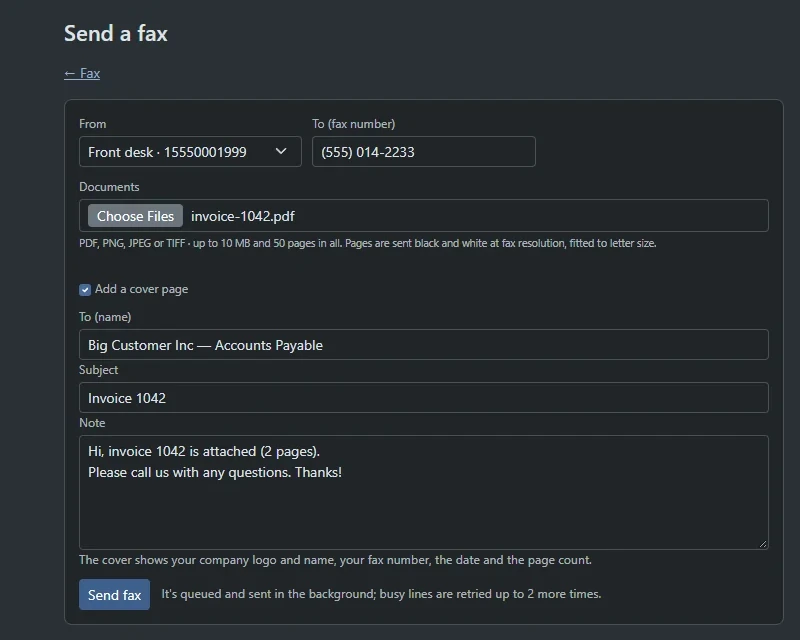
The Send a fax form: choose the fax number to send from, the destination, attach a PDF, tick Add a cover page, and fill in the name, subject and note.
Send a fax: pick the number, attach a PDF, add a cover page.
Software fax

Fax without the machine.

Send and receive faxes from the portal and the app. Attach a PDF, add a cover page with your logo, and every received fax lands in the right inboxes as a PDF.

  • Send PDF, PNG, JPEG or TIFF, up to 50 pages in one fax.
  • Cover pages with your logo, name, fax number, date and page count.
  • Received faxes by email, as a PDF, to the list of addresses you choose.
  • Busy line? It tries again. Failed sends retry on their own, two more tries five minutes apart.
  • A fax number is a destination in your call flow, like a person or a menu.

Software fax in the feature list

Visual voicemail

Voicemail you can read.

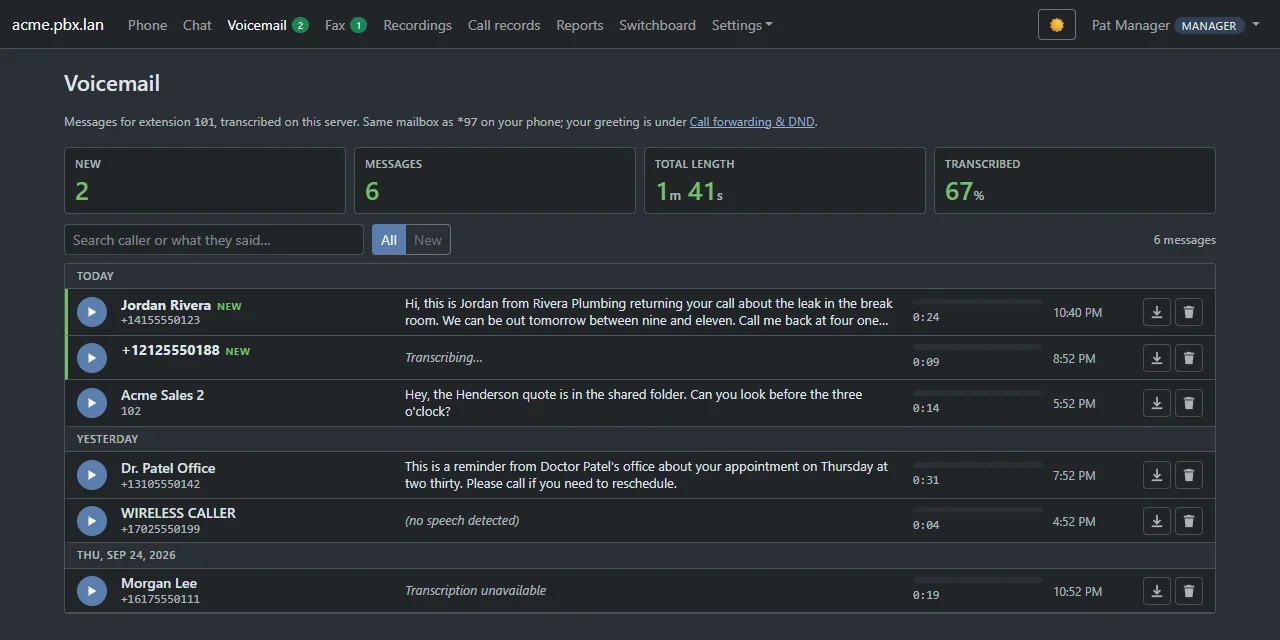
Messages show their words right on the row, written on our own servers. Scan the list, search for a name or a phrase, and press play only when you need the voice. Play or delete in the portal and the lamp on your desk phone follows.

yourcompany.projectpbx.net
Real screen
Visual voicemail: summary tiles for new messages, total length and share transcribed, a search box and a list of messages, each with the caller, the first words of the transcript, its length and a play button.
Every message shows its words. New ones are marked in green.

Voicemail to email

The caller, the time in your zone, the length, the words and the audio, in your inbox.

Voicemail by text

The caller and the first words of the message arrive as a text, the moment it is transcribed.

Shared boxes

A team mailbox with its own number and PIN, and a note of who has heard each message.

Greetings in your voice

Record one in the browser or the app, upload a file, or type it and let your company voice speak it.

Voicemail transcripts in the feature list

Keyword alerts

Know when a call says cancel.

Give it up to 30 words or phrases. When a call or a voicemail mentions one, the people you choose get an email and your webhook gets an event. Matching happens on the voice server, so only the alert leaves it.

Watch list · edit itLive demo

A watch list of words and phrases is checked against six sample calls and voicemails. Edit the list and each item shows whether it would send an alert and which words matched. A trailing star matches any ending, so refund star matches refunded. Whole words, any case.

Comma or one per line, up to 30.

4 of 30 words watched

Where to look
Try
  • Whole words, any case. Cancel finds cancel and CANCEL.
  • A trailing star matches any ending: refund* finds refunded.
  • Phrases work too. Add speak to a lawyer as one item.

4 of 6 would send an alert

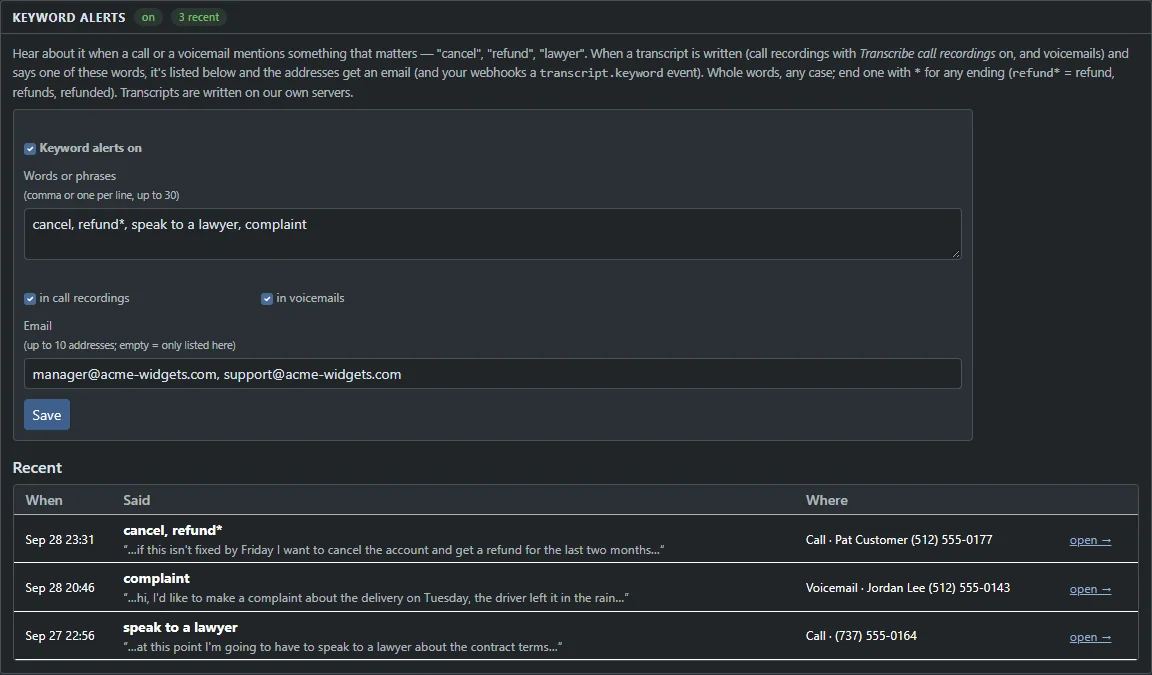
  1. CallPat Customer(512) 555-0177 · Sep 28 23:31…if this isn't fixed by Friday I want to cancel the account and get a refund for the last two months…Alert sentcancel, refund*
  2. VoicemailJordan Lee(512) 555-0143 · Sep 28 20:46…hi, I'd like to make a complaint about the delivery on Tuesday, the driver left it in the rain…Alert sentcomplaint
  3. Call(737) 555-0164Sep 27 22:56…at this point I'm going to have to speak to a lawyer about the contract terms…Alert sentspeak to a lawyer
  4. CallRiley Brooks(512) 555-0191 · Sep 28 16:12…I was refunded last week but the invoice still shows a balance…Alert sentrefund*
  5. CallSam Okafor(737) 555-0112 · Sep 28 14:05…thanks for the quick fix, the new desk phone is working great…No match
  6. VoicemailDr. Patel Office(310) 555-0142 · Sep 27 19:52…a reminder about your appointment on Thursday at two thirty, please call if you need to reschedule…No match
Whole words, any case. A trailing star matches any ending, so refund* matches refunded.
yourcompany.projectpbx.net
Real screen
Keyword alerts settings: a box for up to 30 words or phrases, tick boxes for call recordings and voicemails, up to 10 email addresses, and a Recent table of hits with the words matched.
The real settings page, with the recent hits.

Up to 30 words or phrases

Watched in call transcripts and in voicemail transcripts.

Email and webhook

Up to 10 email addresses get each alert, and a signed webhook event goes to your own systems.

Every hit opens the call

The Recent list shows the words that matched and links to the call.

Keyword alerts in the feature list

30wordsWatched by a keyword alert, across call transcripts and voicemail transcripts.
90daysHow far ahead you can schedule a text, from one minute out. Cancel any time.
50pagesIn one fax, sent from the portal with an optional cover page.
2,000peopleReached by a single mass notification, by call, text or both. An add-on.
Everything in this area

Every line opens its feature.

Chat, voicemail, recording and texting features from the live catalog, each with a link to the full description. 577 features in all, across the whole product.

Chat, video and meetings

Team chatOne-to-one messages and rooms for your company, with presence and live phone status.
Reactions, replies and mentionsEmoji reactions, quoted replies, edit and delete, @mentions with notifications and read receipts.
Files and pictures in chatPaste, drag or attach files with an upload progress bar, and open pictures in a lightbox.
Search that finds messagesSearch finds people, rooms and the words inside messages, and Ctrl+K opens it anywhere in chat.
Phone presence in chatSee who is on a call before you message them, and call or video them from the conversation.
Video calls in chatOne-to-one and group video calls with screen sharing and a ringing invite, on our own self-hosted media server.
Video meetingsSchedule meetings with a nine-digit ID and PIN; colleagues join from the portal and guests from a link.Add-on
4voice Support in chatMessage our support team like a colleague, from the portal or the app; replies arrive as 4voice Support.
Support ticketsOpen and follow tickets with 4voice support from the portal or the app, and read the replies there.Add-on
Service announcementsNotices from 4voice land in your Support conversation and, when important, as a banner on your portal.
Mass notificationSend one message by call, text or both to every extension, your phonebook or a pasted list, and see who heard it.Add-on
Website live chatAdd one script tag and visitors chat with your agents; the chats land in your inbox.Add-on
Omnichannel inboxTexts, website chats, email, WhatsApp and Messenger in one assignable inbox with each contact's history.Add-on
Slack and Google Chat alertsPost missed calls, new voicemails, queue backlogs and poor call quality to your chat channels.Add-on
Video in the appsPlace a video call from the keypad, answer with video, flip cameras and keep working in picture-in-picture.
Personal meeting roomsEvery extension can have its own always-on meeting room with its own PIN.Add-on

Voicemail and recording

Visual voicemailSee, play, search and delete messages in the portal and the app; playing one marks it heard on your phone too.
Voicemail transcriptsRead your voicemail; transcription runs on our own servers, so the audio never goes to an outside AI service.
Voicemail to emailEach message arrives in your inbox with the caller, time, transcript and the audio attached.
Voicemail by textGet a text with the caller and the first words of the message the moment it is transcribed.
Greetings from the portalRecord your greeting and name in the browser or the app, upload a file, or type the words and hear them spoken.
Shared voicemail boxesTeam mailboxes with their own number and PIN, where members see who has already heard each message.
Busy and temporary greetingsCallers hear a different greeting when you are busy, or a temporary one until a date you set.Add-on
After-hours greetingA voicemail greeting that plays automatically when your schedule is closed or on a holiday.Add-on
Out-of-office voicemailWhile you are away, calls skip ringing and play your away message, with 0 to reach a colleague.Add-on
Urgent voicemailCallers press 1 to flag a message urgent, and an on-call list is alerted by app push, text and phone call.Add-on
Voicemail forwardingPass a message to a colleague or shared box with a note, from the portal or the app.Add-on
Call recordingRecord on demand with *2 or always on per extension, with a consent announcement, a periodic beep and a retention window.
Pause for card detailsPress *1 to pause recording while a card number is read; the pause is silent in the file and its transcript.
Call transcripts and searchRecordings are written out on our own servers, saying who said what, and searchable by the words spoken.Add-on
Keyword alertsGet an email and a webhook when a call or voicemail mentions words you choose.
Call sentiment and topicsTag transcribed calls positive, neutral or negative and by topic, using word lists that run on our own servers.Add-on
Retention and legal holdDelete recordings and voicemail after a set time, or place a legal hold that stops every deletion.
Recording share linksShare a recording or voicemail through an expiring link with an optional PIN and a play log.Add-on
Recording opt-outCallers can press 9 after the recording notice so the call isn't recorded.Add-on
Recording exclusionsNumbers whose calls stay out of recordings: the doctor, HR or legal lines.Add-on
VIP voicemail greetingA second voicemail greeting only chosen callers hear.Add-on
Return call from voicemailPress 5 after a voicemail message to call the caller back.Add-on
Voicemail PIN resetForgot the voicemail PIN? Reset it from the portal; the new one is emailed.Add-on
Recording notice per numberEach company number its own recording notice, or none.Add-on
Record calls per numberEvery call that comes in on a chosen company number is recorded.Add-on
Voicemail without PINYour own desk phone goes straight into your voicemail without asking for a PIN.Add-on
Voicemail to email onlyOnce a voicemail is emailed, it's removed from the box.Add-on
Voicemail box limitsAt most a set number of messages per box; when it's full callers are told and the owner is emailed.Add-on
Voicemail operator keyCallers press 9 in someone's voicemail to reach a person instead.Add-on
Record queue callsEvery call a queue's agents answer is recorded.Add-on
Voicemail call-outA new voicemail calls your mobile and plays it (2 calls the caller back).Add-on
Outbound recording noticeThe person called hears the recording notice on a recorded outgoing call.Add-on
Recording by directionAn always-recorded extension records incoming calls, outgoing calls or both.Add-on
Pause recording on holdA recorded call's recording pauses while the call is on hold.Add-on
Voicemail to several emailsEach new voicemail also goes to extra email addresses.Add-on
Voicemail email without audioVoicemail emails carry the transcript and a link to the recording.Add-on
Recording emailsAfter each recorded call, an email with a link to the recording.Add-on
Inside-caller greetingA separate voicemail greeting for colleagues calling from inside the company.Add-on
Unheard voicemail remindersA reminder email when a voicemail is still new after a set number of hours.Add-on
Greeting reminderPeople who never recorded a voicemail greeting or name get a weekly email nudge.Add-on
VIP voicemail marked urgentA voicemail left by a VIP caller is marked urgent automatically.Add-on
Voicemail auto-deleteHeard voicemails older than the company's limit (30-365 days) are deleted, after a week's warning email to the box owner.Add-on
Consent-state recording noticeCallers from all-party-consent states (by area code) hear "this call may be recorded" first.Add-on
Unheard-voicemail whisperAnswering a caller who left a voicemail nobody has heard yet, you hear so first.Add-on
Callback number promptA caller with a hidden number who reaches voicemail keys in a callback number, saved with the message.Add-on
Transfer to voicemail, full options*<ext> (dialed or transferred to) goes through the extension's own voicemail step: temporary greeting, operator / urgent keys, callback prompt.Add-on
Recording bookmarksTime-stamped notes on call recordings; click one to jump there.Add-on
Recording retention per extensionKeep some extensions' call recordings longer or shorter than the company's retention.Add-on
Unreviewed recordingsCall recordings nobody has played or downloaded yet, oldest first.Add-on
Recording opt-out reportCallers who pressed 9 to opt out of recording, per extension, number and day, plus a CSV export.Add-on
Keyword alertAn email when a voicemail or recorded-call transcript mentions words you pick.Add-on

Texting, MMS and fax

Business textingText customers from your company numbers, with a shared or per-extension inbox and unread counts.
Picture messaging (MMS)Send and receive photos, PDFs and contact cards; large photos are shrunk automatically.
Reply templatesOne-tap answers with your company name filled in, in the portal and the app.
Send laterSchedule a text from a minute to 90 days ahead and cancel it any time before it goes.
Missed-call text-backText callers you could not answer automatically, with a different message after hours.
Missed-call texts to meGet a text with who called and when whenever a direct call to you goes unanswered.Add-on
Text satisfaction surveysAsk for an NPS or CSAT score by text after a call and collect the reason, with reports by agent and queue.Add-on
Appointment remindersCall or text clients before appointments; they press 1 to confirm, 2 to cancel or 3 to reach you.Add-on
Online booking pageClients pick a service and a free time on your booking page; each booking gets a reminder and a cancel link.Add-on
10DLC text registrationCapture your brand and campaign details and track carrier approval for texting from local numbers.Add-on
WhatsApp and MessengerConnect your own WhatsApp number and Facebook Page and answer from the shared inbox.Add-on
Software faxSend and receive faxes in the portal and the app with cover pages, and get received faxes emailed as PDF to the people you choose.
Fax retriesBusy or failed faxes retry automatically, with an audio fallback.
Fax tone detectionA fax machine calling a voice number is switched to the company's fax inbox.Add-on
'Got your message' textAn outside caller who leaves a voicemail gets a text from the number they called saying the message arrived.Add-on
After-call thank-you textAfter an answered outside call the caller gets your text from the number they called; once a day per caller.Add-on
Unanswered texts alertAn incoming text with no reply after a set number of hours tells chosen phones and email addresses.Add-on
Fax usage reportPer fax box: faxes sent and received per day, pages, failures and why, plus a CSV export.Add-on
Text message usagePer number: texts in and out per day, delivered / failed, conversations, plus a CSV export.Add-on
Text failure alertAn email when outgoing texts keep failing, so a carrier or registration problem gets fixed fast.Add-on
Fax failure alertAn email when outgoing faxes fail several times in a row.Add-on
Text response timeHow fast incoming texts get a reply, per company number and hour; the unanswered ones, plus a CSV export.Add-on
Text opt-out listWho texted STOP to which company number and when; a CSV for the compliance file.Add-on
See it live

Book a demo and see it all run.

Tell us how your team talks to customers today. We show you chat, texting, fax, voicemail and call search running on a demo company, and answer anything you ask.

  • A call flow drafted for your business
  • Pricing built around your team size
  • Every question answered on the call

Your business name goes with you to the next step. Your email stays in this browser until you send the form.