TRY IT Break the wallboard yourself

Know before they hang up.

A wallboard that turns red the moment callers wait and nobody is free. Callbacks that keep every caller's place in line. Whisper, wrap-up codes, listen and barge. All of it runs in the portal your team already has.

Callers keep their place in line Agents hear the line before the caller Supervisors listen, whisper and barge
yourcompany.projectpbx.net
Real screen
Live call-queue wallboard for Acme Corp: Support, Sales and Billing queues with callers waiting, longest wait, a service-level ring, agent counts and today's totals. The Billing card is outlined in red with the flag No one free.
3sThe wallboard refreshes every 3 seconds, so the floor sees a queue building as it builds.
9Ring strategies, with escalation levels that bring in a second wave of agents.
1sCaller name, number and the line they dialed pop up a second before the phone rings.
100+Add-ons, switched on per company: skills routing, shift schedules, QA scorecards and more.
Live wallboard

A wallboard that turns red when nobody is free.

Press the buttons. Send callers to a queue, put an agent on break, and watch the longest wait and the service level change color by the same rules as the real wallboard.

Wallboard · break itLive demo

A wallboard for three queues: Support, Sales and Billing. Each queue shows callers waiting, the longest wait, the service level, how many agents are free, on a call, on break or out, and today's answered, abandoned, average wait and callback counts. The longest wait is green up to the queue's target, amber up to three times the target and red beyond, and the words On target, Slow or Late say the same. Service level is green from 80 percent, amber from 60 and red below. A queue with callers waiting and nobody free is flagged No one free. Buttons add callers to a queue or put an agent on break, and each agent can be pressed to change their status.

Acme CorpCall queues, live

  • Waiting6
  • Longest wait2:21
  • Answered today91
  • Abandoned10
  • Service level69%

2:31 PMUpdated

Support 770

Target 30 s

Waiting3
Longest wait1:14Slow
Service level64%Watch

1 free1 on a call0 on break1 out

Answered today
58
Abandoned
9
Average wait
0:20
Callbacks
1

Sales 771

Target 20 s

Waiting1
Longest wait0:12On target
Service level78%Watch

1 free2 on a call0 on break0 out

Answered today
22
Abandoned
1
Average wait
0:19
Callbacks
0

Billing 772

No one free

Waiting2
Longest wait2:21Late
Service level82%Good

0 free2 on a call0 on break1 out

Answered today
11
Abandoned
0
Average wait
0:17
Callbacks
0

Agentsfreeon a callon breaklogged out

Add callers

Agents

Or press any agent to change their status.

Board

Agent hears“Call from Support”, then the caller is put through.

Wait: green up to the queue's target, amber to three times the target, red beyond. Service level: green from 80 percent, amber from 60. Seeded example data, refreshed every 3 seconds.

Put it on the wall

Make a TV link and any screen shows the wallboard with no sign-in. It shows names and counts only. Press F for full screen.

Colors that mean something

Wait is green up to the queue's target, amber to three times the target, red beyond. Service level follows your target too.

Every agent in view

Free, on a call, on break or logged out, per queue, with today's answered, abandoned, average wait and callbacks.

See the live wallboard feature

Ring strategies

Nine ways to ring. Pick the one that fits your floor.

The agent idle longest, everyone at once, the one with the fewest calls. Add escalation levels and a second wave of agents joins after a wait you set.

  • Callers hear their place in line and an estimated wait, spoken over the hold music.
  • A way out: after a maximum wait, fall back to voicemail, an extension, a ring group or hang-up.
  • VIPs go first. VIP callers jump the line, on by default for every queue.
  • Agents set their own status from the browser phone, the app, or *50, *51 and *52 on any phone.

See call queues

Queue callback

Hang up. Keep your place.

Nobody likes hold music. A caller presses 1 and hangs up. When it is their turn and an agent is free, the system calls them back from your company number and puts them straight through.

See queue callback

On every call

The small details that make agents better.

Know which line is ringing. Tag the outcome. Ask the caller how it went. Each one takes seconds, and every one lands in your reports.

Agents know which line is calling.

Before the caller is put through, the agent hears “Call from Billing”, or words you choose per queue. The greeting always fits the line.

Live demo
“Call from Billing”

Then the caller is connected.

Tag every call with an outcome.

From the browser phone, the app, or *57* and a code within 30 minutes of the call. Queue reports count every code, and a CSV carries them out.

Live demo

Tagged Sale. From a desk phone: *57*1

Ask callers how it went.

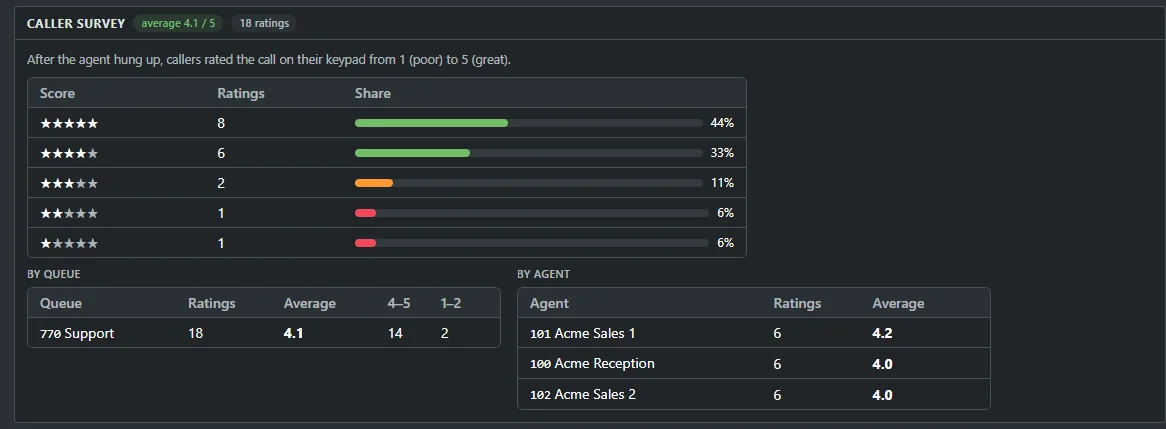
The caller stays on after the agent hangs up and rates the call from 1 to 5 on the keypad. Averages by queue and by agent land in reports, and today's score sits on the wallboard.

Live demo

After your call, please rate it from 1 to 5.

Caller pressed 4. It counts toward the queue and agent averages.

Caller details before the ring.

The portal pops the caller's name, number and the line they dialed a second before the phone rings, on extensions, ring groups and queues.
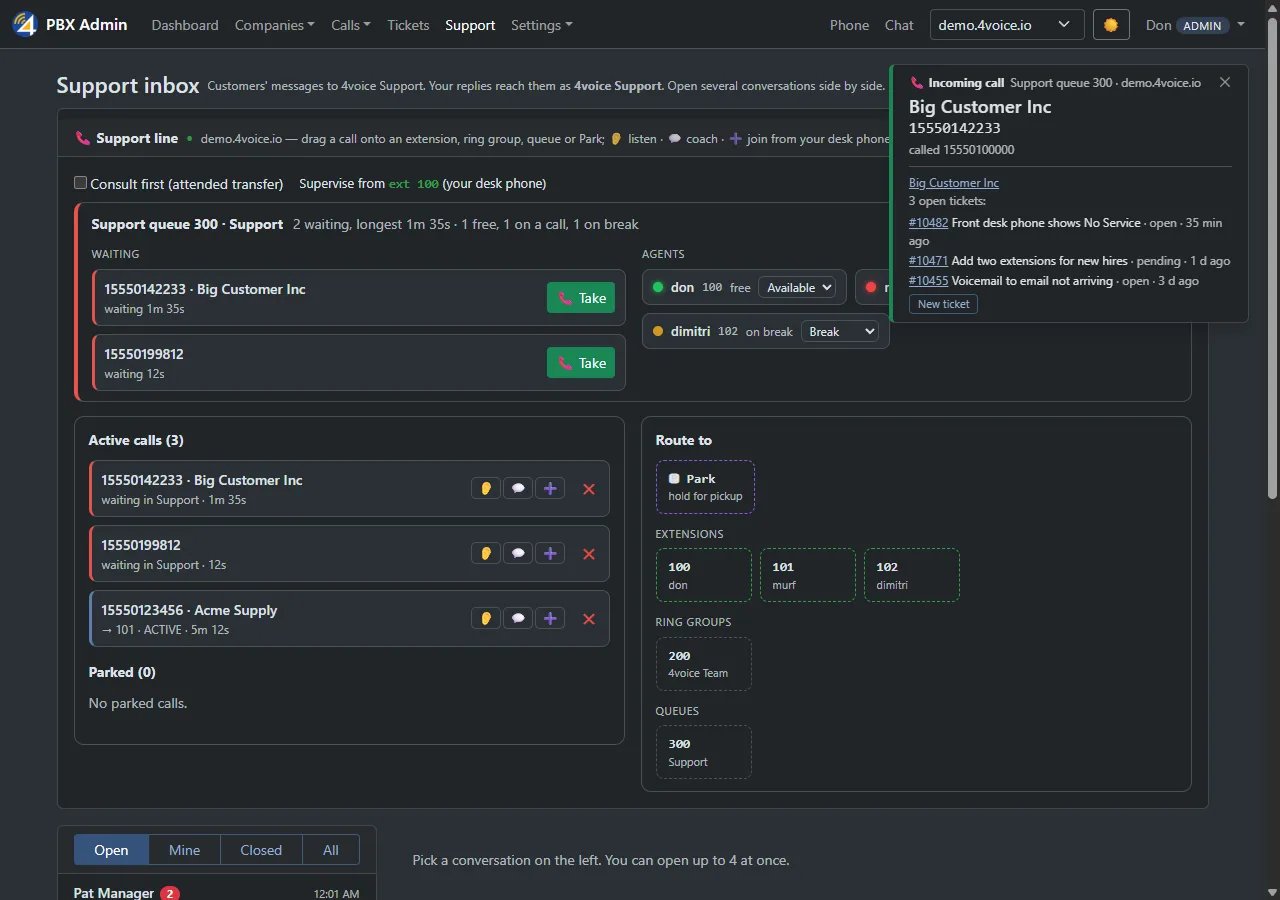
Real screenSupport console with callers waiting in a queue, agents and their status, and an incoming-call popup

Agents run their own status.

Available, on break or logged out from the portal, the browser phone, the app, or any phone. An agent who misses too many offered calls goes on break, so callers never ring an empty desk.

*50Available
*51On break
*52Log out
PortalBrowser phoneAndroid appAny phone
Supervisors

Listen. Whisper. Barge in.

Supervisors step into any live call from the switchboard. Listen in to coach later, whisper to guide the agent mid-call, or barge in and join the conversation.

See every live call

The switchboard shows who is talking to whom, so a supervisor can step in the moment a call needs help.

Coach new agents live

Whisper so only the agent hears you. The caller carries on with their agent as if nothing happened.

Join when it matters

Barge in to take part in the call. Everyone on it hears everyone.

See listen, whisper and barge

The real screens

This is the portal your team gets.

Real screens from the product, with example data. Press any picture to see it full size.

The board your floor watches.

Waiting callers, longest wait, service level and every agent's state, in big type on the TV on the wall.
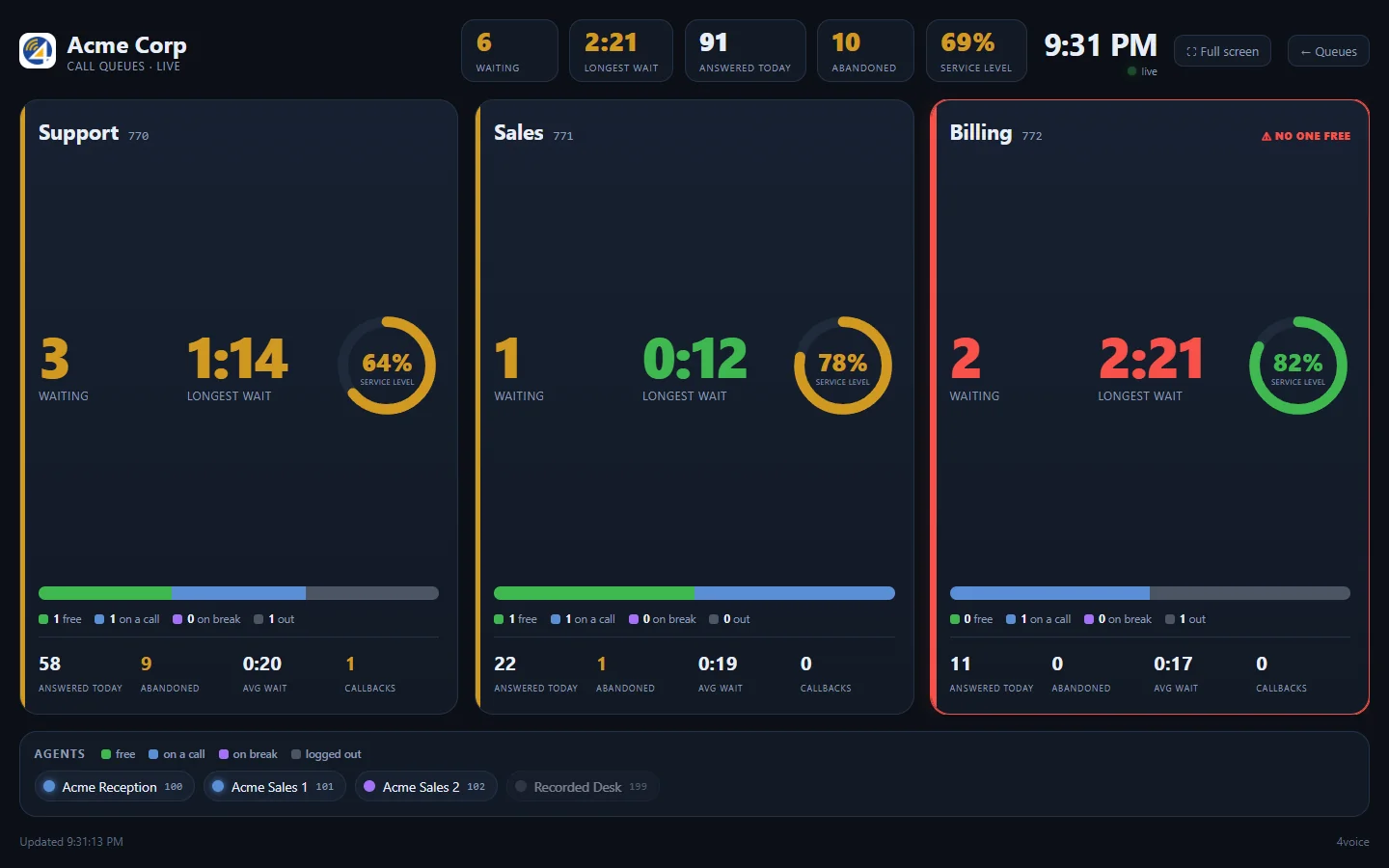

  • Colors follow your targets. Each queue turns amber and red by its own service-level target.
  • A TV link needs no sign-in and shows names and counts only.
  • Today's survey score sits on the board next to answered, abandoned and average wait.
See the live wallboard
Real screenThe whole wallboard: a title bar with the company and totals, then a card for each queue with callers waiting, longest wait, service level, agents free and today's numbers
Real screenThe bottom of a wallboard queue card: a bar of agents free, on a call, on break and out, then answered today, abandoned, average wait, callbacks and a survey score of 4.1 stars
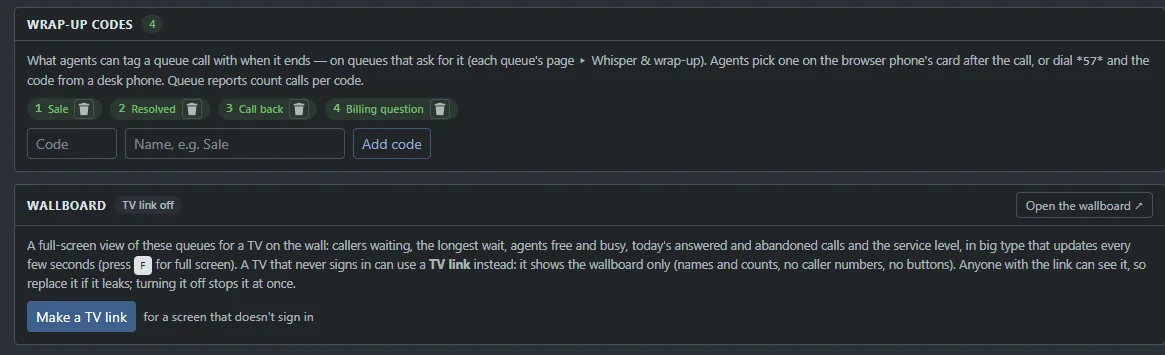
Real screenThe Queues page: wrap-up codes with their names, and a Make a TV link button for a screen that does not sign in

Every callback, listed.

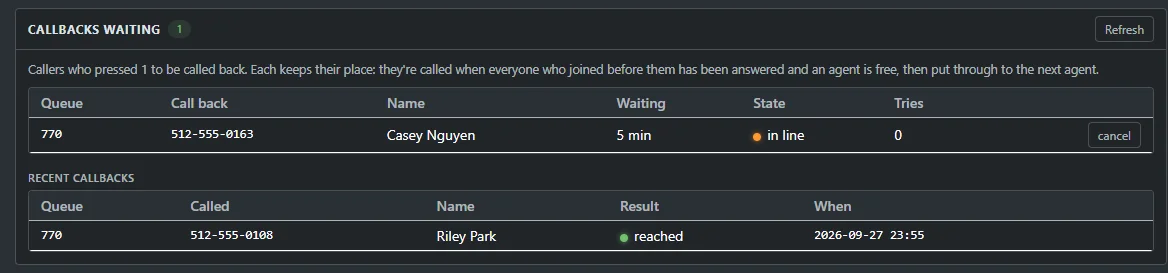
The Queues page shows each pending callback with a Cancel button, and the day's outcomes. Each caller keeps their place in line.
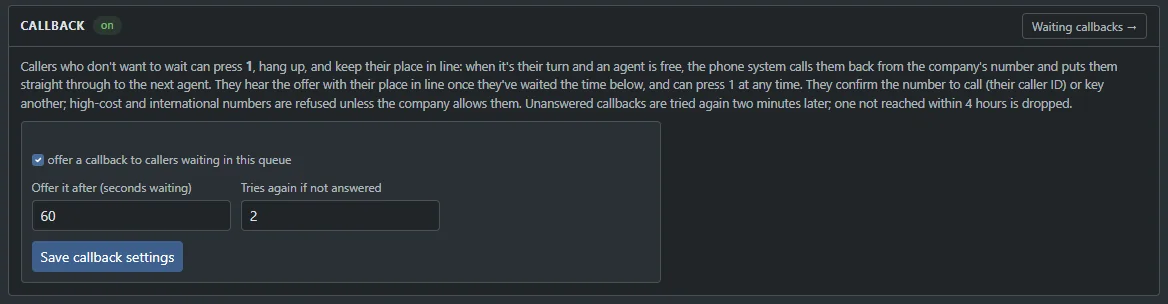
  • Choose when it is offered: after a wait you set, per queue.
  • Retries built in: no answer or busy is tried again, and a callback that cannot be reached expires.
  • Calls back from your company number and puts the caller at the front.
See queue callback
Real screenCallbacks waiting: a table with the queue, call-back number, name, minutes waiting, state In line, tries and a Cancel button, above a list of recent callbacks with the result
Real screenCallback settings for a queue: offer a callback to callers waiting, the number of seconds before it is offered, and how many times to try again

Numbers you can act on.

Service level, abandon rate, waits and talk time per queue and per agent. Arrivals by hour, totals by day. Any date range, in your own time zone, with a CSV of the lot.
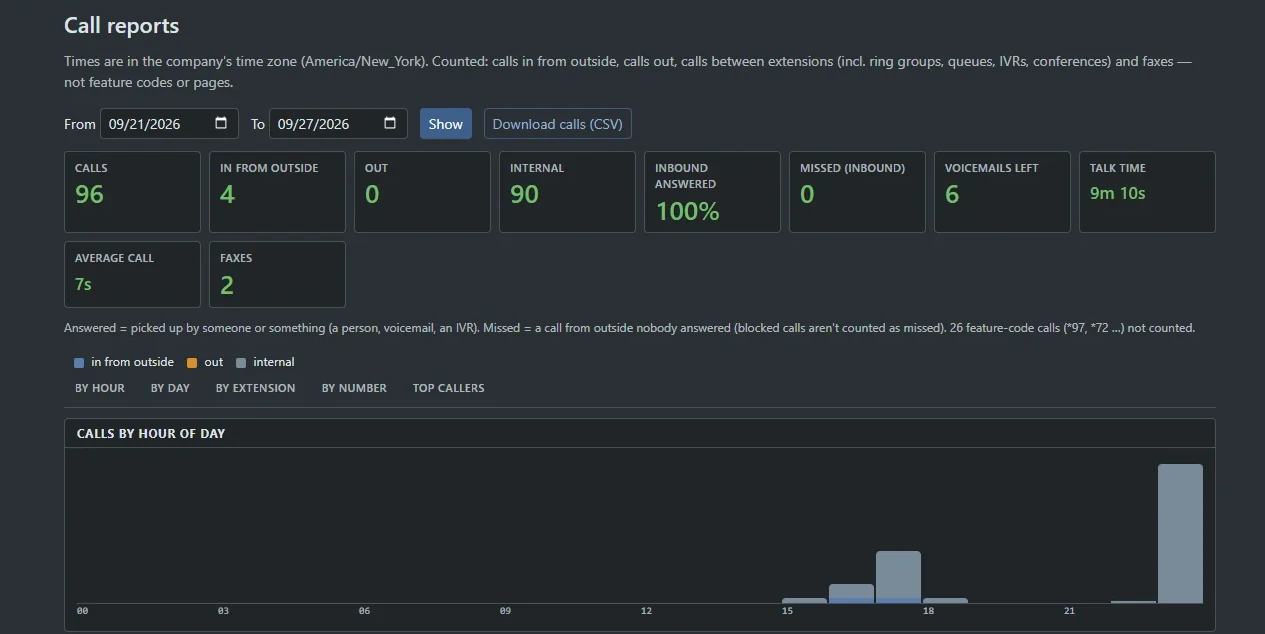
  • Staff to the curve with arrivals by hour.
  • Coach with facts: calls, talk time and wrap-ups per agent.
  • Read it over coffee. Reports can be emailed each morning or on Mondays.
See queue reports
Real screenCall reports: a date range, a Show button and a Download calls CSV button, tiles for calls, in from outside, out, internal and inbound answered, then a chart of calls by hour of day

Set it once per queue.

Switch whisper on, write the line the agent hears and choose the wrap-up codes. Every queue can have its own.
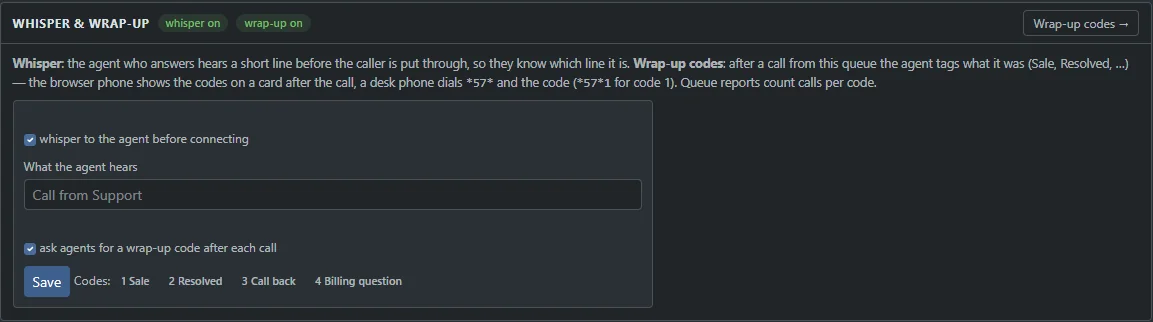
  • Whisper plays before the caller connects, spoken by the phone system's own voice.
  • Wrap-up codes are counted per code and per agent in the queue report.
  • Post-call survey asks your own question and tells callers to stay on the line.
See whisper and wrap-up
Real screenWhisper and wrap-up settings for a queue: whisper to the agent before connecting, the words the agent hears, and ask agents for a wrap-up code after each call
Real screenThe caller survey report: an average score out of 5, a bar for each score from 5 stars down to 1, and averages by queue and by agent
All of it

Everything in the contact center, in one list.

Standard features and add-ons you can switch on per company. Each one links to its entry in the full catalog.

Call queues (ACD)Nine ring strategies, maximum waits and a fallback to voicemail, an extension, a ring group or hang-up.
Escalation levelsLevel 1 agents ring first and level 2 join after a wait you set, with a per-queue agent order.
Position and wait announcementsCallers hear their place in line and an estimated wait, spoken over the hold music every so often.
Queue callbackCallers press 1, hang up and keep their place in line; the system calls them back when an agent is free.
Agent availabilityAvailable, on break or logged out from the portal, the browser phone, the app, or *50, *51 and *52 on any phone.
Agent whisperThe agent hears “Call from Support”, or your own words, before the caller is connected.
Wrap-up codesAgents tag each call with an outcome from the browser phone, the app or *57*, and reports count them.
Listen, whisper and bargeSupervisors monitor, coach or join live calls from the switchboard.
Live wallboardA full-screen TV board of waiting callers, longest wait, service level and agent states, refreshed every three seconds.
Queue reportsService level, abandon rate, waits and talk time per queue and agent, with a CSV download.
Post-call surveyAfter the agent hangs up the caller rates the call from 1 to 5; scores show in reports and on the wallboard.
Skills-based routingCalls go first to agents with the skill the queue needs, best level first, and everyone else after a wait.Add-on
Queue overflow rulesWhen too many callers wait or the wait runs long, new callers go to another queue, group, extension, voicemail box or number.Add-on
Agent shift schedulesWeekly shifts with breaks per agent change their status automatically, with a coverage grid that shows the gaps.Add-on
Queue break reasonsDial *51 plus a reason code so lunch, training and admin time show up separately in reports.Add-on
Agent state historyA bar for each agent's day showing logged out, on break, ready, ringing, on a call and wrap-up.Add-on
Agent leaderboardsRank agents by calls answered, handle time, quality score and wrap-ups, with badges and a TV view.Add-on
QA scorecardsGrade recorded calls against your own checklist and see each agent's average and weakest question.Add-on
Agent call scriptsStep-by-step scripts with questions appear on the screen pop for the right queue or number, and answers become call notes.Add-on
Outbound dialerAgents work a call list with one click to the next number, outcomes, retries and a recorded voicemail drop.Add-on
Incoming-call popupsWhile your portal is open on a computer, the caller's name, number and the line they dialed pop up in it a second before the phone rings.

Search every feature

See it live

See your queues on the board

Tell us how your queues run today. We will show you ProjectPBX running them, wallboard on the wall.

  • A call flow drafted for your business
  • Pricing built around your team size
  • Every question answered on the call

Your business name goes with you to the next step. Your email stays in this browser until you send the form.