LIVE Your numbers, your call flow

See ProjectPBX run on your own numbers.

Tell us how your calls work today. We open a demo company, trace your call through ProjectPBX and answer every question live, and we walk you through pricing.

A call flow drafted for your business The real product, running Four quick steps

Email us your numbers.

This form needs JavaScript to build your message. Send us your company, how many extensions you need and the call you want traced, and we reply to schedule your demo.

Email sales@4voice.io
Book a demo

Your demo order form

Step 1 of 4: Who are we talking to?

If you would rather talk than type.

Best way to reach you

Read from your browser, so we can suggest a time that suits you.

Step 2 of 4: How big is the team?

Closest starting point optional

People and phones. A rough number is fine.

Support, sales, billing: one queue each.

Phones you want to use optional

Step 3 of 4: What do we show first?

Pick as many as you like optional

Or your biggest question. 0 of 600 characters. A number and a question is plenty.

Step 4 of 4: Look it over, then send.

See the exact message


Book a demo opens your email app with this message ready to send. Your details stay in this browser until you press send there.

Prefer email? sales@4voice.io

Almost there. Send it.

Opening your email app

Your message is ready, addressed to sales@4voice.io. Send it from your email app, Gmail or Outlook and the 4voice team takes it from there.

Or paste it into any mail app, addressed to

See the exact message


What happens next

  1. 01

    You press send

    Your numbers, topics and question reach 4voice in one message.

  2. 02

    The 4voice team writes back

    The reply suggests times that suit your time zone.

  3. 03

    A demo company opens

    Your picks decide what goes on screen first.

  4. 04

    You bring a number and a question

    That call is traced through ProjectPBX live, and the rest gets answered.

Real screens, real product

What you will see in the demo.

These are screens from the system we run for you. Press Show me this first on the ones that matter and your picks fill step 3 of the form.

yourcompany.projectpbx.net
Real screen
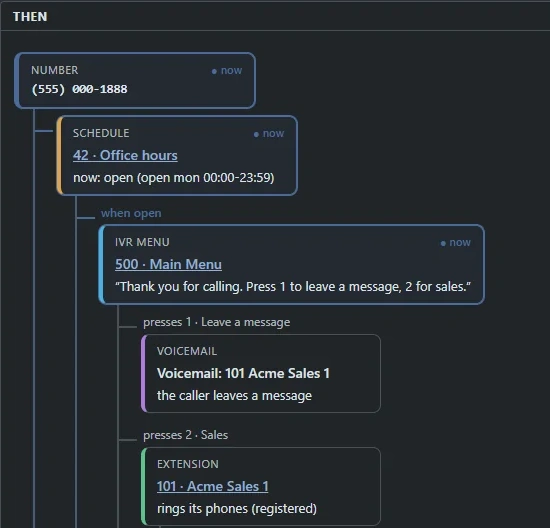
The ProjectPBX call-flow map: a number leads to the office-hours schedule, then the main menu, where key 1 reaches voicemail and key 2 reaches the Sales extension.

Your call flow, mapped

Number, schedule, menu, queue, phone. See the path a call takes right now, lit up.
yourcompany.projectpbx.net
Real screen
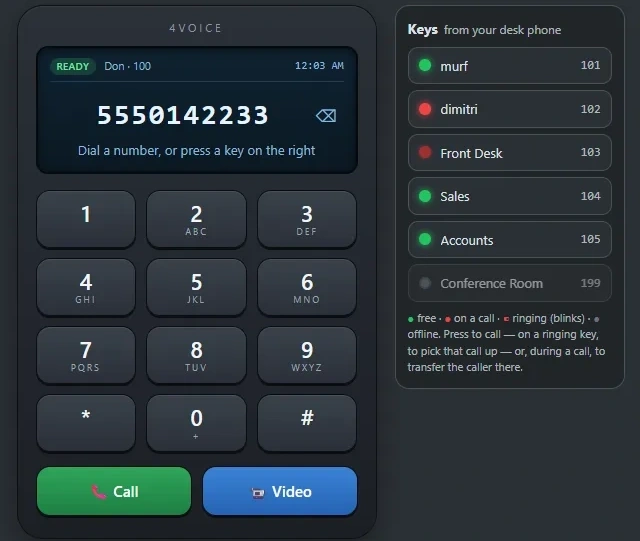
The ProjectPBX browser phone: a keypad with Call and Video buttons beside a column of busy lamps for colleagues, shown free, on a call or ringing.

A call in a browser tab

Dial, hold, transfer. Busy lamps show who is free, on a call or ringing, and one press picks it up.
yourcompany.projectpbx.net
Real screen
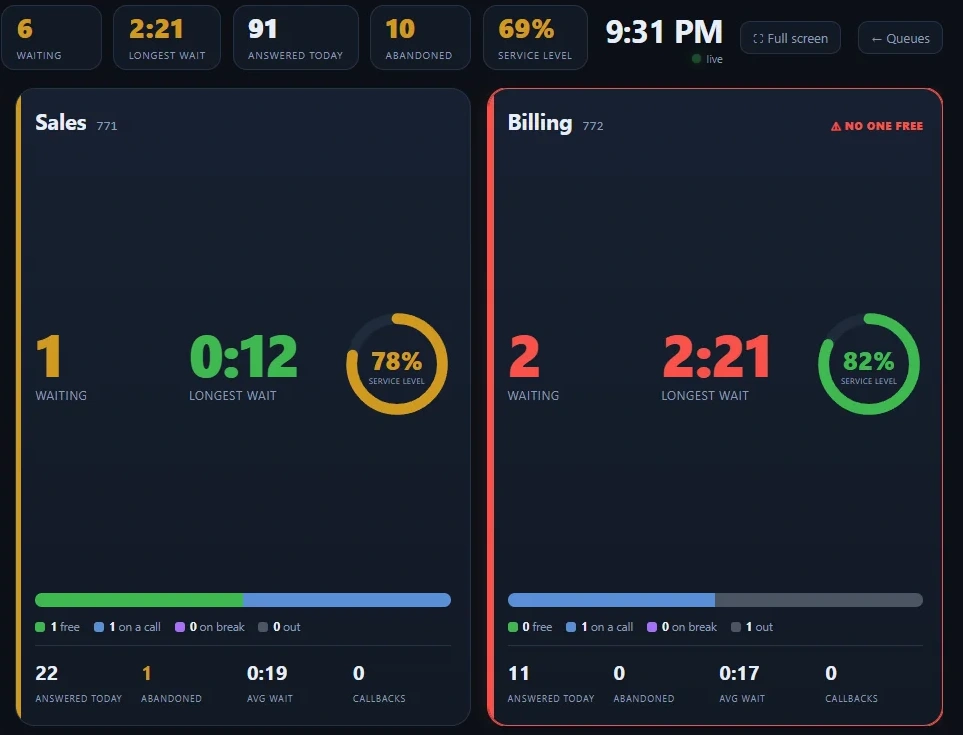
The queue wallboard: Sales and Billing cards with callers waiting, longest wait and a service-level ring, and the totals for the day across the top.

A wallboard your team reads

Callers waiting, longest wait and service level for every queue, refreshed every 3 seconds.
Real screen
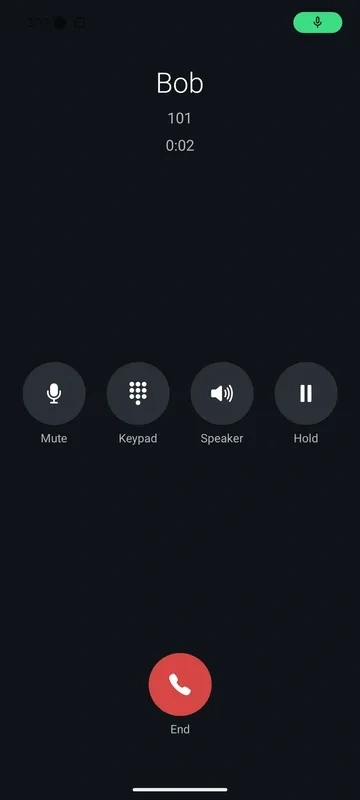
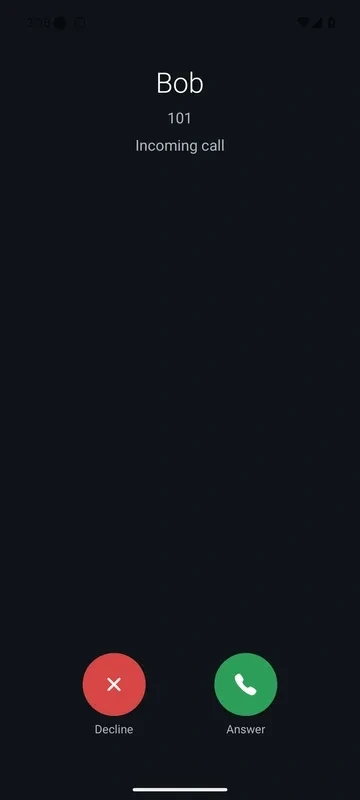
The 4voice Android app on an incoming call from Bob, with Decline and Answer buttons.
The same call in progress, with Mute, Keypad, Speaker, Hold and End.

Rings even when closed

A push wakes the 4voice app and the call rings with Answer and Decline. Tested on a real Android phone on cellular, 2026-10-01.
yourcompany.projectpbx.net
Real screen
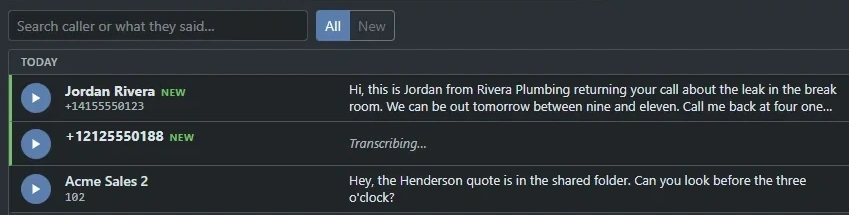
The Voicemail page: new messages marked in green, each with a play button, the caller and a written transcript of what they said.

Voicemail that reads itself

Transcripts appear on the row, written on our own servers. Play, search, or get it all by email.
yourcompany.projectpbx.net
Real screen
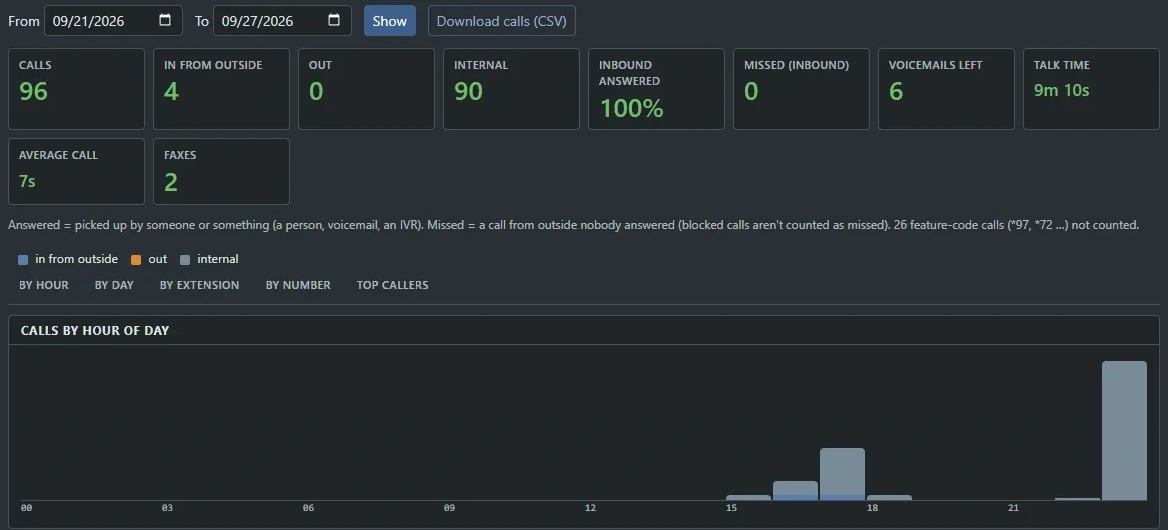
The Call reports page: totals for calls, answer rate and talk time, a chart of calls by hour of day and a button to download calls as a CSV file.

Reports you can act on

Calls by hour, day and extension, answer rate and talk time, with a CSV download in one click.

And, if you want them

Nothing picked yet. We will choose a sensible order for you.

Book with these picks

Tell us which of the 247 features matter most and we start there. Every area of the product has its own page: calling, contact center, collaboration, mobile, reliability, security and integrations.

What happens next

From send to demo, in four moves.

One message from you. A reply with times. Then a demo company built around your call.

  1. 01

    You press send

    Your numbers, topics and question reach 4voice in one tidy message.

  2. 02

    The 4voice team writes back

    The reply suggests times that suit your time zone and your team.

  3. 03

    A demo company opens

    Your starting point and your picks decide what goes on screen first.

  4. 04

    You bring a call

    That number is traced through ProjectPBX live, then the rest gets answered, and we walk you through pricing.

Book a demo One number and one question is enough to start. A menu or a schedule you have in mind makes the demo sharper.

Before you book

Questions we hear first.

Who should join?
Whoever answers the phones and whoever signs them off. ProjectPBX has a manager view and a user view, so we show both.
Will my desk phones work?
Yealink, Polycom and Grandstream phones auto-provision from a secret per-phone address. Users can also take calls in the browser and in the Android app.
What if something goes down?
Working phones keep registering and calling for up to 24 hours if our management platform is unreachable. Calls only go to healthy voice servers, with failover.
Where do transcripts run?
On our own servers. Voicemail audio, recordings and chat text never go to an outside AI service.
Can I move my numbers?
Yes. Porting is a request inside the portal: up to 100 numbers at a time, a letter of authorization you sign by typing your name, and an email at every status change.
Does it connect to our CRM?
HubSpot and Salesforce are available as an add-on: the contact appears on the screen pop and answered calls are logged for you. There is also a REST API and signed webhooks.
How does pricing work?
ProjectPBX bills per seat or by air time, with usage and add-ons itemized. We size it to your numbers in the demo and walk through every line.