
TRY IT Press a key on a live phone menu

Every call finds the right phone.

Desk phones, a browser phone and an Android app ring together. Menus, schedules and ring groups send each call where it belongs, and a change goes live in about 10 seconds.

Desk phone, browser and app ring together Open hours, holidays and a manual override Menus spoken in a natural voice
yourcompany.projectpbx.net
Real screen
Browser phone in a call with Big Customer Inc: the transfer panel is open, with busy-lamp keys and recent calls beside it
1sThe caller's name is on your screen a second before the phone rings.
10sFrom saving a menu or schedule to every phone using it. No restarts.
6Natural English voices read your menus and queue messages, running on our own servers.
5Prompt languages for your menus, available as an add-on.
Try it now

Press a key. Watch the call move.

This is the real shape of a ProjectPBX menu: a number, an open-hours schedule, a greeting, and a key for sales, support, the operator or the company directory. Press Call and follow the call on the same map every number gets.

Dial your own menuLive demo

A phone keypad beside a call-flow map. Press Call, then listen to the menu or read it in the captions. Press 1 for sales, 2 for support, 0 for the operator or 9 to find someone by name, or type a word such as sales. The map lights the path the call takes. Sound is off until you switch it on. Your keyboard works too: digits press keys and Escape hangs up.

In call00:07
Acme Sales 2
Sales, extension 102

Ring group 200

Sales answers: "Acme Sales, how can I help?"

Try
Key tones and a spoken menu: off

Time of day

  • Number(555) 000-1999Acme customer line
    • Schedule42 Office hoursnow: open
      • open
        Menu510 Customer MenuGreets, then waits for a key
        • 1
          Ring group200 Salesanswered by 102
        • 2
          Queue300 Supportsays position and wait
          • 1
            CallbackKeep my placethey call you back
        • 0
          Extension100 Receptionrings its phones
        • 9
          DirectoryDial by namekey the first letters
        • no key
          Hang upNo key in 4 s, twice
      • closed
        Voicemail100 Receptionsays "We are closed" first
Keys work even during the greeting. Digits press keys, Escape hangs up. Sound is off until you switch it on.
Call-flow map

See where every call goes, before it comes in.

Every number has a map: blocking, VIP callers and spam screening first, then the schedule, the menu, ring groups, queues and extensions with their forwarding and do-not-disturb, down to voicemail, conference rooms and fax.

The path right now

The branch a call would take at this moment is highlighted, so you check a change before a customer finds out.

Live in about 10 seconds

Save a menu or a schedule and every phone follows. No restarts, no waiting for tonight.

One map per number

Point a number at a person, ring group, menu, queue, schedule, voicemail box, conference room or fax line.

Drag to rewire

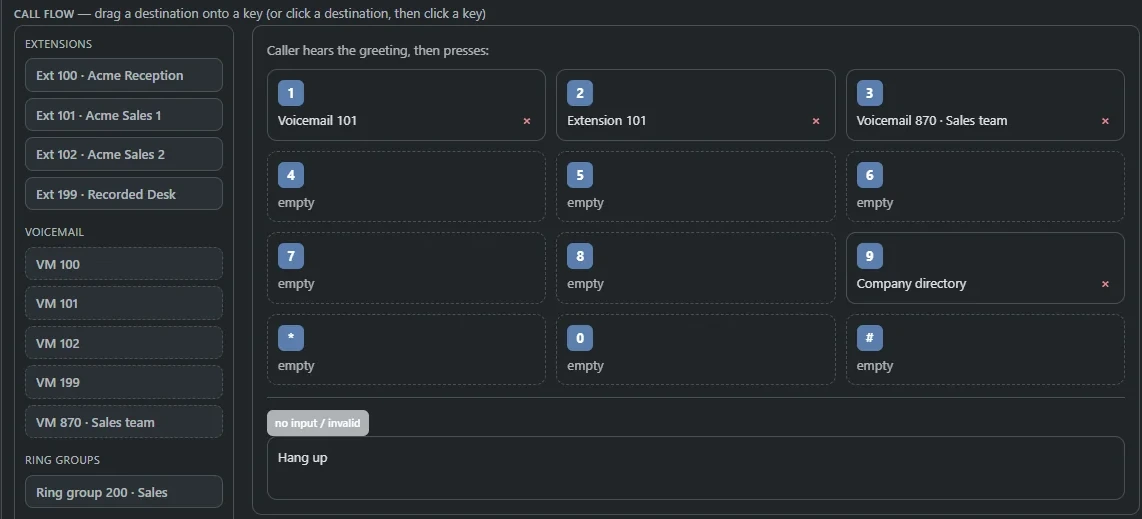
The call-flow editor, as an add-on, lets you drag a destination onto a branch.

About the call-flow map

yourcompany.projectpbx.net
Real screen
Call-flow map for one number: the number, office hours, a menu and voicemail, with the path a call takes right now highlighted
The map for one number. Click it for the full size.
Where does this call go?Live demo

A week of office hours, Monday to Friday 9 AM to 5 PM and Saturday 9 AM to 1 PM. Choose a day and time, mark it as a holiday or force the schedule open or closed, and the route below shows where the call goes.

A call comes in onMonday 2:30 PMthe company's time

Day
This date is a holiday
Override
  • OpenMenu 510, Customer Menu
  • ClosedVoicemail 100, after the closed message
  • HolidayVoicemail 100, after the holiday message

OpenOffice hours read open, so the call goes to the main menu.

Drag the marker, use the arrow keys, or pick a day and time.
Time of day

Open at nine. Closed at five. Handled.

Weekly hours, holidays and a manual override decide where a number rings, in your company's own time zone with daylight saving handled. A change lands in about 10 seconds.

Hours your way

Several ranges a day for lunch breaks, and ranges that run past midnight for night shifts.

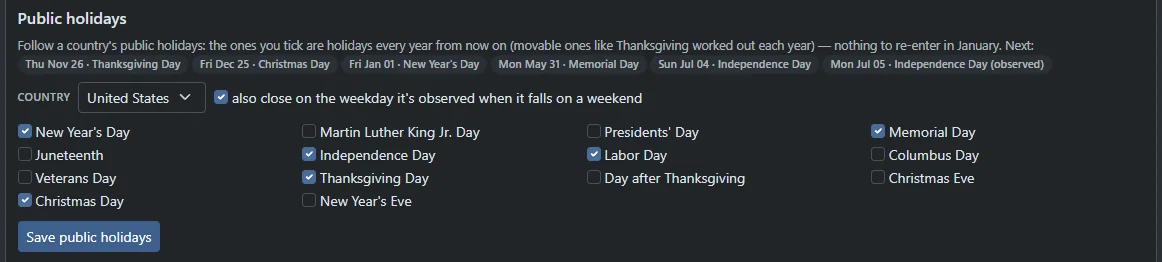
Holidays, ticked once

Tick the US or Canadian holidays and the dates are worked out every year, with weekend closures moved to the weekday you observe.

A switch for emergencies

Force open or Force closed beats the calendar. Press *60 on a desk phone to flip Force closed and Automatic.

Closed greetings

Closed and holiday messages are typed and spoken by a natural voice, or recorded by you.

About schedules

Forwarding, DND and find me

Never miss the one call.

Forward everything, silence your phone, or ring your cell right alongside your desk phone. Set it in the portal or the app, or from any handset with a star code.

  • Forward all calls*72
  • Forward off*73
  • Do not disturb on*78
  • Do not disturb off*79
  • Open or closed*60
  • Block the last caller*61

Ring groups, queues and pickup skip a do-not-disturb extension, and its busy lamp turns amber. Find me can ask for a key press, so your cell's own voicemail never takes the call.

About forwarding

Extension 101 · Acme Sales 1Live demo

Choose normal, do not disturb or forward all for extension 101, optionally ring a cell phone as well, then place a call to see which phones ring and where the caller ends up.

When a call comes in

Find me: ring my cell too
Ask me to press 1 to take the call
CallerBig Customer Inc(555) 014-2233
Desk phone 101rings
Cell (555) 014-9000rings, asks for a 1
Voicemail 101if nobody answers

Find me101 and your cell ring together. Your cell asks you to press 1, so its own voicemail can never take the call.

Forward all calls, when busy, when unanswered or when your phone is offline, to a colleague, a group, a queue, a menu or an outside number.
Browser phone and busy lamps

A real phone in every tab.

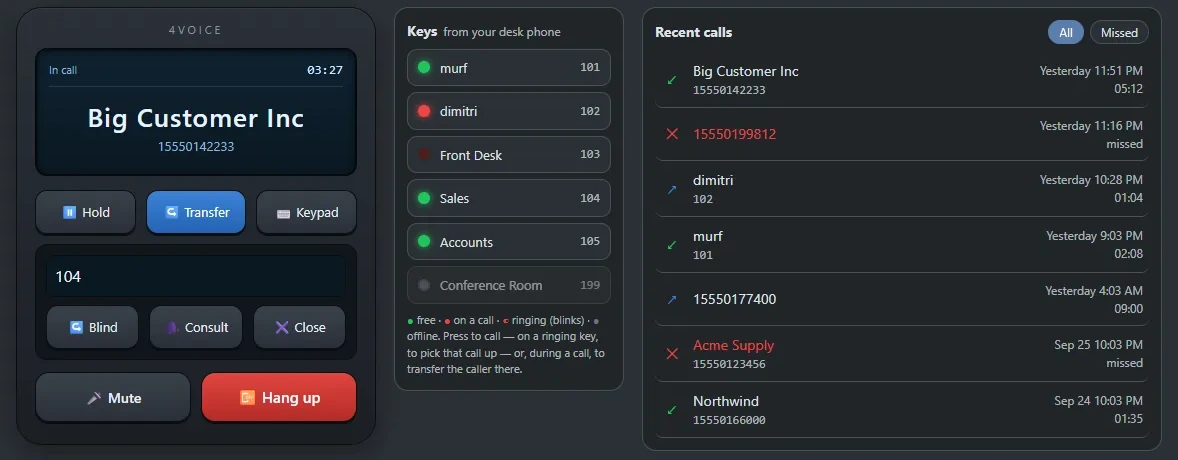
Open the portal and you are on the phones. Dial, hold, transfer and take video calls in the browser, with encrypted audio and nothing to install. Your desk phone rings too.

yourcompany.projectpbx.net
Real screen
The browser phone in a call: an LCD showing In call and the caller's name, Hold, Transfer and Keypad buttons, a transfer panel with Blind and Consult, Mute and Hang up, and a column of busy lamps
  • Rings in the page with the caller's name, and a call bar keeps your call alive while you use other pages.
  • Blind or attended transfer, hold, mute and keypad on screen.
  • Recent calls: the last 50, All or Missed, one click to call back.
  • Video sits right beside Call.

About the browser phone

See who is free. Press to call.Live demo

Front Desk is ringing. Press its lamp to pick up.

The same lamps as a desk phone, refreshed every 2 seconds. Press a lamp to call, press a ringing lamp to pick up, or press one during a call to hand the caller over.
Park, rooms and paging

Move calls around like a pro.

Park a caller on a numbered slot and grab them from any phone in the building. Put a team in one room that waits for the moderator. Page a whole warehouse in one dial.

Park it here. Pick it up there.Live demo

A call is in progress on extension 101. Press a slot to park it, then pick it up from extension 102, or leave it and watch it ring back.

  1. On a call
  2. Parked
  3. Picked up
Extension 101 is talking to Big Customer Inc (555) 014-2233 and 00:41

On a callPress a slot, or the park code, to put the caller on it. They hear hold music until someone picks up.

Slots 1 to 20, and a desk phone can light a key for each one. A call nobody picks up rings the person who parked it.
Room 3510 · Customer callsLive demo

Add guests and the moderator to room 3510. Guests wait on hold until the moderator joins, the moderator can mute or remove people and lock the room, and the call ends when the moderator leaves.

On hold2 guests hear hold music until the moderator arrives. Press Moderator joins.

  • APAlex ParkGuest, on hold music
  • MDMorgan DiazGuest, on hold music
Join with *3 and a roomPINs of 4 to 8 digitsDial-out, roll call, recording: add-ons
Dial *3 and a room number. Participant and moderator PINs keep the room private, and the call ends when the moderator leaves.

Page the warehouse.

A page talks one-way over every phone in the group, and the phones answer themselves. Intercom is two-way to one desk.

Live demo
100
101 (you)
102

ReadyDial a page group's number, or *80 and an extension for an intercom.

Answer anyone's phone.

  • Any ringing call*8
  • That extension**<ext>
  • Take over from another phone*71
  • Ring me when they are free*66

Or press the ringing lamp on a desk phone or the browser phone. The call is yours. The last two codes are add-ons.

About call pickup

Screen it. Block it. Rank it.

Outside callers say their name and your phone tells you who it is, with press 1 to accept. VIP callers ring as "VIP" and skip screening. Block a number, a prefix or the last caller with *61.

Spam and robocall screening scores every outside call and can label it, ask for a key press, send it to voicemail or refuse it.

Call screeningVIP callersCall blockingSpam screening
Star codes

Everything from any handset.

Forward, record, pick up, page, park and flip the schedule from any phone in the building. 44 codes, searchable. Press a code to copy it, or press Ctrl K from anywhere on this site and type *.

Voicemail

Recording

Queues

Routing

Pickup

Forwarding

Blocking

Paging

Phones

Conferences

Caller ID

Dialing

Tests

Add-ons, switched on per company

Everything in Calling

Every calling feature, ready to open.

Lines tagged Add-on are switched on per company by 4voice. Press any feature to see it in the full list.

Phones, lamps, forwarding and rooms

Extensions and ring groupsGive everyone an extension and ring a team all at once or one after another.
Business numbersPoint each number at a person, ring group, menu, queue, schedule, voicemail box, conference room or fax line.
Browser phoneMake and take calls in any modern browser with encrypted audio, a dial pad, hold, transfer and recent calls.
Video on the phonePlace and answer video calls from the browser phone or the app, or with camera-equipped Yealink desk phones.
Busy lampsSee who is free, ringing or on a call, and press a lamp to call them or hand a caller straight over.
Blind and attended transferPass a call straight through or announce it first, from a desk phone, the browser or the switchboard.
Switchboard consoleReception sees every live call and drags it onto an extension, ring group, queue or park slot.
Call parkPark a call on a numbered slot, pick it up from any phone, and let unclaimed calls ring the parker back.
Call pickupAnswer a colleague's ringing phone with ** and their extension, *8 for any ringing call, or their lamp key.
Call forwardingForward all calls, when busy, when unanswered or when your phone is offline to a colleague, group, queue, menu or outside number.
Do not disturbSwitch it on from the portal, the app or *78, and ring groups and queues skip you.
Find me / follow meRing your mobile along with your desk phone, and ask for a key press so a cell's voicemail never takes the call.
Call screeningUnknown callers say their name and you press 1 to accept, or let the call fall through to voicemail.
VIP callersImportant numbers ring as “VIP”, skip screening and jump to the front of VIP-first queues.
Call blockingBlock numbers, prefixes and anonymous callers for the company or one extension, or press *61 to block the last caller.
Spam and robocall screeningScore every outside call, then label suspected spam, ask for a key press, send it to voicemail or refuse it.
Caller ID pickerChoose which of the company's numbers your calls show, as a default or for the next call with *83.
Click-to-callClick a number in call records, voicemail, recordings or the phonebook and your own phone rings first.
Company speed dialsDial *0 and a two-digit code to reach the numbers your team calls most.
Company phonebookShared contacts that put names on incoming calls, desk phones and the browser phone, with CSV import and export.
Presence statusShow available, busy, in a meeting, away or out of office, with an end time and optional calls-to-voicemail.
Boss and assistant linesUp to four assistants' phones ring with the boss's, labeled with who the call is for.
Paging and intercomDial a page group to speak over every member's phone, or *80 plus an extension for a two-way intercom.
Conference roomsDial *3 and a room number, add participant and moderator PINs, and mute, remove or lock people from a live panel.
Custom hold musicUpload your own tracks (MP3, WAV, M4A or OGG) and pick one for the company and another for each queue.
Send a call to my mobilePress *6 mid-call, or tap To mobile in the browser phone, to move the call to your mobile number.Add-on
Call pullDial *71 on another phone of your extension to take over a call in progress.Add-on
Call returnDial *69 and the last caller is read back, with one key to ring them.Add-on
Ring back when freeFind a colleague busy? Press 5, or dial *66 and their extension, and your phone rings once they hang up.Add-on
DND with a timerDial *78 and a number of minutes, or pick an end time in the portal, and do-not-disturb switches itself off.Add-on
Scheduled quiet hoursWeekly do-not-disturb hours per extension, in that person's time zone, without dialing anything.Add-on
Personal call rulesUp to ten rules by caller, day, time and status: ring my mobile too, forward, voicemail, busy or a short message.Add-on
Personal attendantCallers hear “press 1 for my mobile, 2 for a colleague, 0 for reception” before your voicemail picks up.Add-on
Hide my numberDial *67 before a number to hide your caller ID for that call, or *82 to show it once.Add-on
Local presence dialingOutside calls show your company number that matches the area code you are calling.Add-on
Account codesTag outside calls with a client or project code, optional or required before every call, with a report by code.Add-on
Personal speed dialsEach person gets their own *0* shortcuts, up to fifty, also loaded onto their Yealink phone.Add-on
Conference dial-outCall an extension or a North American number into a live conference from the room panel.Add-on
Scheduled conference callsBook a room for a time, email guests the dial-in with a calendar file and PIN, and remind them ten minutes before.Add-on
Conference recordingRecord a room always, or start and stop from the live panel; recordings land on the Recordings page.Add-on
Scheduled bellsPlay a school bell, chime or announcement over a page group at set times, skipping holidays.Add-on
On-hold messagesMix up to five typed, recorded or uploaded announcements into your hold music.Add-on
Auto-attendant menusBuild “press 1 for sales” menus with a drag-and-drop editor, typed greetings or your own recording.
Speech-enabled menusCallers can say “sales” or “billing please” as well as press a key, and keys always work.
Dial by nameCallers key the first letters of a last name, hear up to five matches and press 1 to be put through.
Time-of-day routingWeekly hours with lunch breaks and overnight ranges, holidays and a manual override, decided in your time zone.
Open and closed from any phoneDial *60 on a desk phone to flip a schedule between forced closed and automatic, and hear the result.
Public holiday calendarsTick US or Canadian holidays once and schedules close on the right days every year, observed weekdays included.
Closed and holiday messagesCallers hear a typed message in your company's voice before the call goes on to your closed or holiday destination.
Call-flow mapSee where every call to a number goes, with the path it takes right now highlighted.
Call-flow editorDrag a destination onto a branch of the call-flow map to change where calls go.Add-on
Office closure overrideClose the office now or until a set time from the portal, the app or *88, and every number plays your closure message.Add-on
Area-code routingSend callers from chosen states, provinces or area codes to the nearest office.Add-on
IVR path analyticsSee each menu's calls, each key's share, time to choose, hang-ups and the most common paths.Add-on
Executive screeningOutside calls to an executive ring only the assistants, and the executive hears who is calling before being put through.Add-on
Smarter ring groupsRound robin, longest idle, fewest calls today or weighted, with a ring time per member; people on DND are skipped.Add-on
Number maskingConnect two parties through a pool number so neither sees the other's real number.Add-on
Multi-language promptsMenus and prompts in English, Spanish, French, Portuguese or German, with an IVR key to switch language.Add-on
Natural voice promptsEvery menu, announcement and confirmation is spoken by lifelike text-to-speech running on our own servers, in six English voices.

Desk phones

Auto-provisioningEach Yealink, Polycom or Grandstream phone fetches its own settings from a secret per-phone address.
Programmable keysSet busy-lamp, speed-dial and park keys, with the key grid sized to each model.
Reprovision and rebootRe-pull settings or restart every reachable phone in a company at once and see which did not respond.
Firmware on first bootSet an approved firmware per model and a phone upgrades the first time it provisions, never in a loop.
Hot deskingDial *55, key your extension and PIN, and a shared desk phone becomes yours; *56 hands it back.
Live registration statusSee which phones are online right now and the address each one registered from.
Phone activity logA searchable feed of provisioning, firmware and registration events for troubleshooting a phone.
Managed phone passwordsEvery phone's web password is set by the system, so none is left on a factory default.
Time zone per extensionA remote employee's schedules, portal times and desk-phone clock follow their own time zone.
Encrypted desk phonesAvailable per company (Off, Offered or Required): TLS signaling and SRTP audio for desk phones.
Backup front doorGive each company a primary and a backup front-door controller; both are written into the phone's configuration.
Distinctive ringingEight ring tones for VIPs, each company number, outside calls and inside calls on Yealink and Polycom phones.Add-on
Multicast pagingPage many Yealink desk phones at once over the office network with a single stream.Add-on
Hotline phonesA phone that dials one number when you lift the handset, optionally the only number it can call.Add-on
Phone offline alertsEmail managers when a watched phone has been unregistered for a set time, and again when it is back.Add-on

Search every feature

See it live

Press the keys on your own menu.

Tell us how your calls route today. We show you ProjectPBX running, and where those calls would go.

  • A call flow drafted for your business
  • Pricing built around your team size
  • Every question answered on the call

Your business name goes with you to the next step. Your email stays in this browser until you send the form.