DEMO Watch fraud guard refuse 36 overseas calls

Closed by default. Watched every five minutes.

International calling is off for every new company. Two-factor sign-in stops a stolen password. Fraud guard checks each company against its own history. And your audio never goes to an outside AI service.

Two-factor in the portal and both apps Single sign-on and SCIM as an add-on An audit trail with a name on every change
0Audio, recordings or voicemail sent to an outside AI service. Transcription runs on our own servers.
10One-time recovery codes for every login that switches on two-factor. Each one works once.
5minFraud guard checks every company's last hour against its own last 14 days.
10sFrom saving a security setting to it being live. Nothing to restart.
Every control

Twelve ways a phone system stays yours.

Phone systems are a favorite target for fraud and for password theft. ProjectPBX stops the attack at the door, then gives your managers the controls to see who did what.

Two-factor and recovery codes

Authenticator-app sign-in with 10 one-time recovery codes. Require it for everyone in one tick.

Single sign-on and SCIM

Your own OpenID Connect provider. Switch someone off in your directory and they are signed out everywhere. Add-on.

Roles and permissions

Managers run the company. Users see only their own voicemail, recordings and call records.

Two-person approval

4voice can require a second admin to approve risky platform changes, such as deleting a company or a trunk.

International controls and call limits

Overseas and premium-rate calling start off. Caps on calls at once and on new calls a minute.

Fraud guard

Every company checked every 5 minutes against its own last 14 days. Odd patterns raise an alert and can suspend international calling.

Intrusion prevention

Floods throttled. Scanners and password-guessers banned across every front door at once.

Encrypted calls and phones

Browser-phone audio is encrypted with DTLS-SRTP. Desk-phone TLS and SRTP is available per company.

Audit log and config history

Who changed what, and when. Forward it to your own collector, and put one object back from 90 days of history.

Choose how long recordings and voicemail are kept. Freeze everything for a legal matter.

Erasure and export

Erase one person's calls, voicemail and texts on request, with a proof report. Take everything with you in one download.

Transcribed on our servers

Speech recognition and voices run on our own servers. Audio never goes to an outside AI service.

Fraud guard

A hijacked phone makes 36 overseas calls. All 36 are refused.

Every 5 minutes fraud guard compares each company's last hour of outside calls with its own last 14 days. When the signals light up it emails your managers and 4voice admins, and suspends international calling until an admin clears it.

Fraud guard · watch it fireLive demo

In this simulation fraud guard compares one company's last hour of outside calls with its own last 14 days. Four signals fire: international calls, new destinations, minutes and night minutes. It emails the managers and 4voice admins and suspends international calling. A hijacked phone then makes 36 overseas call attempts. Every one is refused, none are answered and none are billed. Controls: pause preview and replay.

Alert fired at 02:20

Alert and suspend

Managers and 4voice admins emailed. International calling is suspended until an admin clears it.

Last hour, against this company's own last 14 days

  • International calls

    31 this hour

    usual busiest hour: 2Flagged

  • New destinations

    9 never called before

    usual: none newFlagged

  • Call minutes

    212 min this hour

    usual busiest hour: 46 minFlagged

  • Night minutes

    38 min after hours

    usual: none at nightFlagged

Overseas attempts since the hold

Refused
36
Answered
0
Billed
0
  1. ext 214 +55 11 5550 01••Refused over 30 a minute
  2. ext 214 +61 2 5550 01••Refused over 30 a minute
  3. ext 214 +33 1 5550 01••Refused over 30 a minute
  4. ext 214 +49 30 5550 01••Refused over 30 a minute
  5. ext 214 +81 3 5550 01••Refused over 30 a minute
  6. ext 214 +44 20 7946 01••Refused over 30 a minute
  7. ext 214 +52 55 5550 01••Refused suspended

Refused callers hear a spoken reason and the call is never answered or billed. Domestic calls keep connecting. 911 and 933 are never limited.
International controls and call limits

Limits that start closed.

A hijacked phone hits a wall. Overseas calling is off until you turn it on, a runaway phone is capped at the front door, and fraud guard watches each company's own pattern.

  • Off for every new company. International and premium-rate calling wait until you switch them on. It applies in about 10 seconds.
  • A cap on new calls a minute. 30 by default for each company, so a desk phone stuck in a dialing loop cannot call all night.
  • A cap on outbound calls at once. Set your own number. Extra calls get a clear message.
  • Rules for each extension. Dialing permissions, a maximum call length and a phone lock on *77, as add-ons.
  • Spend limits. Alerts at 80% and 100% of a monthly cap, and an optional hard stop, as an add-on.

International calling off by default

  • International and premium-rate callingOff for new companies
  • Switch it on, it applies in about10 s
  • New calls a minute, per company30 by default
  • Outbound calls at onceYour cap
  • Fraud guard sweepEvery 5 minutes
  • Judged againstIts own last 14 days
  • Spend limitsAdd-on
  • Rules for each extensionAdd-on
  • A refused caller hearsA spoken reason
  • A refused call isNever answered, never billed
  • 911 and 933Never limited
Intrusion prevention

Six layers between the internet and your phones.

Floods, guessed passwords, hijacked phones and overseas bursts each hit a wall built for that exact job. Pick an attack and watch where it stops.

Pick an attackLive demo

Pick an attack

Fraud guard flags it, emails your managers and 4voice admins, and suspends international calling until an admin clears it.

The internet

  1. Front-door flood protectionPassed

    Every desk-phone call meets the front doors first. They throttle floods from one address, and never throttle an address whose phones signed in within the last 2 hours. Stops SIP floods.

  2. One shared ban listPassed

    A catch on any server blocks the attacker everywhere, for calls and web logins. Your trusted addresses always win, and an optional community blacklist feed adds more. Stops known bad addresses.

  3. Brute-force protectionPassed

    Repeated failures on SSH, portal sign-in and SIP registration are caught and blocked. Stops password guessing.

  4. Closed voice serversPassed

    Voice servers answer SIP only from our own network. Anything else is dropped before it reaches them. Stops direct hits on a voice server.

  5. Per-company call limitsPassed

    A cap on new desk-phone calls a minute (30 by default), a cap on outbound calls at once, and international calling off for every new company. Stops a hijacked desk phone in a dialing loop.

  6. Fraud guardStopped here

    Every 5 minutes each company's last hour is compared with its own last 14 days. Odd volume, new destinations or night calling raise an alert and suspend international calling. Stops an overseas burst.

Your phones and voice servers

Every web form and live connection in the portal also checks it came from the same site.
Two-factor and recovery codes

A stolen password gets nowhere.

Switch on two-factor for your company and a password alone never opens a session. Any authenticator app works, and ten one-time recovery codes cover a lost phone.

  • Any authenticator app. Six-digit codes that change every 30 seconds.
  • Require it in one tick. Anyone who has not set it up is walked through it at their next sign-in, QR code and all.
  • Lost your phone? Type a recovery code, or ask your manager to reset it. Each code works once.
  • The portal and both apps. The Android app and the admin app ask for the code too.
  • Safe resets. Forgot password? sends a one-time link that lasts an hour and answers the same whatever you type. Welcome emails let people choose their own password.

Two-factor sign-in

Two-factor · use a recovery codeLive demo

Recovery codes

10 of 10 left
Press a code to use it. Each one works once.
yourcompany.projectpbx.net
Real screen
The Sign-in security card in company settings: a ticked box reading require two-factor sign-in for everyone in this company, a Save button, and a note that anyone who has not set it up is walked through it at their next sign-in.
Require it in one tick. Anyone who has not set it up is walked through it at their next sign-in.
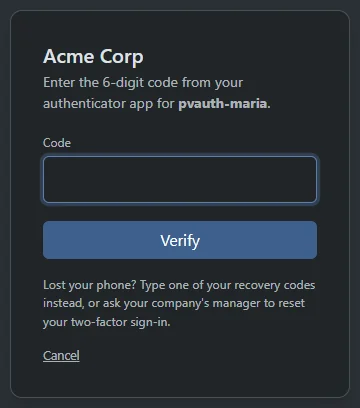
Real screenThe sign-in code step: enter the 6-digit code from your authenticator app, a Verify button, and a note that a recovery code or a manager reset covers a lost phone.
The code step. Type a recovery code, or ask your manager to reset it.
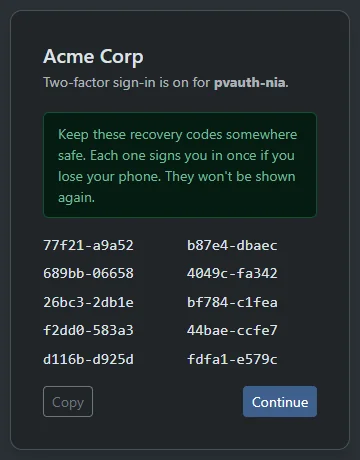
Real screenTen recovery codes shown once after two-factor is switched on, with a Copy button and the advice to keep them somewhere safe because each signs you in once.
Ten recovery codes, shown once. Each one signs you in once.
Single sign-on and SCIM

Your directory decides who is in.

Sign in through your own OpenID Connect provider. Add SCIM, and a person you switch off in your directory is signed out of the portal and the apps. Add-on

  • Tokens checked, every time. Signature, audience, issuer and nonce are verified on each sign-in.
  • Accounts on first sign-in. Limit it to your own email domains.
  • SSO only. Everyone signs in through your provider, and managers keep a password as a break-glass.
  • SCIM 2.0. Create, update and switch off users from your directory.
  • Login security. Allow sign-in only from the networks you list. Everyone sees where they are signed in and can sign the others out. Add-on

See integrations

Your directory (SCIM) · switch someone offLive demo
  • Maria Examplemaria@acme.example
    PortalIn Android appIn
    Active
  • Sam Examplesam@acme.example
    PortalIn
    Active
  • Lee Examplelee@acme.example
    Android appIn
    Active
One change in your directory. SCIM tells ProjectPBX.
Roles and permissions

Managers manage. Users see their own.

Managers run the company. Users see their own voicemail, recordings and calls. Every change lands in an audit trail with who and when.

Manager

  • Runs settings, extensions, numbers, menus and queues
  • Requires two-factor for everyone
  • Resets a colleague's two-factor
  • Reads call reports and the company's audit trail

User

  • Their own voicemail, recordings and call records
  • Signs in with two-factor when the company asks
  • Sees where they are signed in, and signs the others out

4voice staff, by area

  • Admin or support logins
  • Custom roles per area, so a login sees what its job needs
  • Risky platform changes can need a second admin to approve
Two-person approval and audit trail

Risky changes wait for a second admin. Every change has a name on it.

4voice can require a second admin to approve risky platform changes, such as deleting a company or a trunk. Approve one below and watch it land in the audit trail.

Approval request · a second admin decidesLive demo

Request #0142Waiting for a different admin

Delete the trunk "Carrier B"

Asked by Alex Admin. It waits until a different admin decides.

  1. One admin asks. The request names the change and who asked.
  2. A different admin decides. Approve it, or turn it down.
  3. The change runs, and it is logged. Every decision lands in the audit trail with a name and a time.
The person who asked cannot approve their own request. 4voice can require this for risky platform changes.
Audit trail · newest firstLive demo
  1. Pat ManagerRequired two-factor for everyone
  2. Pat ManagerChanged the outbound call cap from 20 to 25
  3. Maria ExampleEdited call forwarding on extension 101
  4. Pat ManagerSwitched legal hold on
Add-on Config history keeps 90 days of changes to extensions, menus and queues, and lets you put one object back. Add-on Audit log forwarding streams events to your own syslog (UDP, TCP or TLS) or HTTPS collector.
Encrypted calls and phones

Turn on encrypted phones. Switch at your own pace.

Browser-phone audio is always encrypted with DTLS-SRTP. For desk phones each company chooses Off, Offered or Required: TLS signaling with a checked certificate and name, and SRTP audio, ending at the front door.

  • Off. Phones register as they do today.
  • Offered. Phones are provisioned for TLS and SRTP, and plain UDP is still accepted while you switch phones over.
  • Required. The front door refuses the company's non-TLS phone requests. Changes reach phones when they reprovision.

Encrypted desk phones

Encrypted desk phones · choose a modeLive demo

TLS + SRTP, UDP accepted

Phones are provisioned for TLS with SRTP audio. The front door still accepts UDP from the company, so you can switch phones over at your own pace.

HTTPS everywhere

Portals redirect to HTTPS, cookies are Secure, the admin console is HTTPS-only, and every portal form and live connection checks it came from the same site.

Secrets stored as fingerprints

API keys, SCIM tokens and recovery codes are kept only as SHA-256 fingerprints. You see an API key once.

Passwords and PINs, hashed

Passwords use PBKDF2. Phone-lock PINs are salted and hashed with scrypt.

Managed phone passwords

Every phone's web password is set by the system, so none is left on a factory default.

Retention, legal hold, erasure and export

Keep it. Freeze it. Erase it.

Keep what you need, for as long as you need it. Freeze everything for a legal matter. Take it all with you in one download, or erase one person's calls, voicemail and texts on request.
yourcompany.projectpbx.net
Real screen
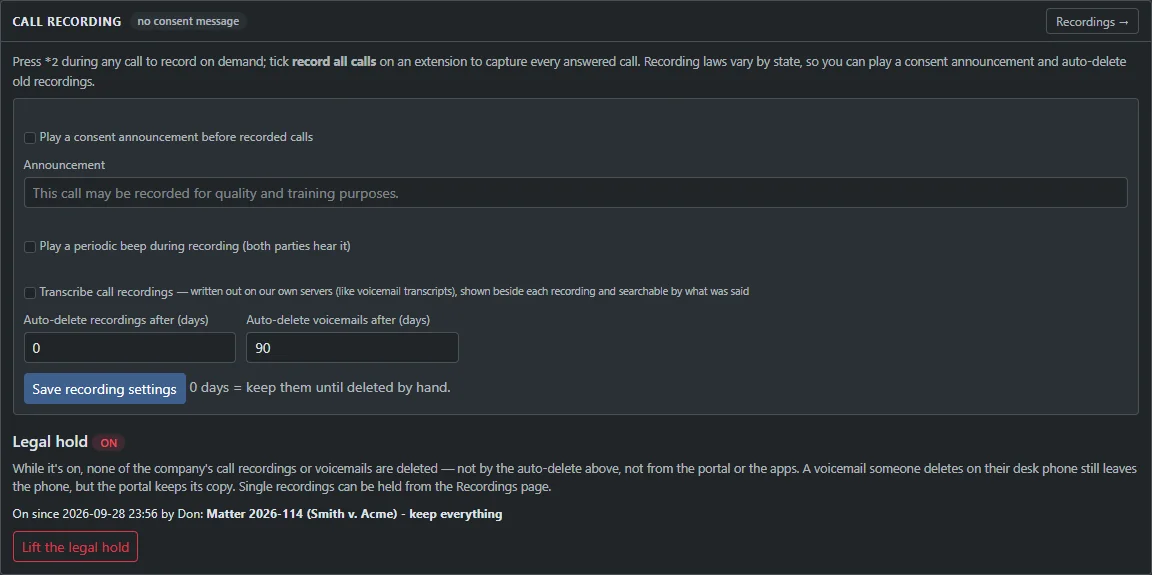
Call recording settings: a consent announcement, a periodic beep, transcription on our own servers, auto-delete days for recordings and voicemail, and a Legal hold panel switched on with a note and a Lift the legal hold button.
Switch on a legal hold and every deletion stops: auto-delete, the portal and the apps. A note is required and the hold is audited.

Delete on schedule. Freeze on demand.

Auto-delete voicemail and recordings after the number of days you set. A consent announcement before recorded calls and an optional beep are one tick each. One recording can be held on its own.

Pause for card details with *1

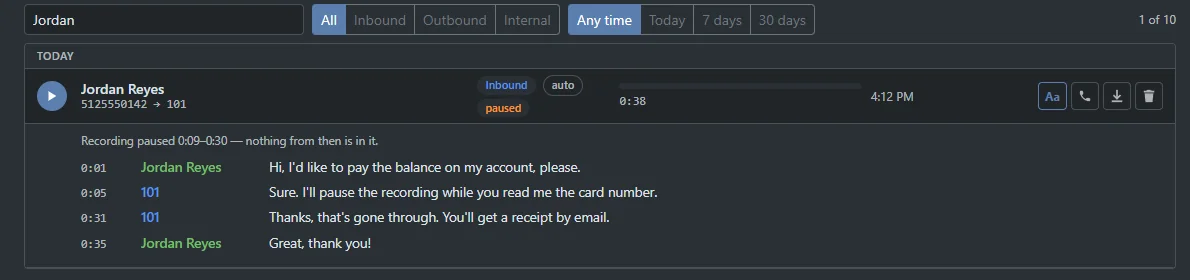
The recording pauses. The pause is silence in the file, so timing and the transcript stay lined up, and the Recordings page shows exactly when it was paused. A low tone means paused, a high tone means recording.

Your data in one ZIP

Call records, recordings and voicemail with transcripts, texts and their pictures, faxes, chat and the whole set-up, without passwords or keys. You get an email when it is ready, and it stays downloadable for 7 days. Up to 3 exports a day.

Erasure requests

Erase a person's data, with proof.

Managers open Settings, then Privacy requests, enter a phone number or an email, and ProjectPBX erases or anonymizes that person's calls, recordings, voicemail, texts, faxes, chat and more. The proof report keeps only keyed hashes.

Erasure requests

Privacy request · proof reportLive demo
  • Erasure requestby phone number
  • Callsanonymized
  • Recordingserased
  • Voicemailerased
  • Texts and pictureserased
  • Faxeserased
  • Chaterased
  • Proof reportkeyed hashes only
Erasure is a built-in feature for every company, not an add-on.
yourcompany.projectpbx.net
Real screen
The Data export card: Build an export, and a list with who asked, the status ready until a date, the size and a Download button.
Company data export. You get an email when it is ready, and it stays downloadable for 7 days.
yourcompany.projectpbx.net
Real screen
A recording with a transcript and the note: recording paused 0:09 to 0:30. The agent says they will pause the recording while the caller reads the card number.
A paused recording. The Recordings page shows exactly when the pause began and ended.
Transcription on our own servers

Transcripts are written on our own servers.

Audio, recordings, voicemail and chat text never go to an outside AI service. Transcription, speech menus and natural voices all run on 4voice's own servers.

Voicemail transcripts

Written by a Whisper model on our own servers, fully offline.

Call transcripts Add-on

Each side of the stereo recording is written separately, so the transcript says who said what.

Keyword alerts Add-on

Matched on our own servers. Only the alert leaves them, by email and webhook.

Speech menus and six natural voices

They run on our servers too.

Speech and transcription on our servers

One voicemail, start to finishLive demo

Inside 4voice's servers

  1. Hi, this is Jordan from Big Customer.
  2. I have a question about the last invoice.
  3. Could someone call me back this afternoon?

Keyword alert sent: invoice. Email and webhook carry the alert, not the audio.

  • Your audio sent to outside AI0
Transcript and alert are made on our own servers.
See it live

Bring your hardest security questions.

Sign-in, call limits, who sees what. We walk through every control on a live demo company.

  • A call flow drafted for your business
  • Pricing built around your team size
  • Every question answered on the call

Your business name goes with you to the next step. Your email stays in this browser until you send the form.